11
Manual installation
Main
Language
T uner Mode
Install
Picture
Features
Sound
Auto Program
Manual
Name
Fav. Program
Install
System
Fine Tune
Language
T uner Mode
Name
Fav. Program
Auto Program
Manual
Manual
P A L-M
P A L-N
Fine Tune
Auto
NTSC
System
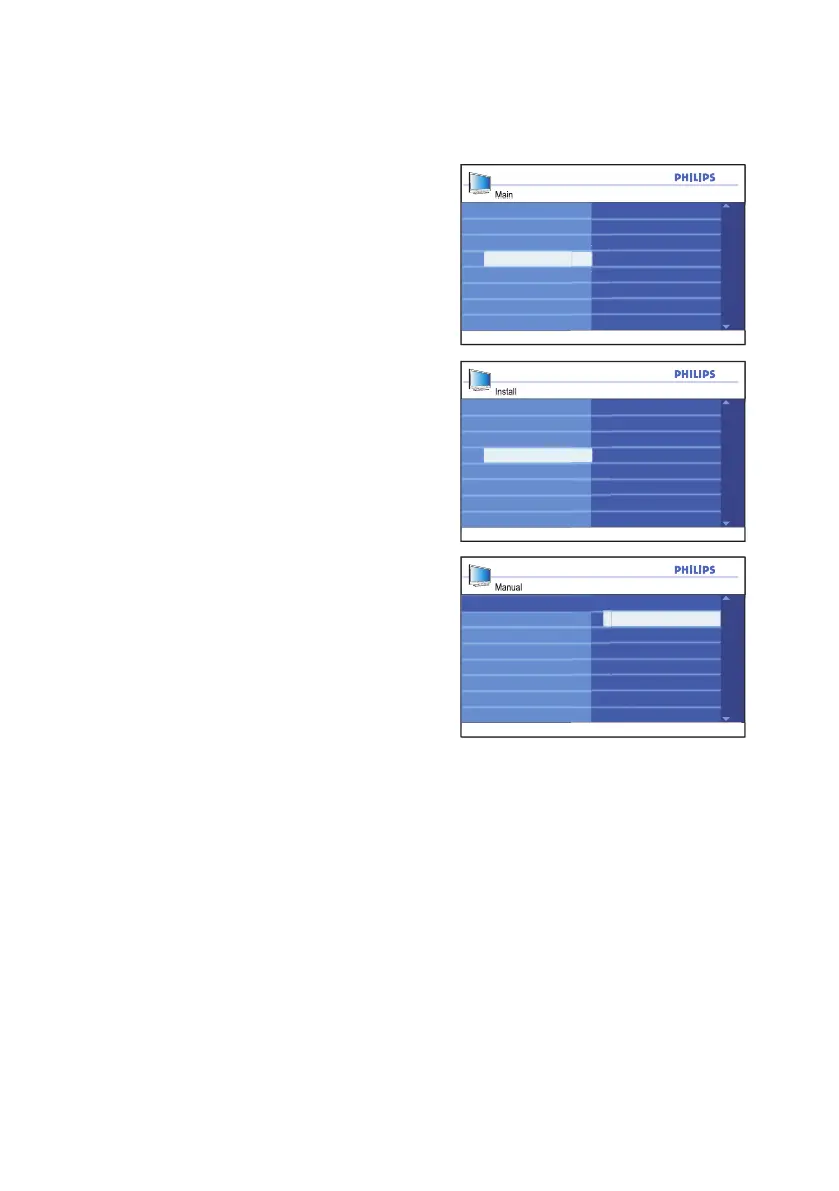
Changing the TV System
Press 1. h button to display the on-screen
menus.
Press 2. ï button until Install is highlighted.
Press 3. u button to select Install.
Press 4. ï button until Manual is
highlighted.
Press 5. u button to select Manual.
Press 6. u button to select System.
Press 7. ï or Î button to select Auto,
NTSC, PAL-M or PAL-N.
Press 8. u button to select the option.
Press 9. h or EXIT button to exit the
on-screen menus.
TV Systems:
Automatic• : The TV will automatically
detect the tuner system.
NTSC• : Used mainly in North America
and some South American countries.
PAL-M• : Used in Brazil.
PAL-N• : Used in Argentina, Uruguay and
Paraguay.





 To Next Page