13
Naming your channels
Main
Language
T uner Mode
Install
Picture
Features
Sound
Auto Program
Manual
Name
Fav. Program
Install
003
004
005
006
007
008
009
002
T uner Mode
Auto Program
Manual
Fav. Program
Language
Name
Install
003
004
005
006
007
008
009
Auto Store
Manual Store
Sort
Fav. Program
Language
002
Name
Install
003 N E W S
004 M O V I E
005 S P O R
006
007
008
009
T uner Mode
Auto Program
Manual
Fav. Program
Language
002 D O C U
Name
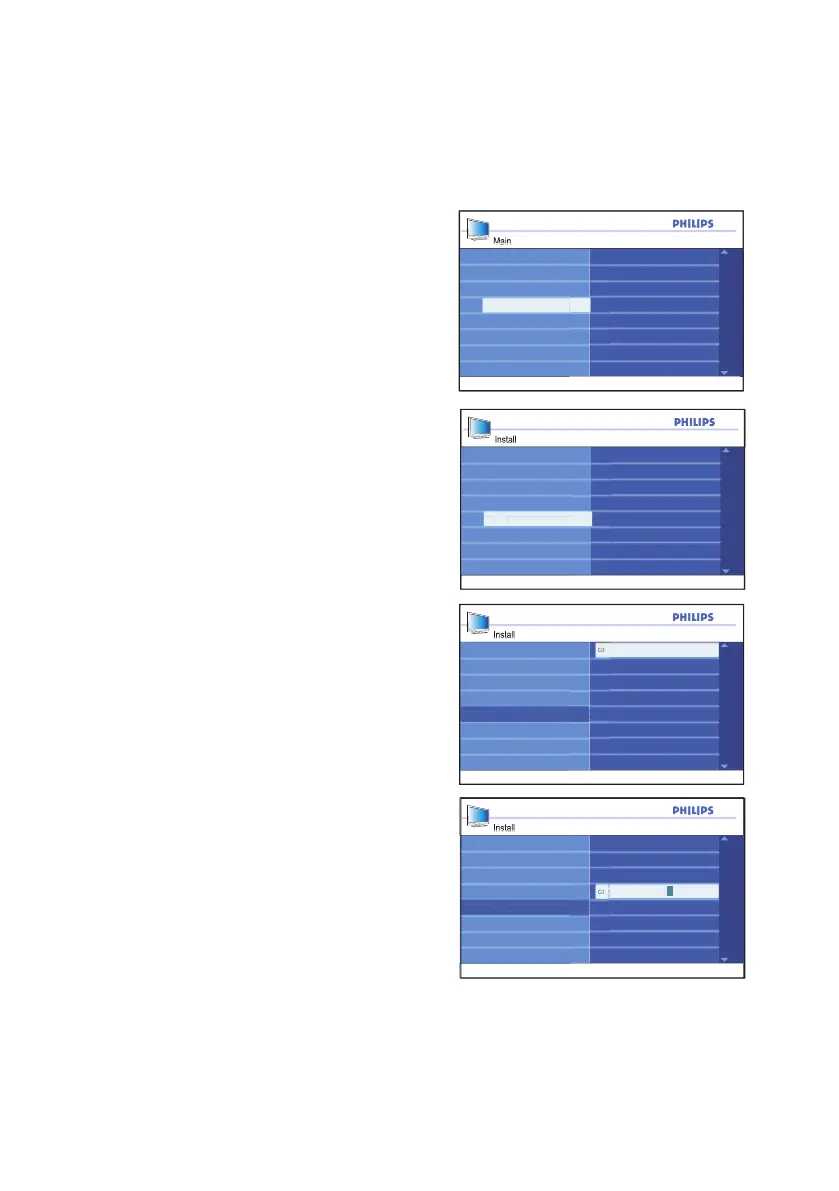
You can assign a short name for your
channels with the Name feature.
Press 1. h button to display the on-screen
menus.
Press 2. ï button until Install is highlighted.
Press 3. u button to select Install.
Press 4. ï button until Name is
highlighted.
Press 5. u button to select the first channel
number on the list.
Press 6. u button to start naming the
channel number.
Press 7. Æ button until a rectangular block
cursor appears next to the channel
number.
Press 8. ï or Î button to cycle through the
list (A-Z, 0-9) to select the characters or
numbers to use for the channel name.
Press 9. u button to move the cursor to
the second space and repeat step 7.
You can use up to a combination of 5
characters or numbers for naming your
channels.
Press 10. u button to store the name to the
channel.
The channel number and name will be
displayed on the top left of the screen.
Press 11. h or EXIT button to exit the
on-screen menus.







 To Next Page