34
Using Ambilight (certain models only)
Features
Ambilight
Mode
Color
Balance
Timer
Child Lock
Parental Lock
Active Control
Closed Caption
Brightness
Ambilight
Custom
Saturation
100
0
5 0
Palette
Custom
100
0
5 0
Palette
Saturation
Ambilight
Palette
Brightness
Balance
Custom Color
Ambilight
Saturation
Mode
Color
Ambilight
Warm White
Blue
Red
Green
Y e llow
Brightness
Balance
Custom Color
Ambilight
Cool White
Mode
Color
Magenta
Custom
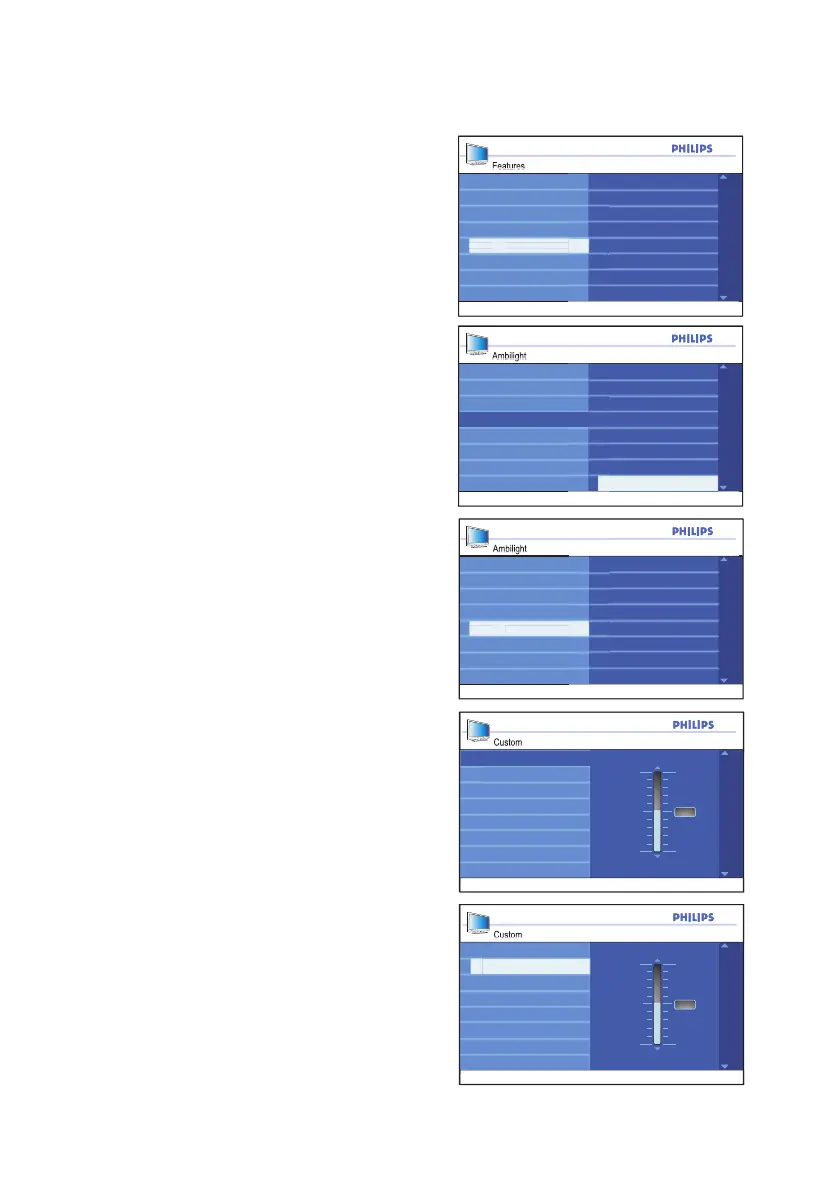
Using Custom color
Repeat the steps 1 to 5 from the section
on Turning on Ambilight.
Press 1. ï button until Color is highlighted.
Press 2. u button to select the Color.
Press 3. ï until Custom is highlighted.
Press 4. u button to select Custom.
This will enable the Custom Color
menu.
Press 5. Í button to highlight Color.
Press 6. ï button to highlight Custom
Color.
Press 7. ï or Î button to highlight Palette
or Saturation.
Press 8. u button to select Palette or
Saturation.
Press 9. ï or Î button to adjust the set-
tings.
Press 10. h or EXIT button to exit the
on-screen menus.
Ambilight Custom colors:
Palette: • Adjusts the general color of the
light output.
Saturation• : Adjusts the color intensity
of light output.







 To Next Page