30
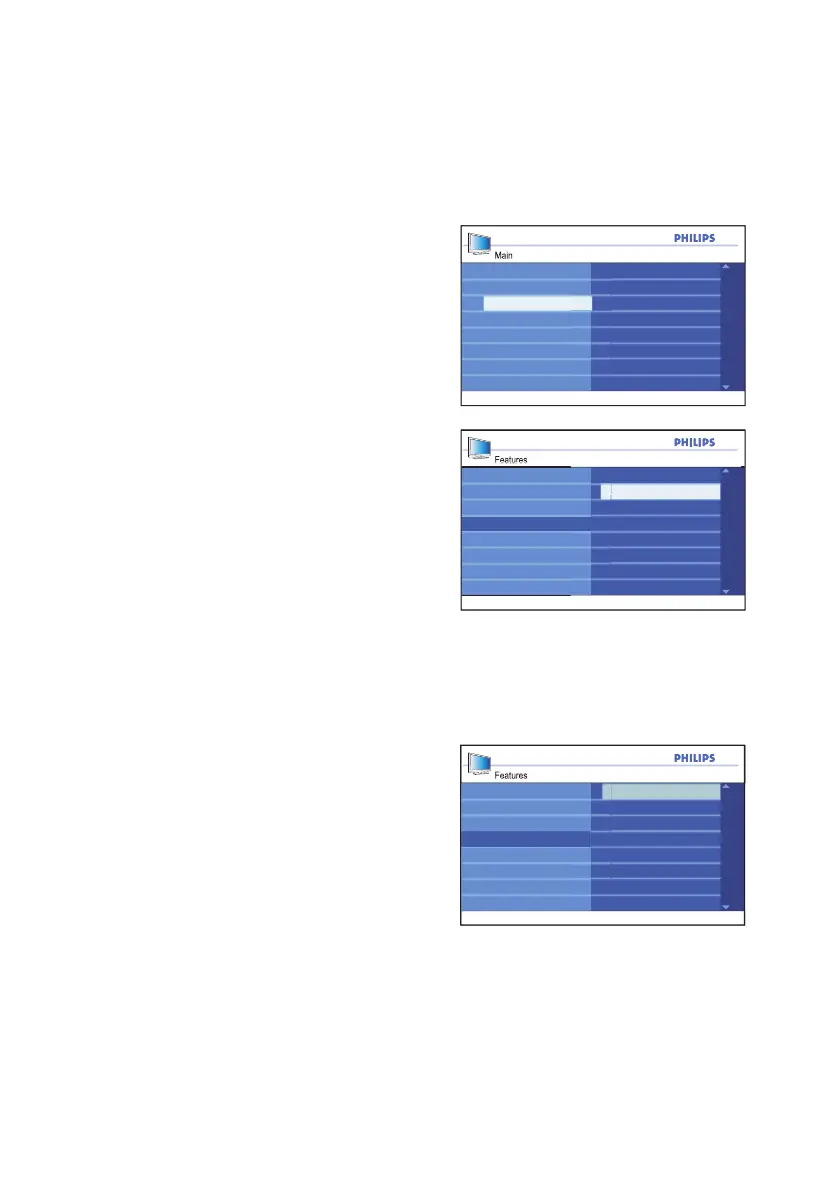
Using Active Control
Main
Timer
Child Lock
Install
Picture
Features
Sound
Parental Lock
Active Control
Closed Caption
Features
OffTimer
Child Lock
Parental Lock
Closed Caption
On
Active Control
Features
Closed Caption
Timer
Parental Lock
Child Lock
Active Control
On
Off
Active Control will automatically adjust the
picture settings continuously to provide the
best picture quality under any signal
conditions.
Press 1. h button to display the on-screen
menus.
Press 2. ï button until Features is
highlighted.
Press 3. u button to select Features.
Press 4. ï button until Active Control is
highlighted.
Press 5. u button to select Active
Control.
Press 6. ï or Î button to highlight On.
Press 7. u button to enable Active
Control.
Press 8. h or EXIT button to exit the
on-screen menus.
Turning off Active Control
Repeat the steps 1 to 5 from the section
on Using Active Control.
Press 1. ï or Î button to highlight Off.
Press 2. u button to highlight Off.
Press 3. h or EXIT button to exit the
on-screen menus.







 To Next Page