37
Changing your picture format
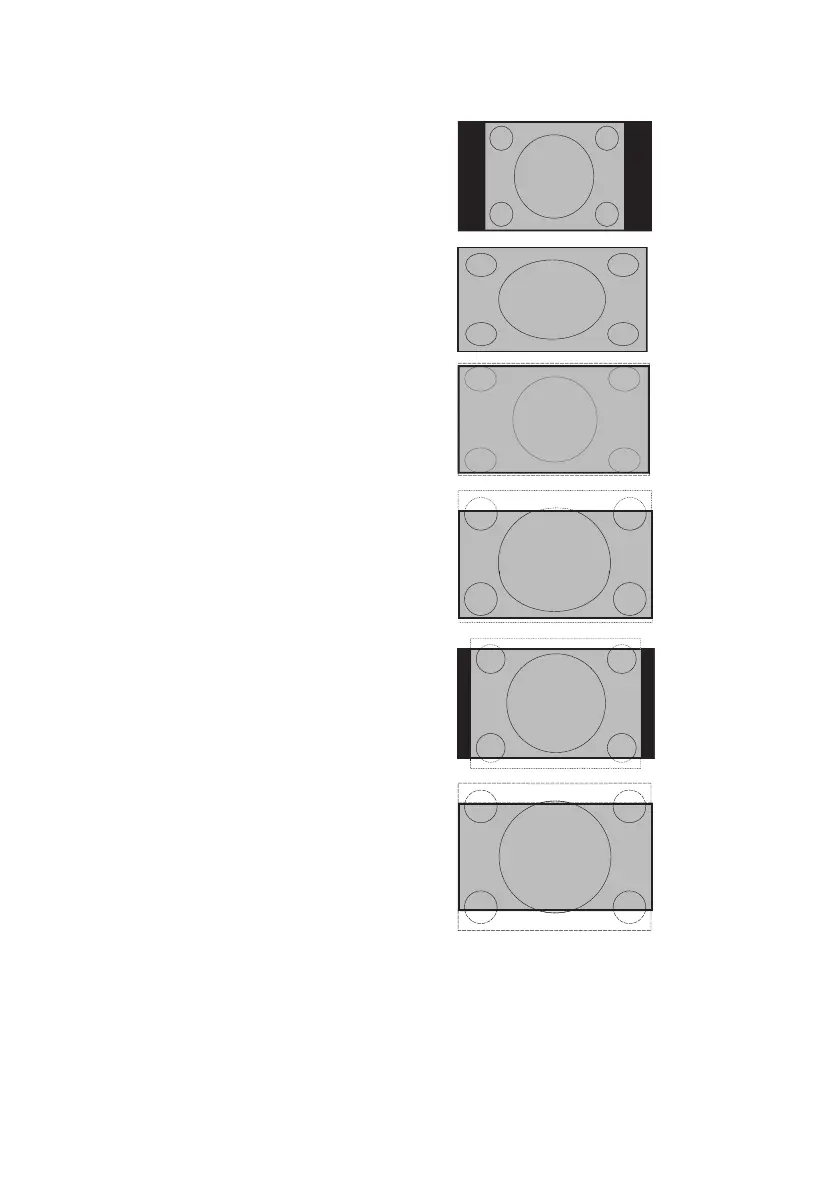
4 : 3
16 : 9
(Widescreen)
Superzoom
Subtitle
Zoom
Movie Expand
14 : 9
Movie Expand
16 : 9
The pictures you get on your TV may be
in the widescreen (16:9) or standard (4:3)
format depending on your broadcast stations.
You can select various screen formats to suit
the type of programs you watch.
Press the 1. ë button repeatedly to cycle
through the available picture formats.
Picture Formats:
4:3• : Entire picture is reproduced on the
screen with black bands on the left and
right of the screen.
16:9• : The picture is displayed in its
original proportions as transmitted.
Superzoom• : Removes black bands on
the sides of the screen of 4:3 format
programs with minimal distortion.
Subtitle Zoom• : The 4:3 format pro-
gram is displayed on the entire screen
leaving the subtitles area visible. Some of
the top of the picture is cropped off.
Movie Expand 14:9• : The picture is
enlarged to fit horizontally with black
bands visible at the sides of the screen.
Movie Expand 16:9• : The picture is
enlarged to fill up the screen and elimi-
nate the top and bottom black bands.
Some of the top and bottom of the
picture is cropped off.







 To Next Page