28
Controlling access to TV programs
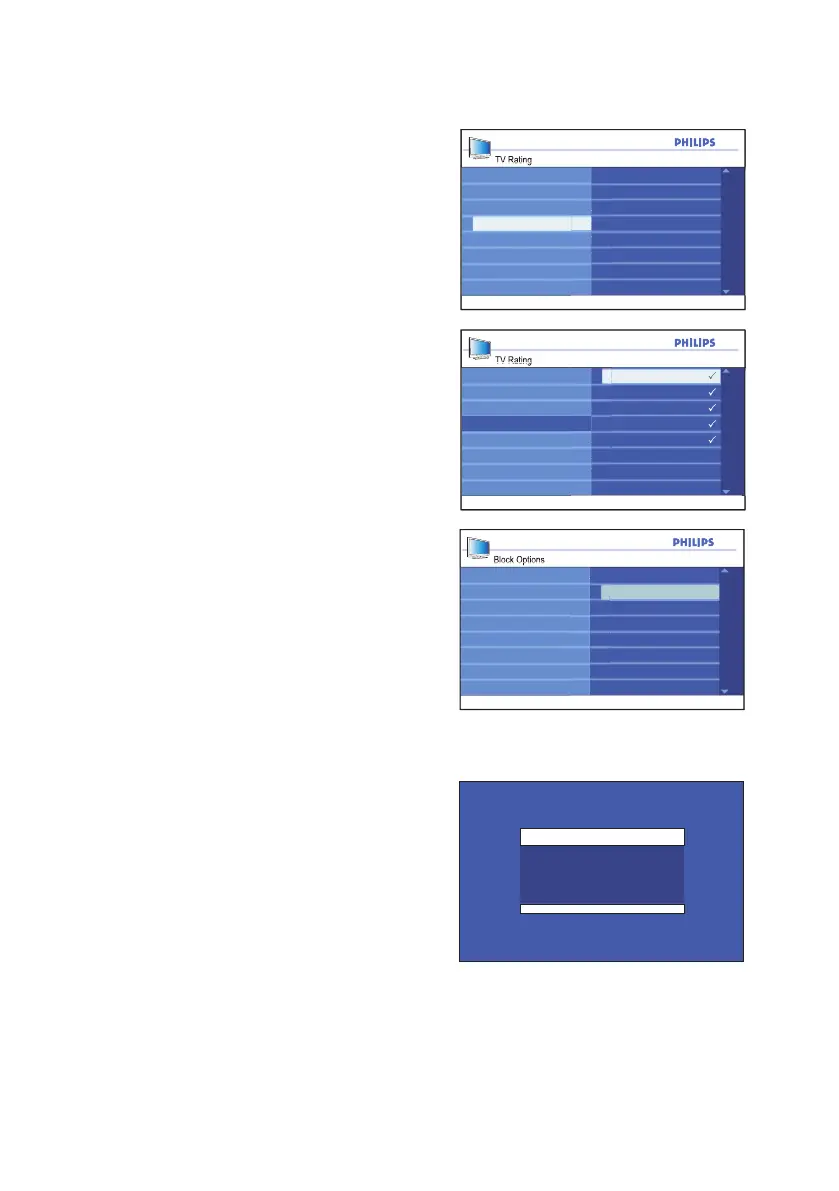
TV Rating
Lock All
V
TV-MA
TV-Y
TV-G
TV-Y7
S
D
L
TV-14
TV-PG
TV Rating
Lock All
V
TV-MA
TV-Y
TV-G
TV-Y7
S
D
L
TV-14
TV-PG
Channel 5
Blocked By
TV - 14
Access Code : ----
Block Options
Unrated
No Rating
Off
Blocking
On
Press 4. u button to select to select the
age-based rating.
Press 5. ï or Î button to highlight Lock
All.
Press 6. u button to enable Lock All.
A tick () will appear beside the rating
label to indicate the rating lock has been
enabled.
If content-based rating labels are present,
they will also be enabled (with a tick
beside them).
To enable one or more ontent-based
ratings, highlight only those and press the
u button.
Press 7. Í button to return to the
Parental Lock sub-menu.
Press 8. ï button until Block Options is
highlighted.
Press 9. u button to select Block
Options.
Press 10. ï or Î button to highlight On.
Press 11. u button to enable Block
Options.
Press 12. h or EXIT button to exit the
on-screen menus.
NOTE:
Your programs will be blocked if they fall un-
der the TV rating category that you enabled.
The screen will display a message to inform
you that the program has been blocked by
the TV rating.
Programs remain locked even after the TV
has been switched off.
You can choose to enter the Parental Lock
access code which will allow you to view the
program.
Subsequently, all other locked programs will
be viewable.







 To Next Page