16
TELEPHONE COUPLER
INSTRUCTION FOR USE
Please note - These instruction should be used in conjunction with your
Philips LFH 0725 desk top machine. The Philips Telephone Coupler DDC2
makes it possible to record telephone conversations on a Desk top Dictation
System . The Telephone coupler is designed for use only with the Philips 725
desk top Dictation System.
Important, please retain these instructions for future reference.
CONNECTION
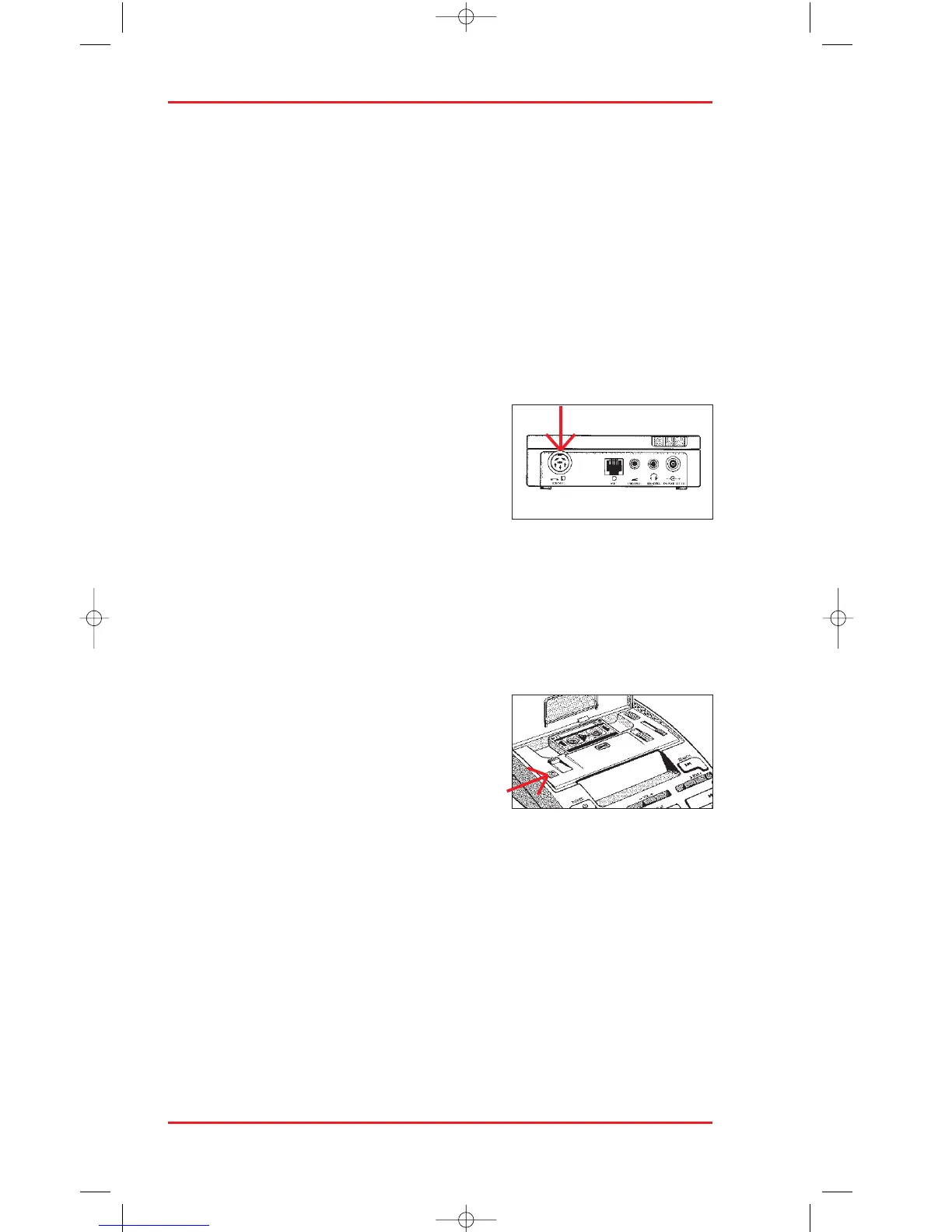
Connect the coupler telephone plug to a dual
outlet adapter connect your telephone to this
adapter. The adapter with telephone and
coupler connected should then be plugged into
the telephone wall socket. Please note that
connection of only one parallel equipment is allowed in parallel with the
main equipment. Connect the six-pin plug from the coupler to the telephone
socket of the desk top Dictation System. The Telephone Coupler is now ready
for use.
RECORDING
Insert a Mini-cassette into the cassette com-
partment. Simply press the telephone recording
button (TEL/REC) to start recording. Press
STOP to stop.
PRODUCT NUMBERING
The use the prefix LFH0 is used by Philips to denote a dictation product.
Within the „instructions for use“ for dictation products this prefix is implied
(i. e. 725 = LFH0725).












 To Next Page