65BDL3052E/75BDL3052E/86BDL3052E
33
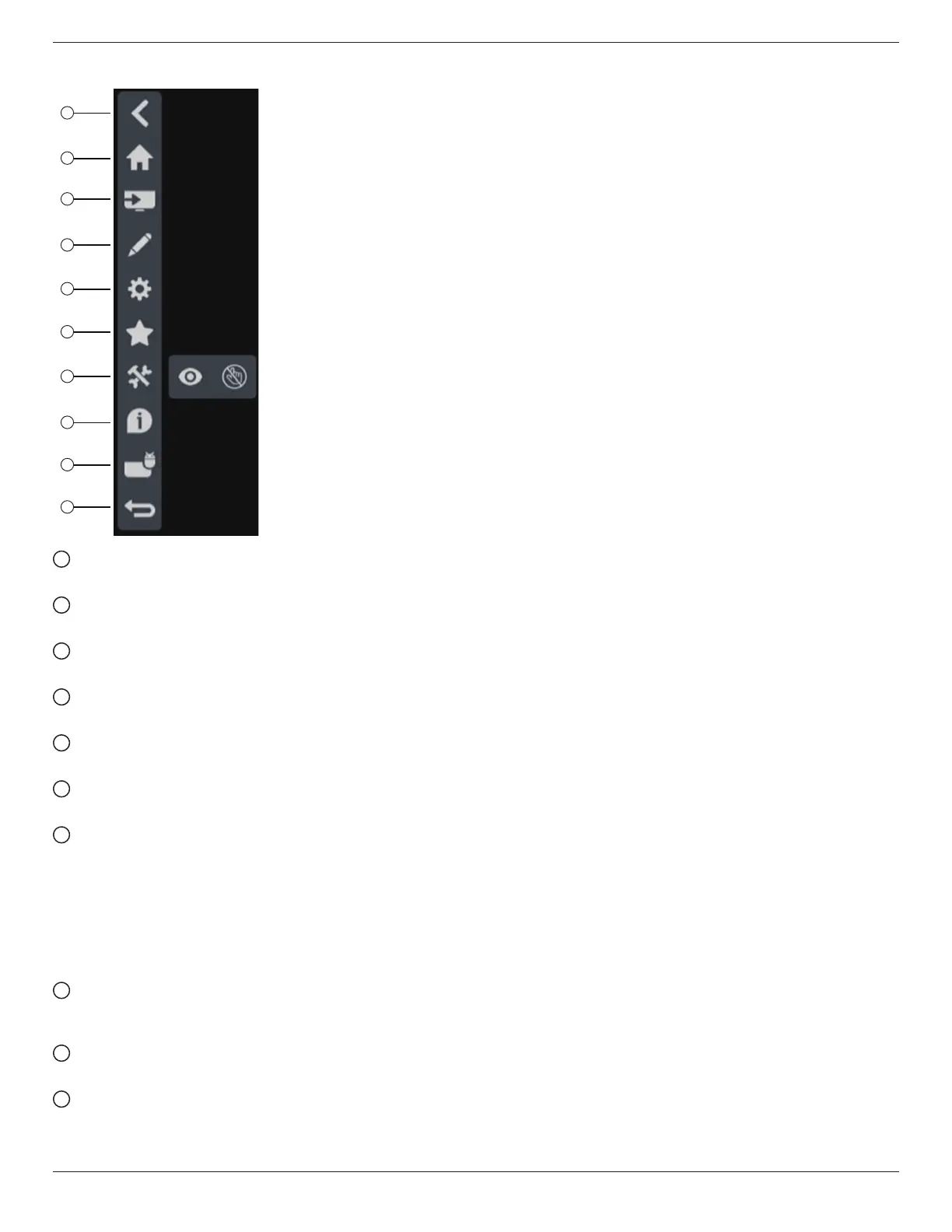
5.6. Side Bar
2
1
3
4
5
6
7
8
9
10
1
Hide
Hide side bar.
2
Home
Open Home.
3
Source menu
Open source menu.
4
Annotation
Open Annotation.
5
OSD Menu
Open OSD menu.
6
My Favorite
Open my favorite, add or remove frequently used APK.
7
Tool
(6-1) Freeze/Unfreeze: Only freeze/unfreeze the signal
screen of non-Android, the audio signal is still alive.
(6-2) Touch Lock: Lock the touch function, you need to input
password to unlock it after the touch lock is enable.
The default password is 123. You also can set the new
password in Settings -> Signage Display -> System tools ->
Touch lock password.
8
Quick info
It will display the information of Time, Network and
Monitor Information.
9
History
Show history app.
10
Back
Return to the previous page or exit from the previous
function.








 To Next Page