User Manual BDL4251V
21
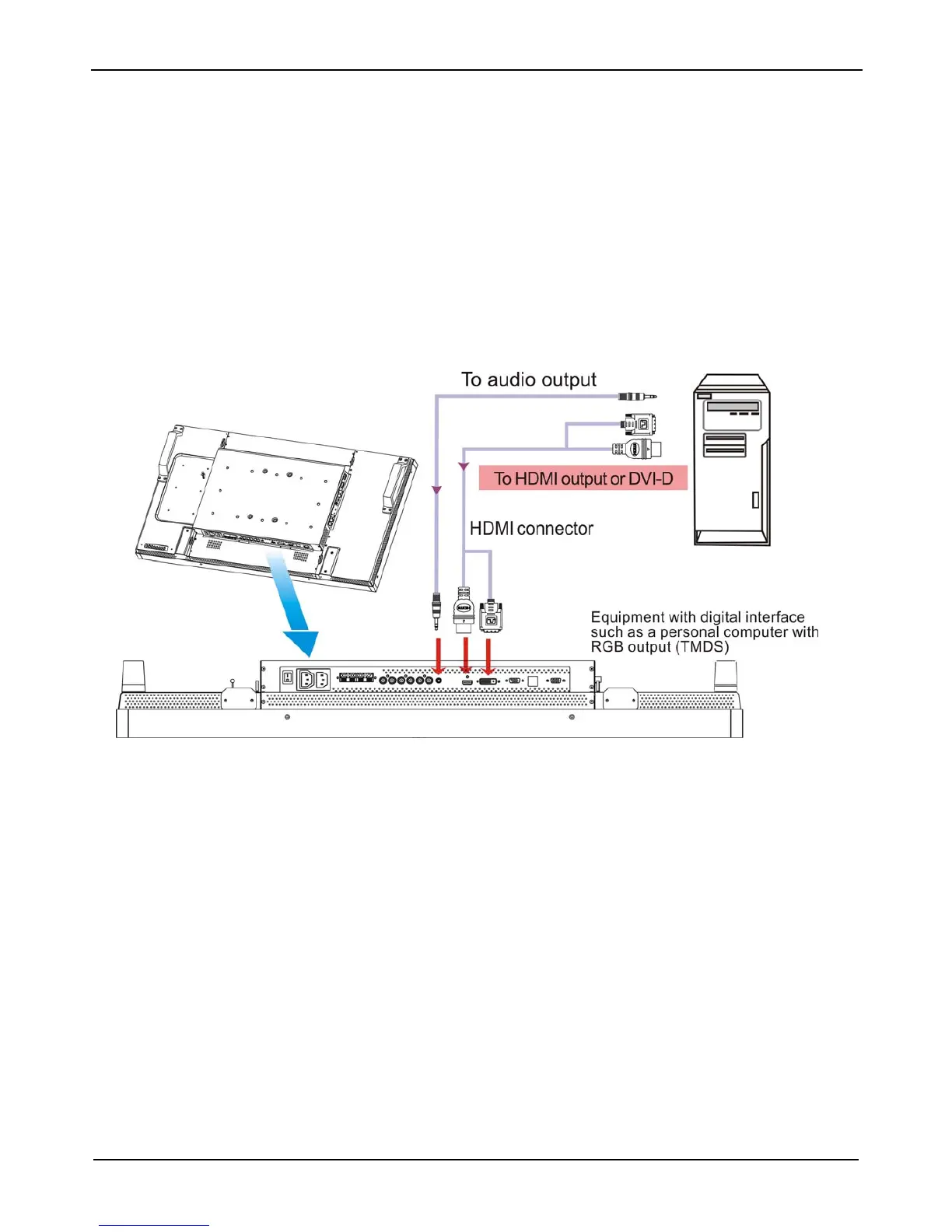
Connecting to a Digital Interface Equipment
Connections can be made between the LCD monitor and other digital equipment that is equipped with a digital interface compliant with the DVI
(Digital Visual Interface) standard.
Connect the LCD Monitor to a Computer with a Digital Output
• The HDMI , DVI-D IN connector accepts a HDMI cable.
• HDMI and DVI-D can receive HDMI video signals from either a HDMI output of for instance a DVD player or from a DVI-D output of a PC.
• To ensure the display quality, use a cable with a quality prescribed by DVI standards.
• The AUDIO IN 1, 2, 3 or HDMI connector can be chosen to receive an audio source. Select AUDIO 1, 2, 3 or HDMI from the AUDIO
SOURCE button on the remote control. HDMI(for audio) is only selectable only when HDMI or DVI-D (for video) is selected.
• Note that the signal of a HDMI / DVI-D connector cannot be output to the VGA OUT connector.












 To Next Page