EN 9
3. FUNCTIONAL OVERVIEW
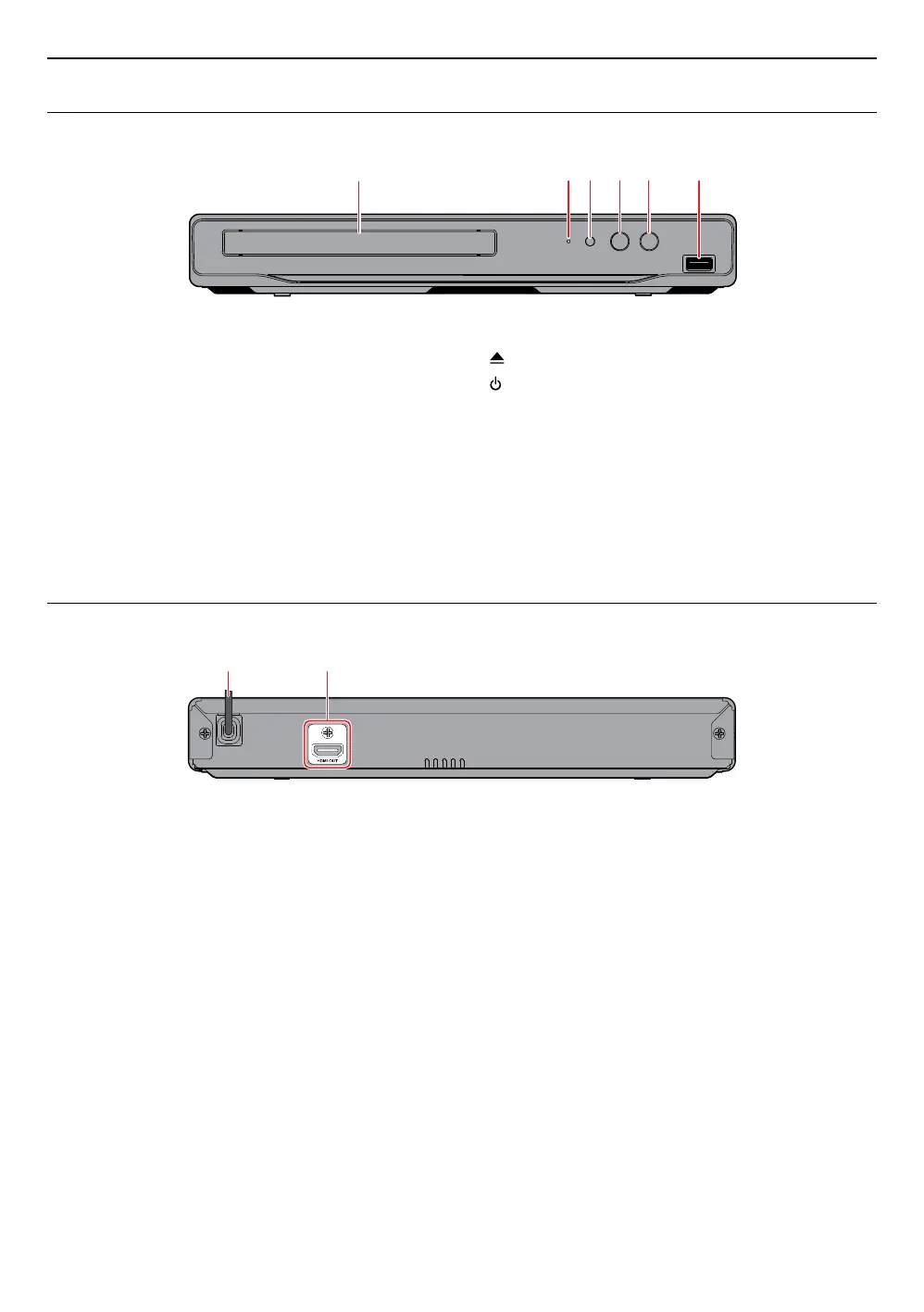
3.1. Front panel
1 3 4*2 5 6
* The unit can also be turned on by pressing this button.
1. Disc tray
2. Power-on indicator
3. Infrared sensor window
4.
(OPEN/CLOSE) button*
5.
(POWER) button
6. USB input
CautionC
• Do not connect any device other than USB memory stick or USB card reader into the USB input. (e.g. PC, external
HDD, digital camera, keyboard, mouse, etc.)
• When connecting a USB memory stick, connect it directly to the USB input. Do not use a USB extension cable.
NoteD
• Due to new ENERGY STAR
®
requirements, this unit will automatically turn on the screen saver after 5 minutes of
inactivity and enter standby mode after 25 minutes of inactivity.
3.2. Rear panel
1 2
1. AC power cord
2. HDMI OUT jack
CautionC
• Do not touch the inner pins of the jacks on the rear panel. Electrostatic discharge may cause permanent damage
to the unit.
• This unit does not have a TV RF modulator.



 To Next Page