Service Modes, Error Codes, and Fault Finding
EN 37BJ3.1E LA 5.
5.8 Fault Finding and Repair Tips
Read also paragraph “Error Codes” - “Extra Info”.
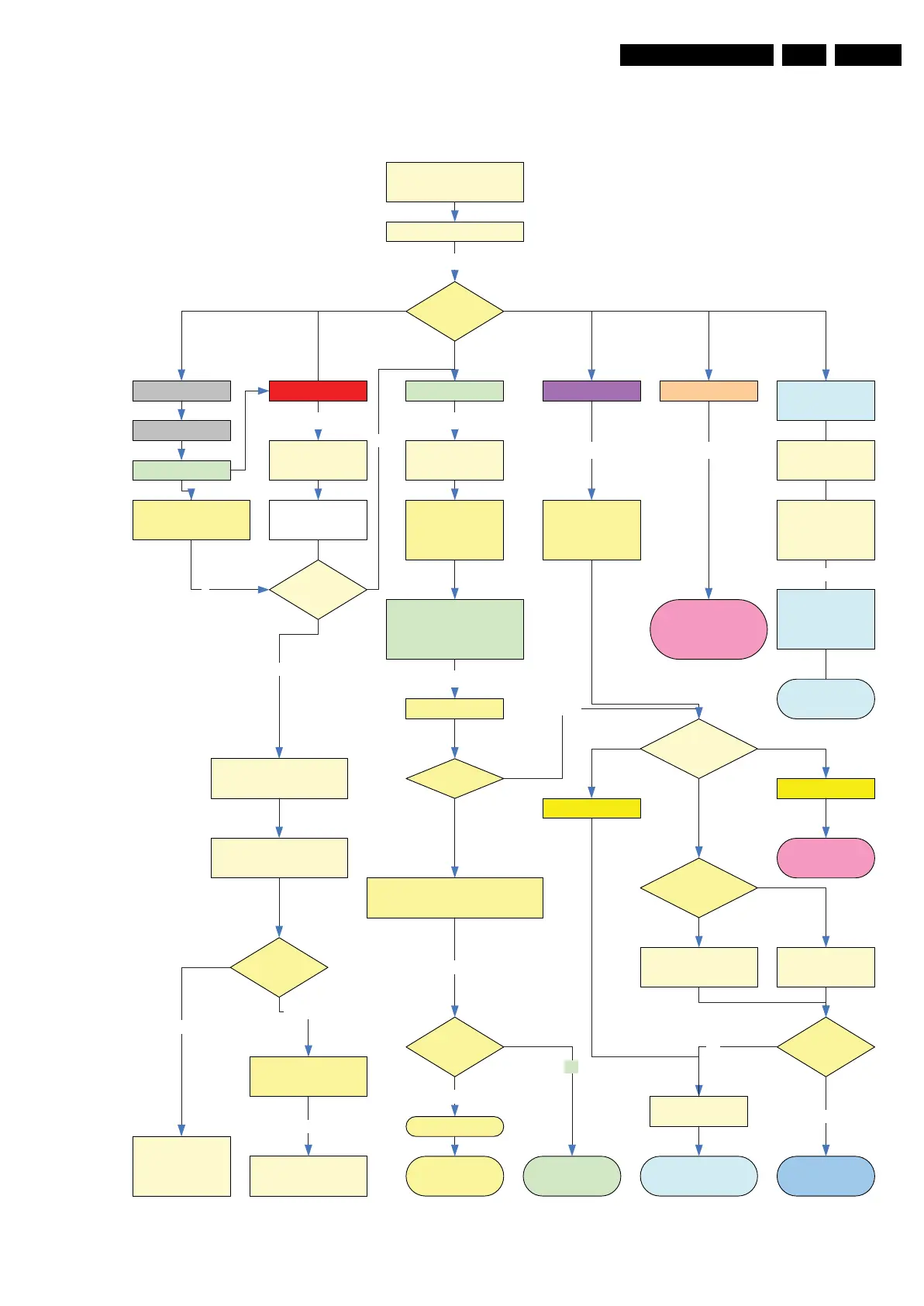
Figure 5-17 General fault find tree [1/2]
Defective FTV
LED?
Led is Off Led is RED Led is green (blue) Led is blinking
Check on/off switch
SSB
Not operating
Go to platform supply
repair
Switch on via RC or
local Keyboard
Check connections to front /
keyboard & SSB
Check power supply on
pin 7 CN 1M46
Read out protection
code
On blinking LED
Set is starting up
and rebooting
Set behaviour
For an explanation of the numbers,
refer to the foot notes (on the next page)
Error code
related to?
Disconnect CN 1M02
To Audio part
Disconnect Power supply to
ambilights
Replace SSB
SSB 12NC is in CSM
If no log file reflash
Standby Software via
Hyper Terminal
If possible go to SAM
and check Software
and Hardware events
Log
1
2 3
4
Set is
operating?
No
Monitor start-up log file
on UART
Set is starting up.
Go to Audio / Video
fault finding
No
Connect USB
memory and go to
CSM.
Y
+5V Stby?
Not present
On/Off switch is on
Is present
Monitor UART Log file
10
Read CSM log file from
USB.
If CSM Log file is on USB
then CTRL part is OK
Audio/Video?
6
Check and update
to latest software
y
Set is OK
Check option codes a nd settings
Software and Hardware events?
Error codes?
Go to SAM
9
Yes
Disconnect set from
Mains and reconnect
7
Two LEDS are on
Reflash Standby
Software via Hyper
Terminal
10
Set is
operating
Follow SSB replacement
Instructions
Ambilight or Audio
part defective
Yes
Latest Software?
Symptom Cures?
8
Execute Memory
Elpida test
Tunnel bus test
Platform
Supply?
DC-Prot?
Repair or replace
Display Supply
No
Standby Line
1Mxx will be Low
5
H_16851_006.eps
080307






 To Next Page