14 EN
8 Navigation
system
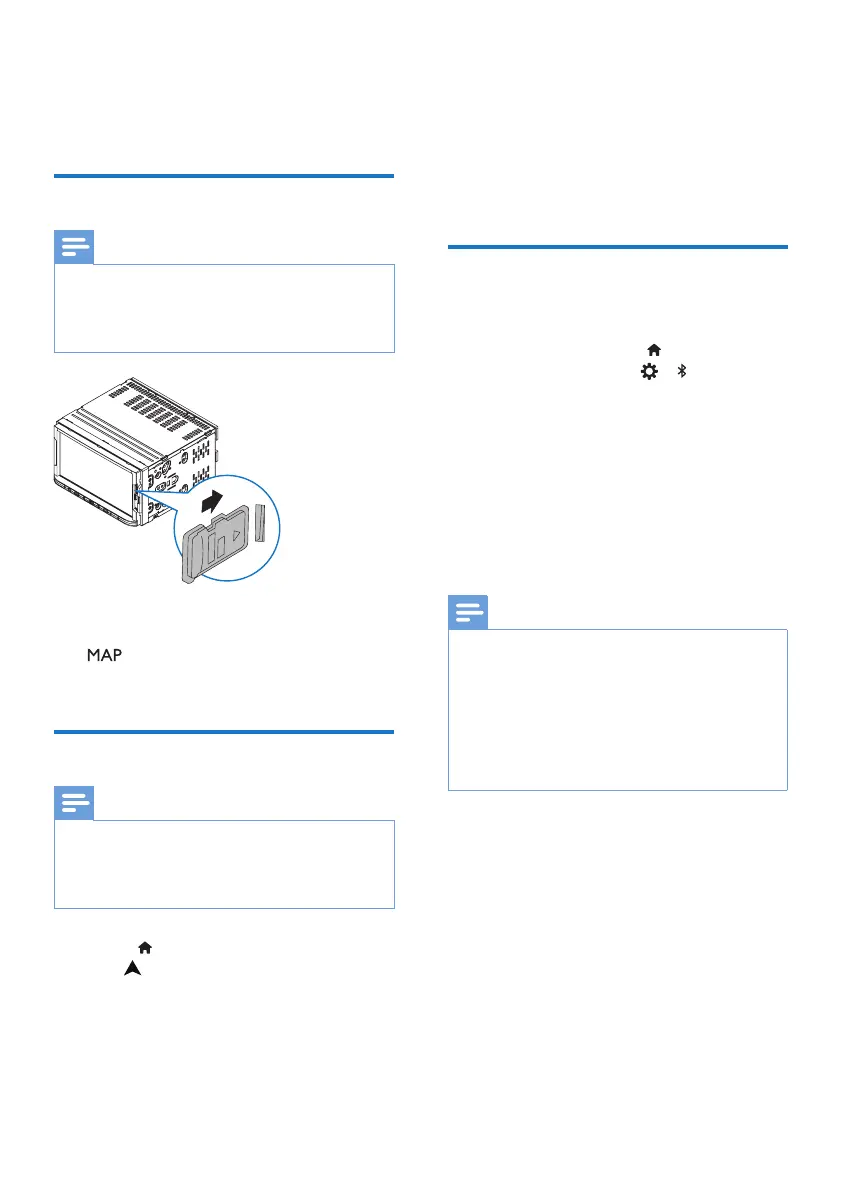
Insert the map data card
Note
•
The map data card is not included in the
packaging.
• Before using the map data card, update the
map data if necessary..
1 Flip up the protective cover.
2 Insert the map data card into the
slot until you hear a “click”.
3 Close the protective cover.
Navigate your road trip
Note
•
Risk of trac accident! Never operate the
navigation system during drive. Complete
the setting of your destination and other
navigation specications before you drive.
1 Press to enter the Home screen.
Tap
.
» The navigation interface is
displayed in a few seconds.
2 Follow the user manual of the
navigation map to set navigation
specications.
9 Bluetooth
On the unit, you can enjoy music play
that stream from a connected Bluetooth
device.
Connect your Bluetooth
device
1
On your unit, press to enter the
Home screen. Tap
> to switch
on Bluetooth.
2 On your Bluetooth device, search
for and select Philips CE600N.
3 Follow the onscreen instructions to
complete Bluetooth connection.
• If necessary, enter the passcode
on your Bluetooth device (0000
by default).
Note
•
The operational range between this system
and a Bluetooth device is approximately 8
meters (24 feet).
• Any obstacle between this system and
a Bluetooth device can reduce the
operational range.
• Keep away from any other electronic
device that may cause interference.



 To Next Page