16
9 Reconnect the negative terminal of the car
battery.
Install remote control battery
Caution
Risk of explosion! Keep batteries away from heat,
sunshine or fi re. Never discard batteries in fi re.
•
Note
Remove batteries if they are exhausted or if the
remote control is not to be used for a long time.
Batteries contain chemical substances, they should be
disposed of properly.
Perchlorate Material - special handling may apply. See
www.dtsc.ca.gov/hazardouswaste/perchlorate.
•
•
•
1 Open the battery compartment.
2 Insert 1 CR2025 battery with correct
polarity (+/-) as indicated.
3 Close the battery compartment.
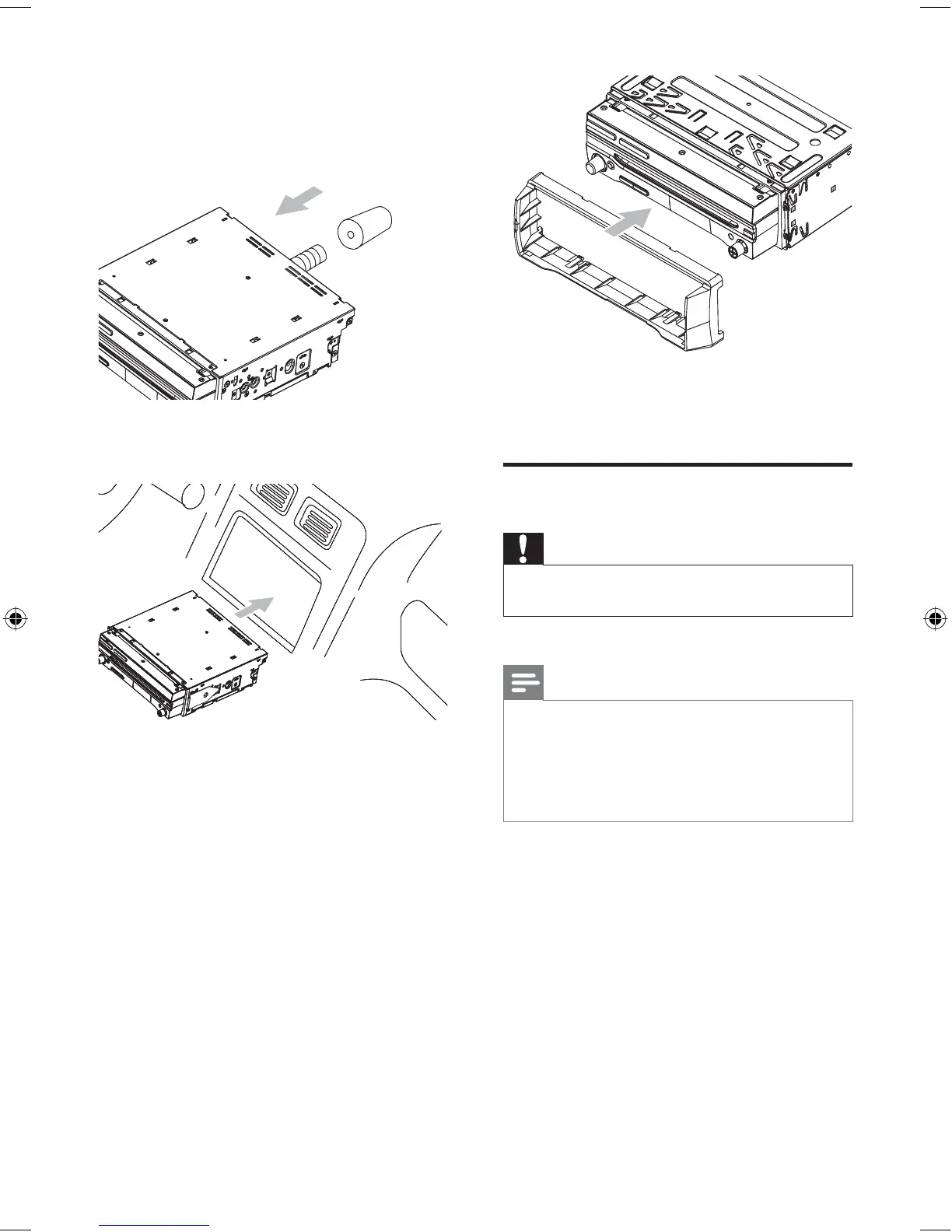
6 Place the rubber cushion over the end of
the bolt.
7 Slide the unit into the dashboard until a
click sound is heard.
If the unit cannot fi t into the
dashboard, remove the mounting
bracket on the both side of the unit
and replace them with the supplied
short mounting brackets.
8 Attach the trim plate.
•
EN
EN.indd Sec1:16EN.indd Sec1:16 2008-11-14 13:23:062008-11-14 13:23:06



 To Next Page