17
Set clock
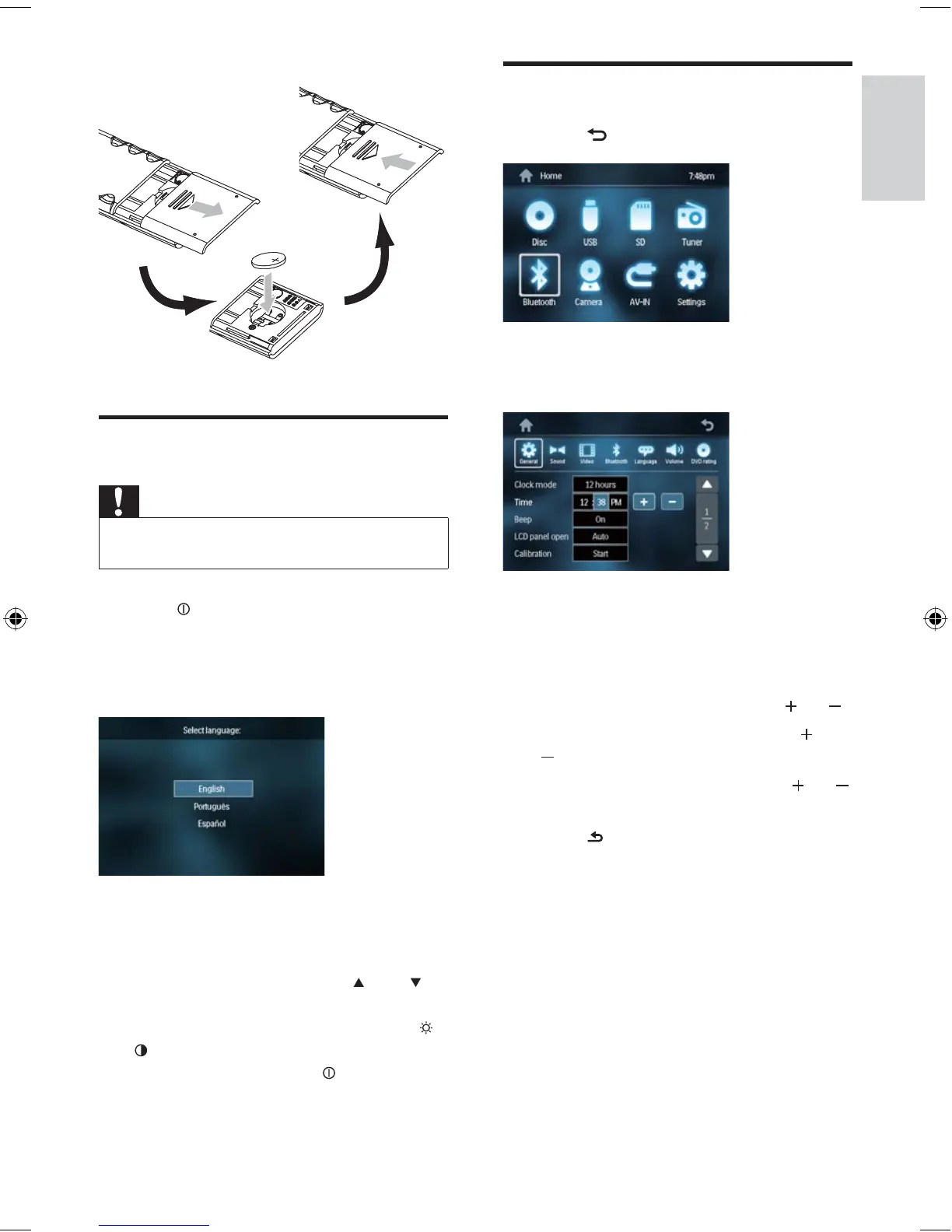
1 Touch to display main menu.
2 Touch [Settings] .
The setup menu is displayed.
3 Touch [General] .
4 Touch [Clock mode] repeatedly to select:
[12hr] : 12 hour mode
[24hr] : 24 hour mode
5 Touch the hour digits, then touch or .
6 Touch the minute digits, then touch or
.
7 If 12 hour mode is selected, touch or
to select [AM] or [PM] .
8 Touch to exit.
»
•
•
Turn on
Caution
Risk of road accidents! Never watch video or adjust
settings while you drive.
•
1 Press to turn on the unit.
The screen opens automatically.
The available OSD (On-Screen
Display) languages are displayed.
2 Touch a language to select.
The OSD language is changed to the
selected language immediately.
To adjust the screen tilt, press
TILT .
To close the screen, press OPEN/CLOSE .
To adjust the brightness/contrast, press
/
, then adjust 4 WAY NAVIGATION .
To turn off the unit, press
for 3 seconds.
The screen closes automatically.
»
»
»
•
•
•
•
»
Connect reverse driving cable
English
EN
EN.indd Sec1:17EN.indd Sec1:17 2008-11-14 13:23:082008-11-14 13:23:08



 To Next Page