17
DELL P1230 M25P
FOCUS(H V) VLINBAL USER
RASTER(H V) LIN(H V)SUB
V(OFFSET GAIN) SUB
D CONVERGENCE NS PURITV
EXIT
.
7.1.4 Pre-check the purity by using " full RED pattern"
Especially
four corners after external
control "adjust purity" can be used to optimize the purity
performance in pure RED, this action can help to
Achieve a correct white tracking a
degaussing, the user (OSD)
djustment.
.
7.2.2 Adjust the cut off ofR&Btoget9300K
(X= 0.283 0.006, Y= 0.298 0.006)
and brightness output at reading from 0.06 to 0.07 Ft-L
(may need to readjust the Vg2).
(Apply a signal with 10cm x 10cm white pattern to test set.)*
Keep G cut off with 153
(60%) DAC value during all alignments.
7.2.3 Move the cursor to 9300K R/G/B (GAIN) items.
CPU software will set contrast to maximum when
adjustment OSD cursor stays at GAIN items.
Adjust the gains of R/G/B to get 9300K (x=0.283, y=0.298).
7.2.4 Move the cursor to sub-contrast and adjust the brightness
to
7.2.5 Switch the input signal to full white pattern. Move the OSD
cursor to ABL and adjust the output brightness to .
7.2.6 Repeat 7.2.2, 7.2.5 to get optimal adjustment (white
tracking meet requirement 0.015 with respect to center
value) and return to main menu. After exit, the
OSD will disappear and auto-save the data.
7.2.7 Repeat 7.2.2 to adjust 6500K 'cut off' to meet
(X= 0.313+/- 0.006, Y= 0.329+/- 0.006).
7.2.8 Repeat 7.2.3 to adjust R/G/B 'GAIN' of 6500K to meet
(x= 0.313, y= 0.329) and brightness output
to
7.2.9 Repeat 7.2.2 to adjust 5500K 'cut off' to meet
(X= 0.332 0.006, Y= 0.347 0.006).
7.2.10 Repeat 7.2.3 to adjust R/G/B 'GAIN' of 5500K to meet
+/- +/-
35 0.5 Ft
31 0.5 Ft-L
31+/- 1 Ft-L.
7.2.11 Repeat 7.2.2 to adjust sRGB 'cut off' to meet (x=
0.313 +/-0.006, y= 0.329 +/- 0.006).
7.2.12 Repeat 7.2.3 to adjust R/G/B 'GAIN' of sRGB to meet
(x=313, y=329) and brightness output to 27+/-1 Ft-L.
Apply 69KHz/85Hz with full white & 10cm X 10cm white patterns (video as 0.7Vpp)
*Use color analyzer (Minolta CA-100) to adjust cutoff and white uniformity.
Preset (OSD control in the factory mode) following items with initial data (DAC value):
R cut off (BAIS) = 60% , R gain (GAIN) = 70%
G cut off (BAIS) = 60% , G gain (GAIN) = 70% sub contrast (SUB)= 70%
B cut off (BAIS) = 60% , B gain (GAIN) = 70% ABL = 50%
Remark: 100% = 255 steps, 60% = 153 steps, 50% = 128 steps, 70% = 179 steps.
7.2
7.1External degaussing
7.1.1 Remove ferromagnetic measuring equipment, Iron tablet etc
in the neighbourhood of the apparatus within the half meter.
7.1.2 Positioned in the E - W direction (CRT face east), the monitor
has to be degaussed by using external degaussing coil.
Remark: The external degaussing coil should be a stick type, can't
use ring type for MITSUBISHI NF CRT, and set the electrical current
of purity coils (four Corners and N/S) equal to zero, which means
the output of
equal to 128, or switch off the monitor before external degaussing.
PWM 4 to 8 of 7204 (61P4K420WT)
7.1.3 Slowly increase the distance between the picture tube and
degaussing coil, keep the coil in parallel with the screen of CRT
when the distance is more than 2 M, then turn off the degaussing
current.
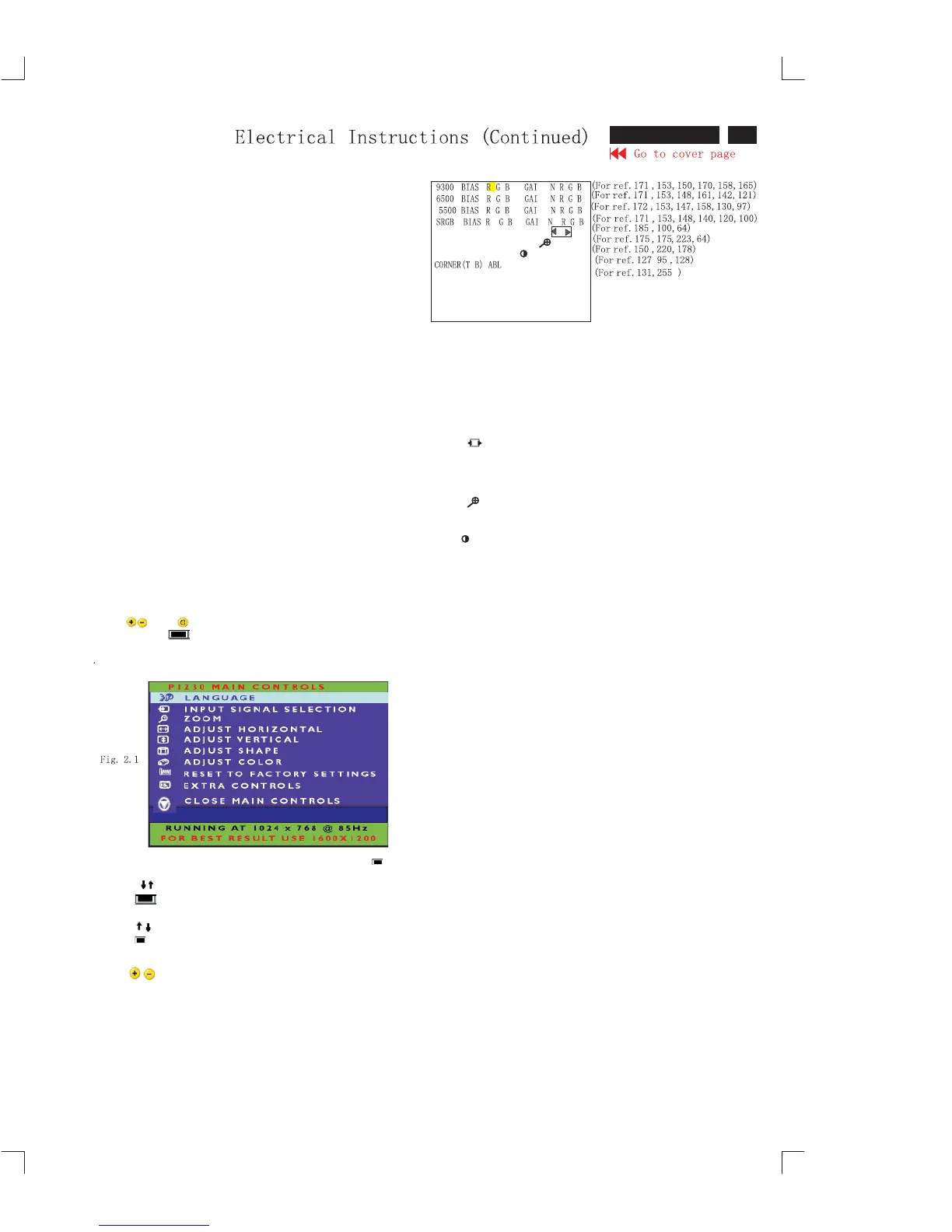
To access factory mode
1.Turn off monitor (do not turn off PC)
2. Press " " and " "simultaneously on the frond control
panel, then press " " ,wait till the OSD menu with characters
DELL P1230 VO.15 20031119(below OSD menu)" come on the
screen of monitor.
3.If OSD menu disappears on the screen of monitor, press " "
again (anytime), then the OSD menu comes on the screen again.
4.Using " ":to select DELL P1230 VO.15 20031119
5.Using" "to access/confirm the selection
6.Bring up the "function adjustment" as shown in Fig.2.2
Press " "button for function selection as shown in Fig.2.2
Press " " button to access/confirm each item selection
(The cursor indicator will be changed from yellow color to red
color
Using " "to increase or decrease the value
BIASRGB:R (red) G(green) B(blue) cut off
GAINRGB:R(red) G(green) B(blue) gain
V FOCUS: Vertical Focus adjustment
H FOCUS: Horizontal Focus adjustment
VLIN BAL : vertical Linearity Balance
USER Horizontal size range adjustment range
H RASTER: Horizontal raster adjustment
V RASTER: Vertical raster adjustment
H LIN: Horizontal linearity adjustment
V LIN: Vertical linearity adjustment
SUB:" " Zoom range
V OFFSET: Vertical raster center
V GAIN : Vertical size center
SUB : Sub Contrast allowance range
T CORNER: Corner Correction of Top
B CORNER: Corner Correction of BOTTOM
ABL : Auto brightness Limitation
7.2.1
7. Alignment of Vg2 cut-off point, white tracking
(For example: 171 is value of "BIAS R")
01379
DE L L P1230 VO.15 20031119










 To Next Page