18
DELL P1230 M25P
Electrical Instructions (Continued)
Go to cover page
8. Focus adjustment
9. Loading DDC code
- Apply a video signal in the 1280 x1024 with 146kHz/85 Hz
mode
- Select " M/E " pattern.
- Set the brightness at center (50%) and the contrast to
MAX.-position.
- Adjust focus potentiometers (top of L.O.T.) Focus 1 for
horizontal focus and Focus 2 for vertical focus so that the
picture at 2/3 of the diagonal lines (from center to four corners)
of the displayed screen is as sharp as possible.
TheDDCHEXdatashouldbewrittenintotheDDCIC by
EEPROM (7804) writer or EDID301.EXE program and Software
DDC Alignment Kit.
Purity Adjustment
1. Purity adjustment
2. Static convergence
-Makesurethemonitorisnotexposedtoany
external magnetic field.
- Produce a full red pattern on the screen, adjust the
purity magnet rings on the PCM assy (on CRT) to
obtain a complete field of the color red. This is done
by moving the two tabs (2-pole) in such a manner
that they advance in an opposite direction but at
the same time to obtain the same angle between
the two tabs, which should be approximately 180
degree.
- Check by full green pattern and full blue pattern
again to observe their respective color purity.
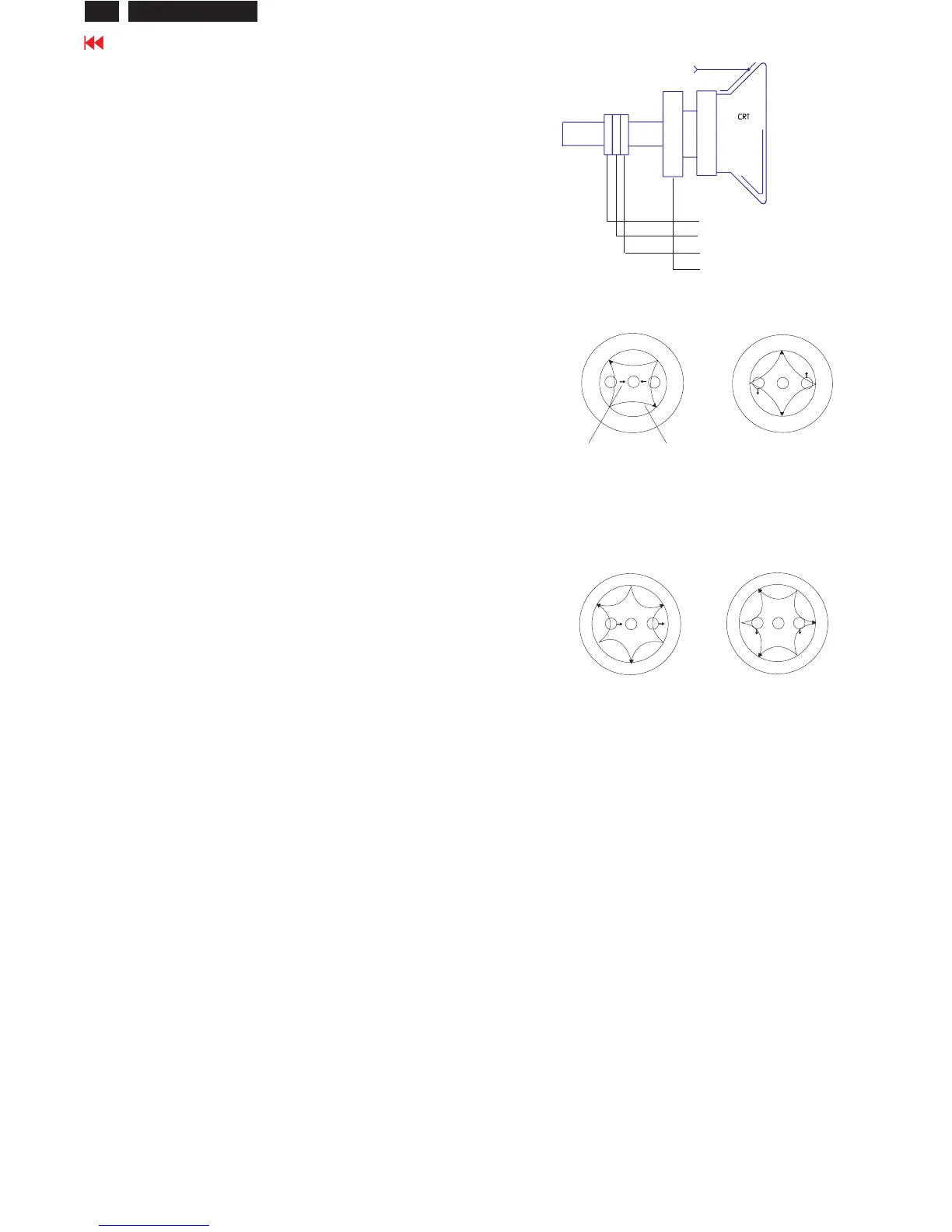
Introduction
Slight deviation in the static convergence can be
corrected by using two permanent pairs of magnets
whicharefittedaroundtheneckoftheCRT.These
are the 4-pole magnet and the 6-pole magnet.
The4-polemagnetmovetheoutermostelectron
beams (R and B) parallel in the opposite direction
fromtheother.The6-polemagnetmoves the
outermost electron beam (R, B and G) parallel in the
opposite direction from the other.
The magnetic field of the above magnets do not affect
S
S
N
N
B
G R
S
S
N
N
B
G
R
Beam displacement
direction
Magnetic flux
lines
6-pole
Beam motion producced by the
6- pole convergence magnet
S
S
S
N
N
N
R
B
G
S
S
S
N
N
N
R
B
G
4-pole Beam motion producced by the
4-pole convergence magnet
2-pole purity magnet
6-pole convergence magnet
4-pole convergence magnet
Deflection Yoke
the center of the CRT neck.
Setting
- Before the static convergence setting can be made,
themonitormustbeswitchedonfor30minutes.
- The focus setting must be made correctly.
- Signal: 640 * 480, 31.5 kHz/60 Hz mode.
- Set the tabs of the 4-pole magnet in the neutral
position. This is when the tabs are opposite one
another. In this position the magnets do not affect the
deflectionoftheRandBelectronbeams.
- Set the tabs of the 6-pole magnet in the neutral
position. This is when the tabs are opposite one
another. In this position the magnets do not affect the
deflectionoftheR,B,andGelectronbeams.
- First set the 4-pole magnet optimally.
- Thensetthe6-polemagnetoptimally.
- If the convergence is not now optimal, then adjust to
the optimal setting with the 4-pole magnet and then with
the6-Polemagnetagain.
- Set the tabs of the 6-pole magnet in the neutral
position. This is when the tabs are opposite one
another. In this position the magnets do not affect the
deflectionoftheR,B,andGelectronbeams.
- First set the 4-pole magnet optimally.
- Thensetthe6-polemagnetoptimally.
- If the convergence is not now optimal, then adjust to
the optimal setting with the 4-pole magnet and then












 To Next Page