Diagnostic Software
EN 45DVDR615/69 5.
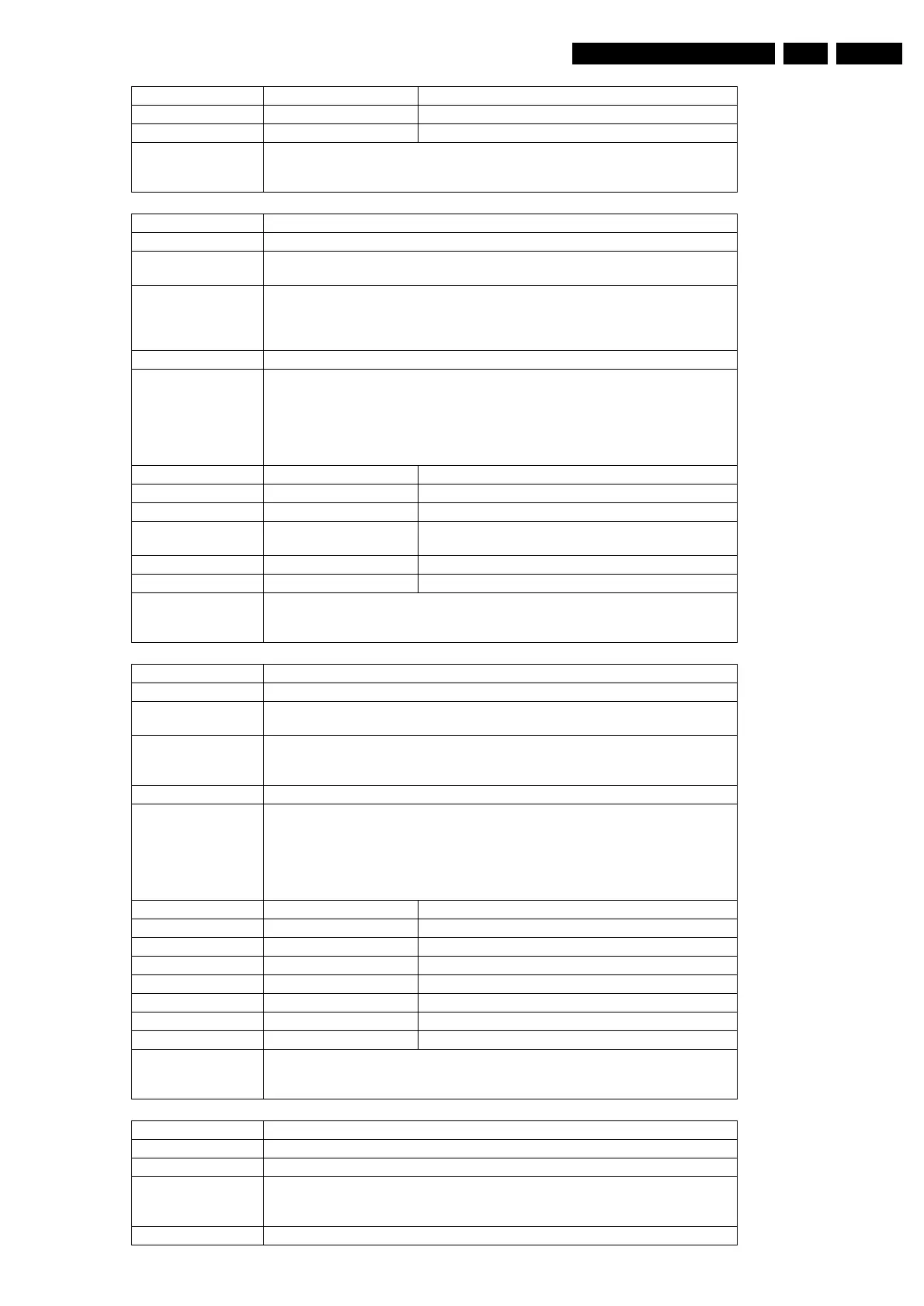
Error Number Description
120400 Getting the Diagnostics software version succeeded
120401 Getting the Diagnostics software version failed
Example DS:> 1204
120400: Software Diagnostics Version = 0001
Test OK @
Nucleus Name DS_SYS_EepromUpload
Nucleus Number 1205
Description Upload the contents of the NVRAM on the analogue board or the digital board to the
service PC, by using the X-modem protocol
Technical - Decode the user input
- Determine whether to upload the analogue board or digital board NVRAM
- Start uploading using the XMODEM protocol
- Determine whether all was uploaded OK
Execution Time Depends on the chosen NVRAM and the User.
User Input Choose one of the following parameters for the nucleus:
1. Upload the contents of the NVRAM of the digital board
2. Upload the contents of the NVRAM of the analogue board
Choose in the terminal on the control PC -> transfer -> receive file.
Select X-modem protocol. Then click receive in the dialogue and fill in the file name
in which you want to store the data.
Error Number Description
120500 Download succeeded.
120501 User input is not valid.
120502 Something went wrong while copying the data from
NVRAM to SDRAM .
120503 Something went wrong while transferring the data.
120504 User cancelled the upload.
Example DS:> 1205 1
120500:
Test OK @
Nucleus Name DS_SYS_EepromDownload
Nucleus Number 1206
Description Download a file with the contents of the NVRAM for the analogue board or the digital
board from the service PC to the recorder, by using the X-modem protocol
Technical - Decode the user input and determine what EEPROM to fill: digital / analogue
- Store the downloaded (using XMODEM) bytes in SDRAM first
- Then copy these contents into the EEPROM after verification
Execution Time Depends on the chosen NVRAM and the User.
User Input Choose one of the following parameters for the nucleus:
1. Download the contents of the NVRAM of the digital board
2. Download the contents of the NVRAM of the analogue board
Choose in the terminal of the control PC -> transfer -> send file.
Select X-modem protocol. Then choose a file with the Browse button in the dialogue
and click on send.
Error Number Description
120600 Download succeeded
120601 The write to NVRAM failed.
120602 Timeout. Too many retries.
120603 A file was sent with a wrong header.
120604 User cancelled the download.
120605 User input is not valid.
120606 Unknown Error
Example DS:> 1206 1
120600:
Test OK @
Nucleus Name DS_SYS_DvIdNumberSet
Nucleus Number 1207
Description Set the IEEE 1394 unique ID
Technical - Decode the user input
- Store the id into NVRAM
- Validate the segment of storage by updating the checksum
Execution Time Less than 1 second.
http://www.jdwxzlw.com/?fromuser=华盛维修



 To Next Page