8 9Your recorder Your recorder
Table of contents
Table of contents
3 Your recorder
We are delighted that you have chosen a Philips device. Visit our
website for comprehensive support such as user manuals, software
downloads, warranty information and much more:
www.philips.com/dictation.
3.1 Product highlights
• Stereo recording in MP3 format for excellent sound quality
• Zoom microphone feature for recording at distances of up to 15
metres / 50 feet
• ClearVoice for clear and natural reproduction of speech
• Motion sensor for automatic microphone sensitivity adjustment
• Voice-activated recording mode without pressing buttons (hands-
free operation)
• Pre-recording feature, to avoid missing a single word
• Recording and power supply via a USB port for unlimited recordings
• Large color display for clear status information of recording
• Slot for microSD card for extra storage
• Highlight important parts of your recording using index marks
• Calendar search to find all recordings quickly
• Robust and ergonomic metal design for extra durability
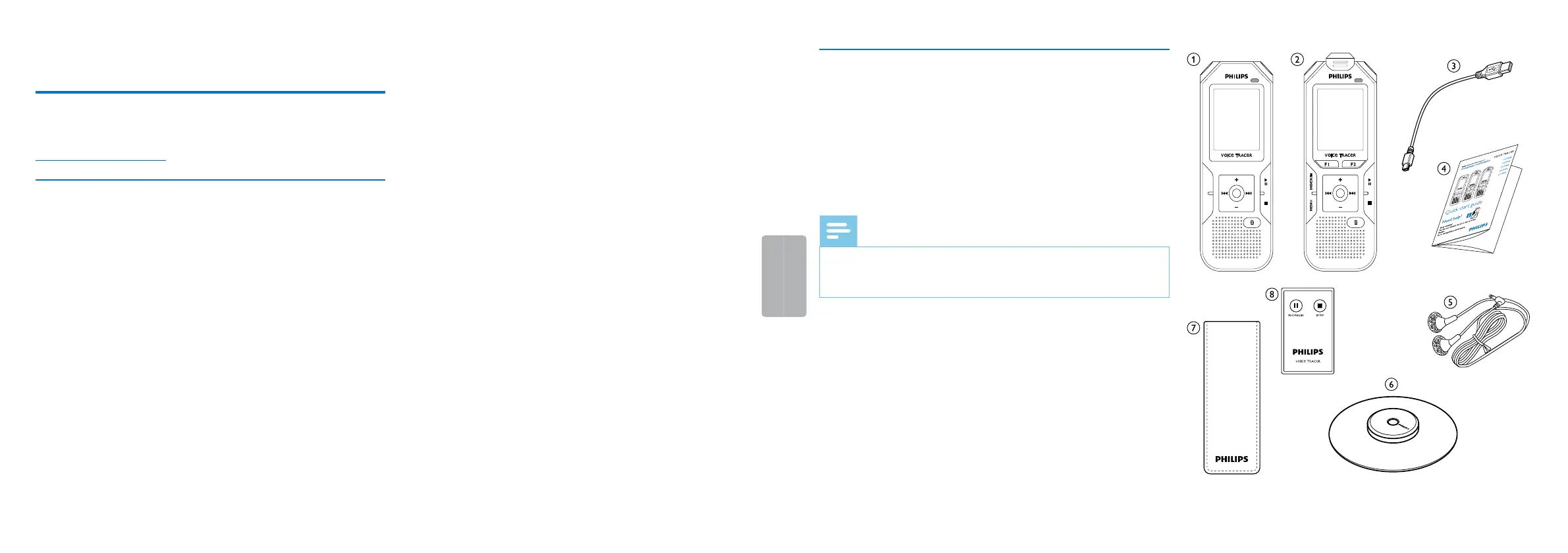
3.2 Package contents
a DVT4010: Device
b DVT6010 – DVT8010: Device
c USB cable to connect to a computer
d Quick start guide
e DVT6010 – DVT8010: Stereo headphones
f DVT8010: Meeting microphone
g DVT8010: Carry case
h DVT8010: Remote control (battery inserted)
Note
• Please note that some individual components may not be included
in delivery with your model. If any item is missing or damaged,
please contact your distributor.
MENU INDEX/a













 To Next Page