12 13Your recorder Your recorder
Table of contents
Table of contents
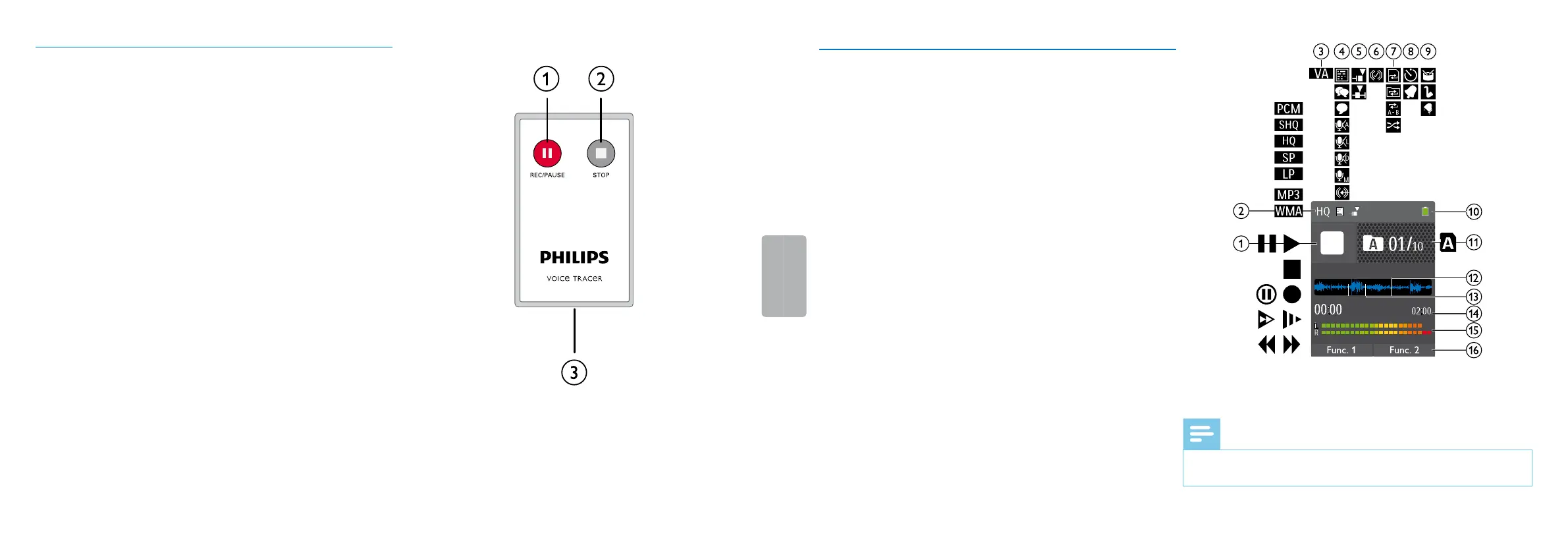
3.3.3 Remote control (DVT8010)
a Start recording (record key), pause recording (pause key)
b Stop recording (stop key)
c Battery compartment (not shown)
3.4 Start-up screen
a j Playback: S–Normal, {–Pause, j–Stop, c –Slow, U–Fast,
g–Recording, |–Recording paused, VW–Search
b ƒ Set recording quality: ‡–PCM, …–SHQ, ƒ–HQ,
ˆ–SP, †–LP, „–MP3 (music playback),
‰–WMA (music playback)
c ‚–Voice activation switched on
d Microphone sensitivity °–Dictation, ±–Speech to text,
¯–Conversation, ²–Auto zoom function, µ–Zoom
function: Lecture, ·–Zoom function: long distance,
¸–Manual microphone sensitivity, Ë–Line-in source
e Editing mode set: Å–Add recording, Æ–Overwrite
recording
f Ç–ClearVoice turned on (for better playback quality)
g Set repeat mode / continuous loop: –Repeat file playback,
Á–Repeat folder playback, ÖRepeat selection/sequence,
Ä–Random repeat mode
h À–Timer on, ¿–Alarm on
i Equalizer mode set (for music playback) È–Pop, É–Jazz,
Ê–Classic
j Battery charge level
k u Selected folder, depending on the selected storage medium
(u–internal memory, à–microSD card)/ number of the
current recording / total number of recordings in the folder
l Position indicator of current playback/recording
m Recording index markers set
n Playback/recording duration, total time of recording
o Playback/recording level of the right and left channels
p DVT6010 – DVT8010: Function of the soft function keys
Note
• The position and appearance of the symbols may vary, depending
on the model, the mode and the selected functions.













 To Next Page