Service Modes, Error Codes, and Fault Finding
EN 27EM5.1E 5.
5.5.3 How to clear the Error Buffer
Use one of the following methods:
• By activation of the "RESET ERROR BUFFER" command
in the SAM menu.
• With a normal RC, key in sequence "MUTE" followed by
"062599" and "OK".
• When you transmit the commands "DIAGNOSE" - "99" -
"OK" with ComPair (or with a DST).
• If the content of the error buffer has not changed for 50+
hours, it resets automatically.
5.5.4 Error Codes
In case of non-intermittent faults, clear the error buffer before
you begin the repair. This to ensure that old error codes are no
longer present. Before clearing the buffer, write down the
content, as this history can give you significant information.
If possible, check the entire contents of the error buffer. In
some situations, an error code is only the result of another error
code and not the actual cause (e.g., a fault in the protection
detection circuitry can also lead to a protection).
There are various errors:
• I2C device errors.
• I2C bus errors.
• Protection errors.
• Errors not related to an I2C device, but of importance:
– BLACK CURRENT LOOP (ERROR 28): detection of a
continuous fail of the black current stabilisation loop of
the HOP.
– FALCONIC (ERROR 26): at start-up, after initialisation
of the PICNIC, the presence of the FALCONIC can be
checked.
– EAGLE (ERROR 27): at start-up, after initialisation of
the PICNIC, the presence of the Eagle can be
checked.
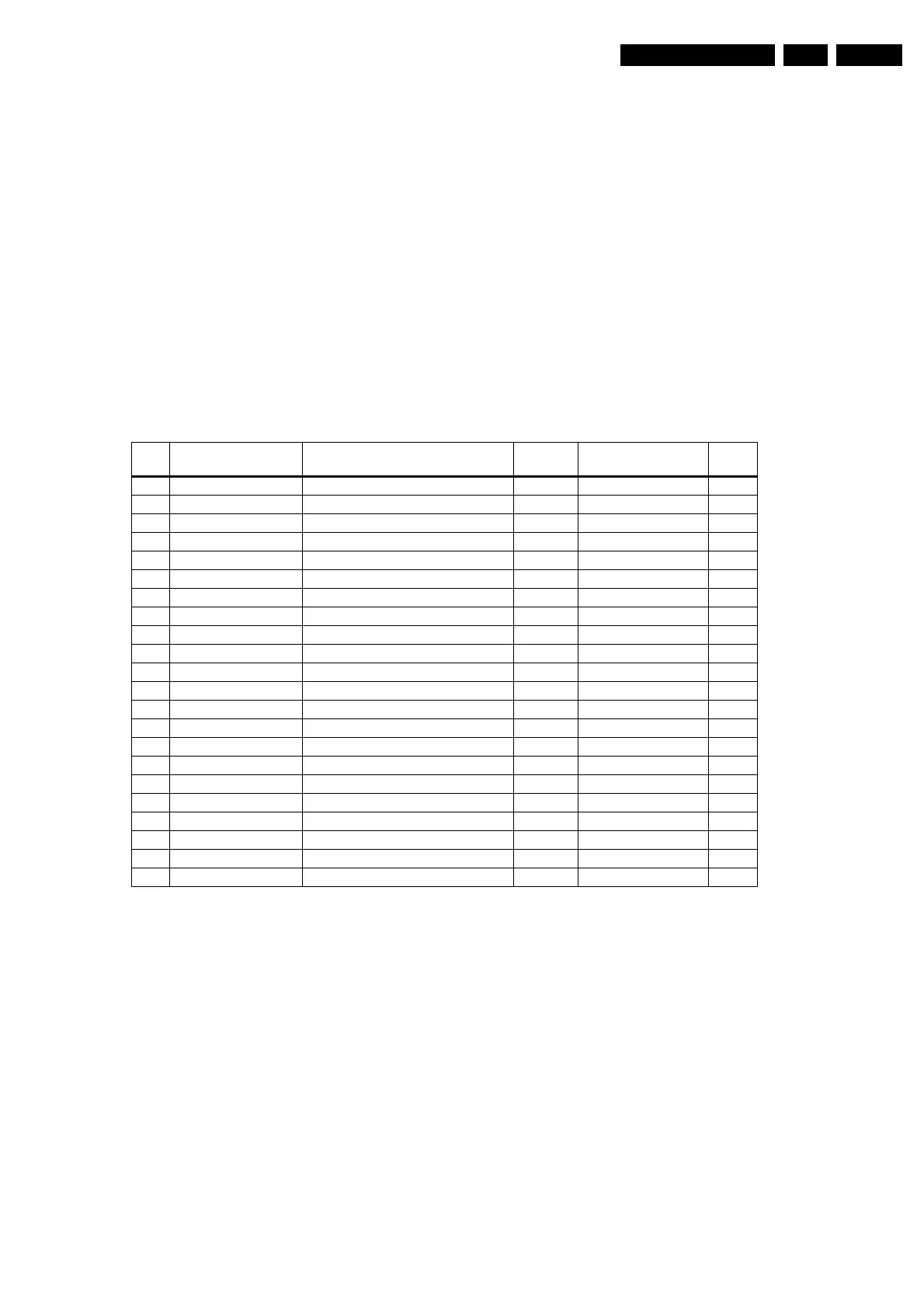
Table 5-3 Error codes
Note:
Error codes 1, 6, or 18 are protection codes and in this case,
supplies of some circuits will be switched "OFF". Also, in
protection, the LED will blink the number of times equivalent to
the most recent error code.
5.6 The Blinking LED Procedure
5.6.1 Introduction
Via this procedure, you can make the contents of the error
buffer visible via the front LED. This is especially useful for fault
finding, when there is no picture.
When the SDM is entered, the front LED will show (blink) the
contents of the error-buffer. Error-codes = 10 are shown as
follows:
• A long blink of 750 ms (which is an indication of the decimal
digit),
• A pause of 1.5 s,
• "n" short blinks (where "n" = 1 - 9),
• When all the error-codes are displayed, the sequence
finishes with a LED blink of 3 s,
• The sequence starts again.
Example: Error 12 9 6 0 0.
After activation of the SDM, the red front LED will show:
• 1 long blink of 750 ms (which is an indication of the decimal
digit) followed by a pause of 1.5 s,
• 2 short blinks followed by a pause of 3 s,
• 9 short blinks followed by a pause of 3 s,
• 6 short blinks followed by a pause of 3 s,
• 1 long blink of 3 s to finish the sequence,
• The sequence starts again.
Note: If errors 1, 6 or 18 occur, the LED always gives the last
occurred error even if the set is NOT in service mode.
5.6.2 How to Enter
Use one of the following methods:
• Enter the SDM (only via soldering pads marked "SDM" on
SSB). The blinking red front LED will show the entire
Error Device Description Def. item Defect. module indi-
cation
Diag
1 M24C32 NVM, spontaneous blinking error 1 7011 Control B5a
2 Hfail Protection Horizontal Flyback protection / Horizontal Flyback /
3 SAA4978 PICNIC 7713 Feature Box B3a
4 Supply 5V 5V protection / +5V Supply B5a
5 Supply 8V 8V protection / +8V Supply B5a
6 Slow I2C bus blocked Spontaneous blinking error 6 / Slow I2C Blocked /
7 TDA9330 HOP High-end Output Processor 7301 Video Controller B4
8 TDA932x HIP High-end Input Processor 7323 Chroma IF IO B2
9 PCF8574 Wireless expander 7501 Sound Output H
13 UV1318/... Tuner protection 1T01 Tuner A8
14 MSPxxxx ITT sound processor 7A02 Audio module B6a
16 FBX Feature Box Protection / +3V (Fbx) Supply B3
18 Fast I2C bus blocked Spontaneous blinking error 18 / Fast I2C Blocked /
19 TDA8444 Auto Scavem DAC 7500 Auto Scavem SC1
21 M62320P PIP I/O Expander 7403 Video Dual Screen C3
22 TDA888X PIP BOCMA 7301 Video Dual Screen C4
23 TELE9 PIP Tuner 7201 Video Dual Screen C2
24 SAB9081 PIP Muppet 7801 Video Dual Screen C1
26 SAA4992 Falconic 7718 +3V (Fbx) Supply B3b
27 T8F24EF Eagle 7724 +3V (Fbx) Supply B3c
28 Black current loop Black current loop / Video Controller /
32 M29W400BT Flash Ram (EPG) 7012 EPG Memory B5a








 To Next Page