4
English
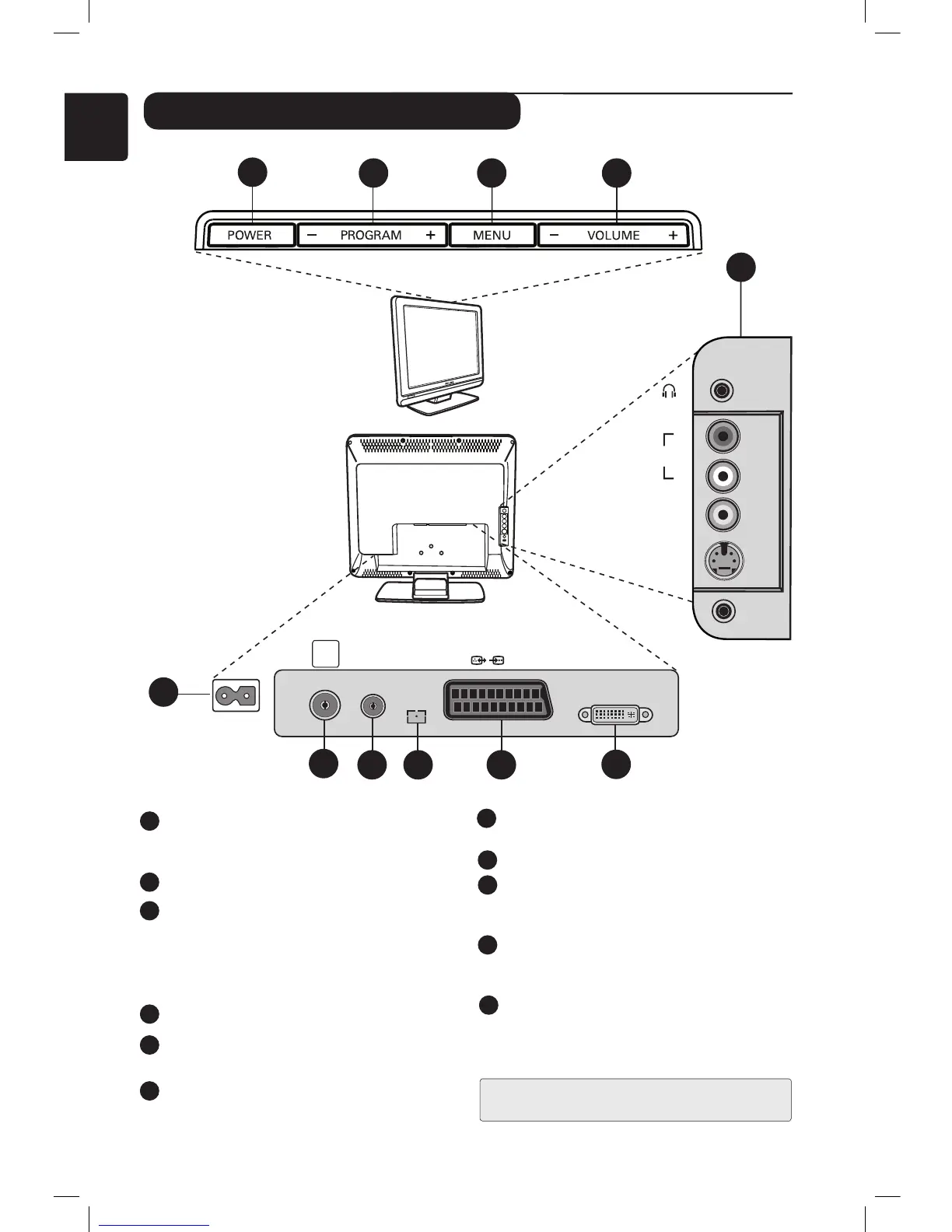
Television keys and connectors
POWER : to switch the TV on or off.
Note : The power remains on even when the
POWER switch is turned off.
PROGRAM – / + : to select programmes.
MENU : to access or close menus. The
PROGRAM – / + keys can be used to select
a menu item and the VOLUME – / + keys
to enter into the selected menu item and
make adjustments.
VOLUME – / +: to adjust sound level.
POWER socket :
Insert the mains plug into a
wall socket.
TV Aerial socket :
Insert the aerial plug into
the TV Antenna socket.
1
2
3
4
5
6
8
FM Aerial socket :
Insert the radio aerial lead
into the FM Antenna socket.
For Service use only.
EXT1 socket : for connecting to devices like
DVD, VCR, recorder, decoder or games
console.
DVI-I (HD / PC) : for connecting a High
Definition (HD) equipment or computer with
DVI/VGA output.
Side connections (AV/SVHS) : for
connecting to devices like camera or
camcorder. Also allows you to connect your
headphone for your personal listening pleasure.
9
7
10
11
2 3 4
1
5
11
EXT1
DVI-I
(HD/PC)
FM
ANT
TV
:
75Ω
6
7 8 9
10
VIDEO
IN
S-VIDEO
DVI
AUDIO
IN
AUDIO
IN
R
L
For more information about connections,
see page 16 to 19.












 To Next Page