16
English
Connecting Peripheral Equipment
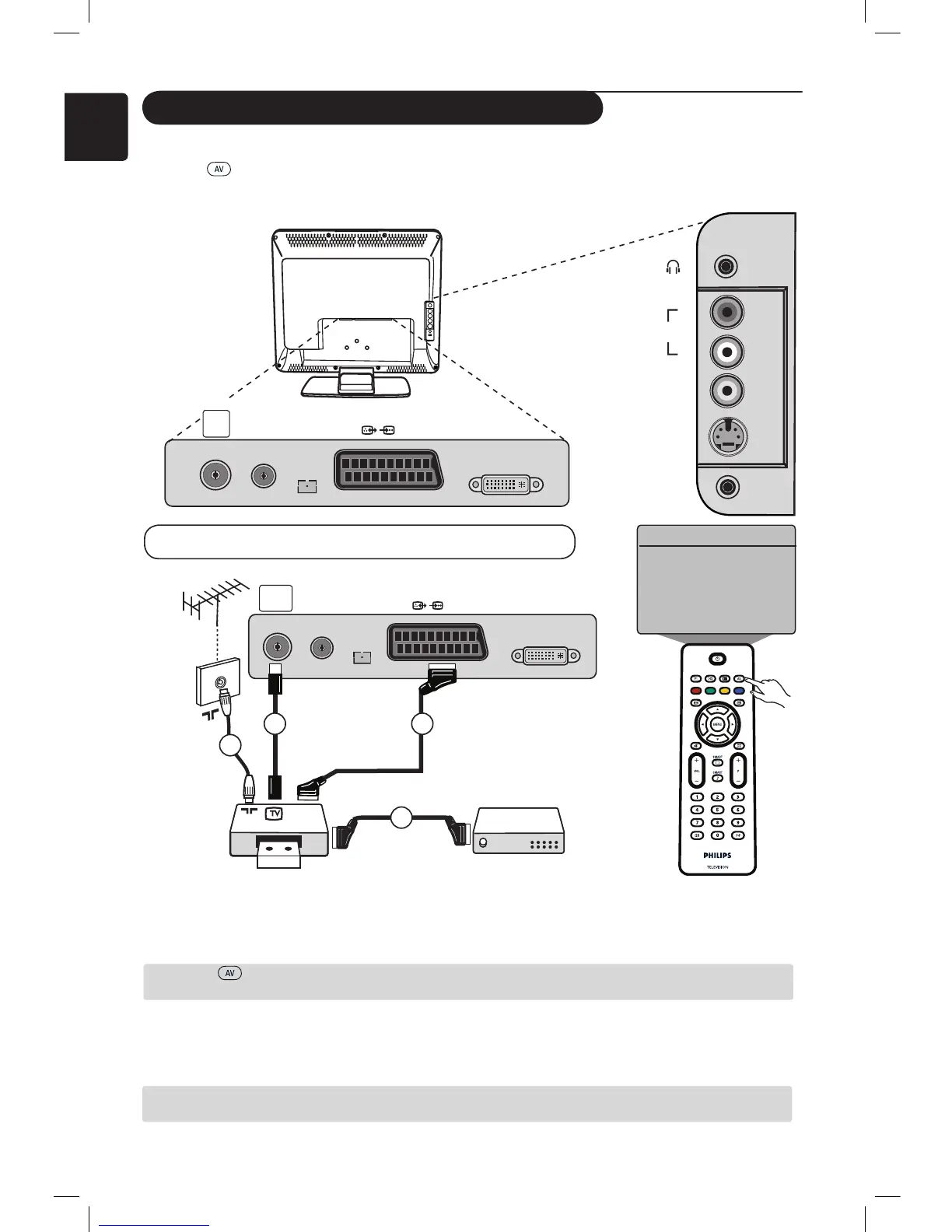
The diagram below shows the sockets on the TV.
Press the key on the remote control to display Source List. Use the Î ï keys to select EXT1,
AV/SVHS, PC, HD or FM Radio according to the equipment you have connected. Use the Æ key to switch
the TV to the selected mode.
Connect the aerial cable 1. Use a good quality euroconnector cable 2 to obtain the optimum picture
quality. If your recorder does not have a euroconnector socket, the only connection possible is via
the aerial cable 3. You will therefore need to tune in your video
recorder’s test signal and assign it
programme
number 0 or store the test signal under a programme between 90 and 99 (see Manual
Store on page 6). See also the handbook of your recorder.
Press the
key to display Source List and
use the Î ï keys to select EXT1. Use the Æ key to
switch to the selected source.
Decoder with Recorder
Connect a eurocable 4 to your decoder to the second euroconnector socket of your recorder. See
also the handbook of your recoder. You can also connect your decoder directly to EXT1 with a
eurocable.
IMPORTANT : In order to connect your Canal + decoder, please use EXT 1 scart only.
EXT1
DVI-I
(HD/PC)
FM
ANT
TV
:
75Ω
1
4
2
EXT1
DVI-I
(HD/PC)
FM
ANT
TV
:
75Ω
3
VIDEO
IN
S-VIDEO
DVI
AUDIO
IN
AUDIO
IN
R
L
Æ
Source
TV
EXT1
AV / SVHS
PC
HD
FM Radio
Connecting a DVD Recorder or VCR Recorder
RECORDER
DECODER
AV key











 To Next Page