17
English
Connecting Peripheral Equipment
Connecting a Computer
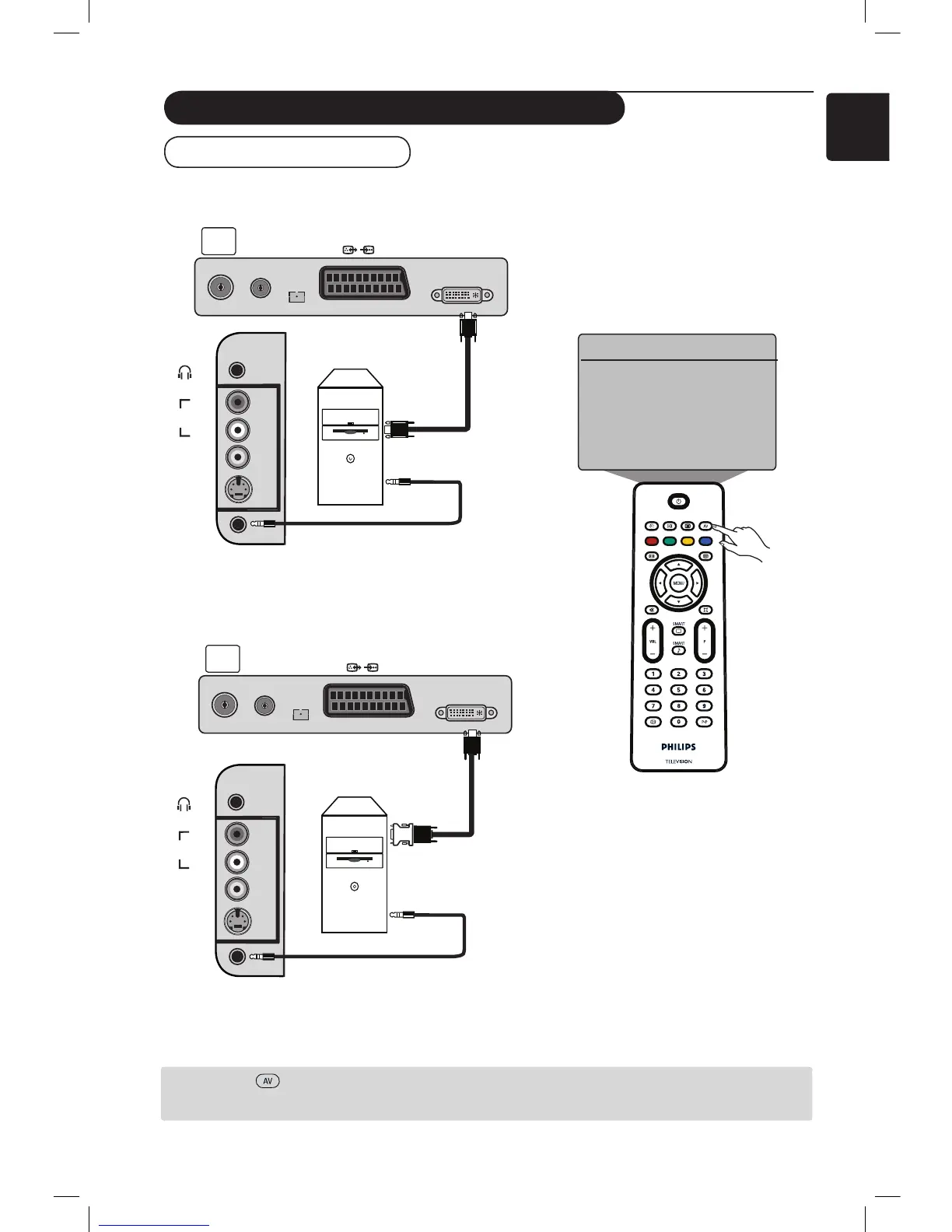
& Connect the DVI output of your computer to the DVI-I In of the LCD TV. If your computer does
not have a DVI output, use a DVI to VGA cable to connect to the PC.
é Connect the computer audio output to the DVI AUDIO IN of the TV.
“
Press the key to display Source List and the Î ï keys to select PC. Use the Æ key to switch to
the selected source.
VIDEO
IN
S-VIDEO
DVI
AUDIO
IN
AUDIO
IN
R
L
VIDEO
IN
S-VIDEO
DVI
AUDIO
IN
AUDIO
IN
R
L
DVI-I
(HD/PC)
FM
ANT
TV
:
75Ω
EXT1
DVI-I
(HD/PC)
FM
ANT
TV
:
75Ω
EXT1
Æ
Source
TV
EXT1
AV / SVHS
PC
HD
FM Radio
PC with
DVI connector
VGA to DVI
adaptor
PC with
VGA
connector
DVI (PC) to DVI-In (TV) connection
VGA (PC) to DVI-In (TV) connection
AV key











 To Next Page