EasyManua.ls Logo

Philips Flat TV - Accessory Connection Scenarios; Recorder and Cable Box Hookups; Satellite Receiver;Cable Box AV Wiring

Philips Flat TV
188 pages
Print Icon
To Next Page IconTo Next Page
To Previous Page IconTo Previous Page
Loading...
18
English
Connecting Peripheral Equipment
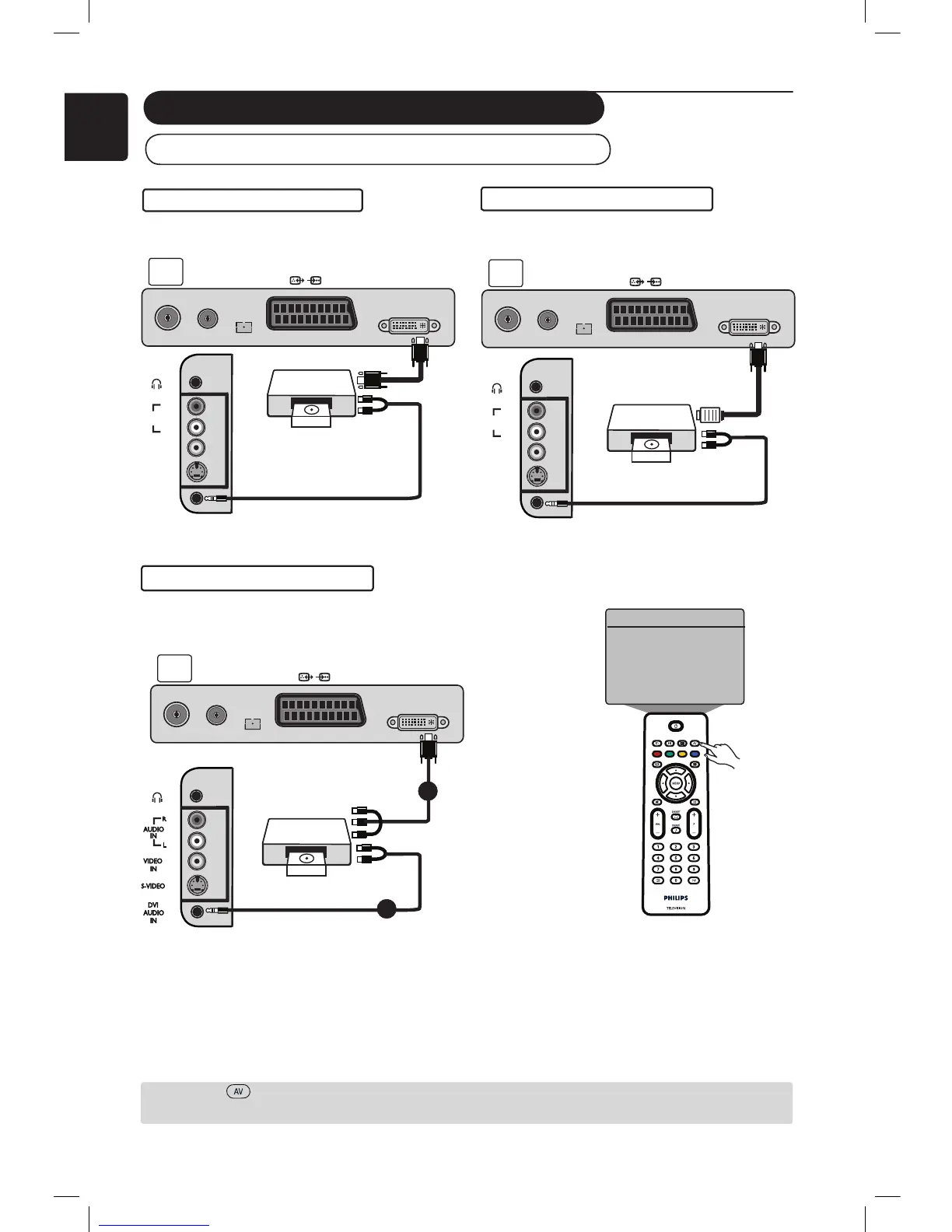
Connecting the High Defi nition (HD) Equipment
If you are using a High Definition equipment that can produce high definition signals, the TV can accept
those signals by carrying out the connections below.
& Connect DVI / CVI output of your HD equipment to the DVI-I input of the LCD TV. If your
HD equipment has only a HDMI connector, a DVI to HDMI adaptor cable is needed (see above
diagrams).
é Connect the Audio (Red and White) outputs of the HD receiver to the DVI Audio In of the TV.
Press the key to display Source List and the Î ï keys to select HD. Use the Æ key to switch
to the selected source.
DVI to DVI-In connection
HDMI to DVI-In connection
VIDEO

VIDEO
IN
IN
S-VIDEO
S-VIDEO
DVI
DVI
AUDIO
AUDIO
IN
IN
AUDIO
AUDIO
IN
IN
R
R
L
L
VIDEO
VIDEO
IN
IN
S-VIDEO
S-VIDEO
DVI
DVI
AUDIO
AUDIO
IN
IN
AUDIO
AUDIO
IN
IN
R
R
L
L
DVI-I
(HD/PC)
FM
ANT
TV
:
75Ω
EXT1
DVI-I
(HD/PC)
FM
ANT
TV
:
75Ω
EXT1
HD Equipment
HD Equipment
HDMI
to DVI In
cable
CVI to DVI-In connection
DVI-I
(HD/PC)
FM
ANT
TV
:
75Ω
EXT1
1
VIDEO
IN
S-VIDEO
DVI
AUDIO
IN
AUDIO
IN
R
L
2
Æ
Source
TV
EXT1
AV / SVHS
PC
HD
FM Radio
AV key
Red/Green/Blue
Connectors
White
or Red
Connectors
HD Equipment

Table of Contents

Other manuals for Philips Flat TV

Related product manuals