3
English
Using the Remote Control
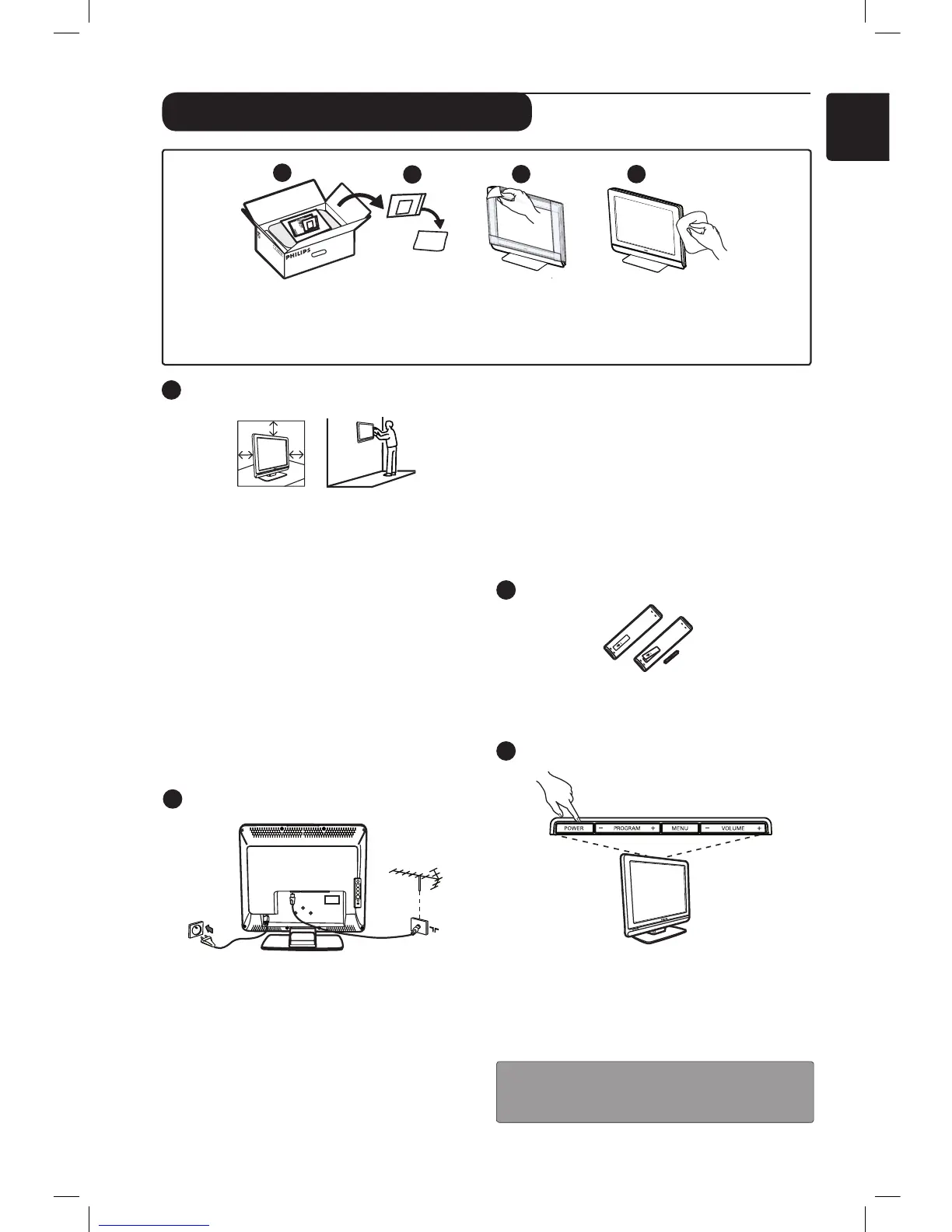
• Insert the 2 batteries supplied. Ensure that
the (+) and (-) ends of the batteries line up
correctly (inside of case is marked.)
Switching on the TV set
• To switch on the TV set, press the POWER
button. A green indicator comes on and the
screen lights up.
• If the TV set remains in standby mode (red
indicator), press the P – / + button on the
remote control.
NOTE: Do not leave the TV in standby mode
for an extended period of time. Instead,
disconnect the TV from the mains.
Positioning the TV set
• If you place the TV set on a surface, ensure
the surface is level and that it can withstand
the weight of the TV.
• Before you hang your TV on a wall, ensure
the wall is suitable to carry the weight of
the TV. Installation of the TV set on the wall
should be carried out by qualified person.
Improper installation can cause the TV to be
unsafe.
The connections do not have to be made
before hanging the TV, but the cables must
be inserted into connectors of the TV.
• Wherever you place or hang the TV, ensure
that air can circulate freely through the
ventilation slots. Do not position the TV in a
confined space.
Connections
If you do not have a cable box or satellite box,
follow these instructions:
• Insert the aerial plug into the : socket at
the bottom of the set.
• Insert the mains plug into a wall socket
(220-240V 50/60Hz).
If you are using a cable box or satellite box see
“Connecting peripheral equipment” on page 16
to 19.
•
2
3
1
Preparation / Getting started
4
1
5
P
F
5
1
21
2
0
P
F
5
1
2
1
2
3
P
F
5
3
2
1
1
2
3 4
Do not remove the protective sheet until you have completed the stand/wallmounting and
connections.
Please handle with care. Use a soft cloth provided to clean the glossy black front of the TV.
The power consumption of the set is given
on the type plate at the rear of the TV.
Warning: Verify that the mains supply voltage
in your home corresponds to the voltage printed
on the sticker at the rear of the TV.
If the TV is mounted on a swivel base or swivel
arm, ensure no strain is placed on the power
cord when the TV is swivelled. Strain on the
power cord can loosen connections. This may
cause arcing and result in fire.
•











 To Next Page