32
ENGLISH
2
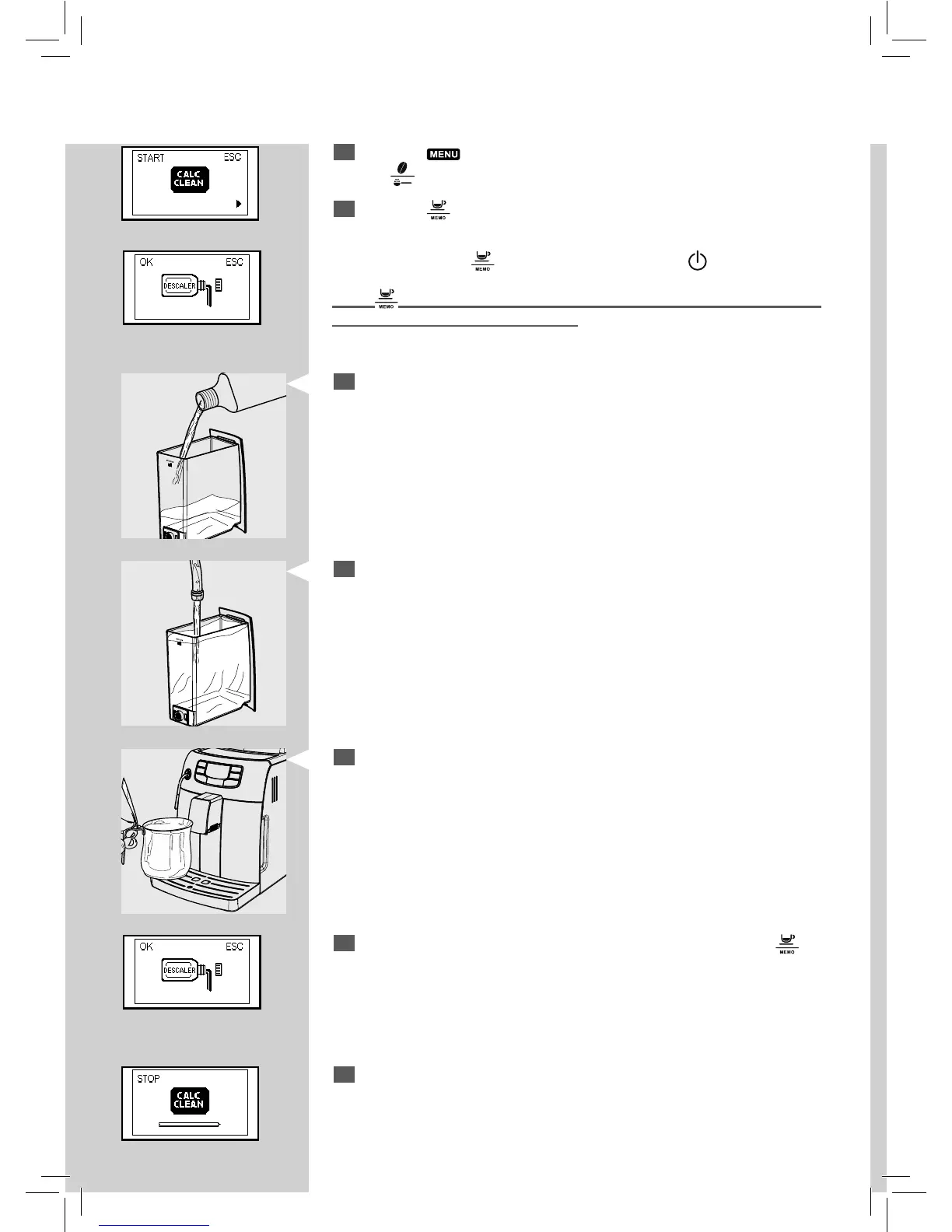
Press the " " button and, if necessary, scroll the pages by pressing
the "
" button until the following page is displayed.
3
Press the " " button to enter the descaling menu.
RedRed
8
At this point the machine will start dispensing the descaling solution at
intervals (the bar shows the cycle progress).
Red
Note: If you press the " " button by mistake, press the " " to quit.
If the "
" button is pressed, the descaling cycle starts and it is necessary
to complete it before brewing co ee.
5
Fill with fresh drinking water up to the MAX level. Place the tank back
into the machine.
6
Place a container under the steam wand.
Note: Use a container of at least 1.5 litre capacity. If you do not have a con-
tainer of this capacity, pause the cycle by pressing the espresso co ee button,
empty the container, place it under the dispensing spout and restart the cycle
by pressing the same button again.
7
Only after adding the descaling solution in the tank, press the " "
button to start the descaling cycle.
4
Pour the entire content of Saeco concentrated descaling solution into
the appliance water tank.
Orange







 To Next Page