ENGLISH
33
RedRedRedRedRed RedRed Red
CALC
CLEAN
. . . .
CALC
CLEAN
. . . .
CALC
CLEAN
. . . .
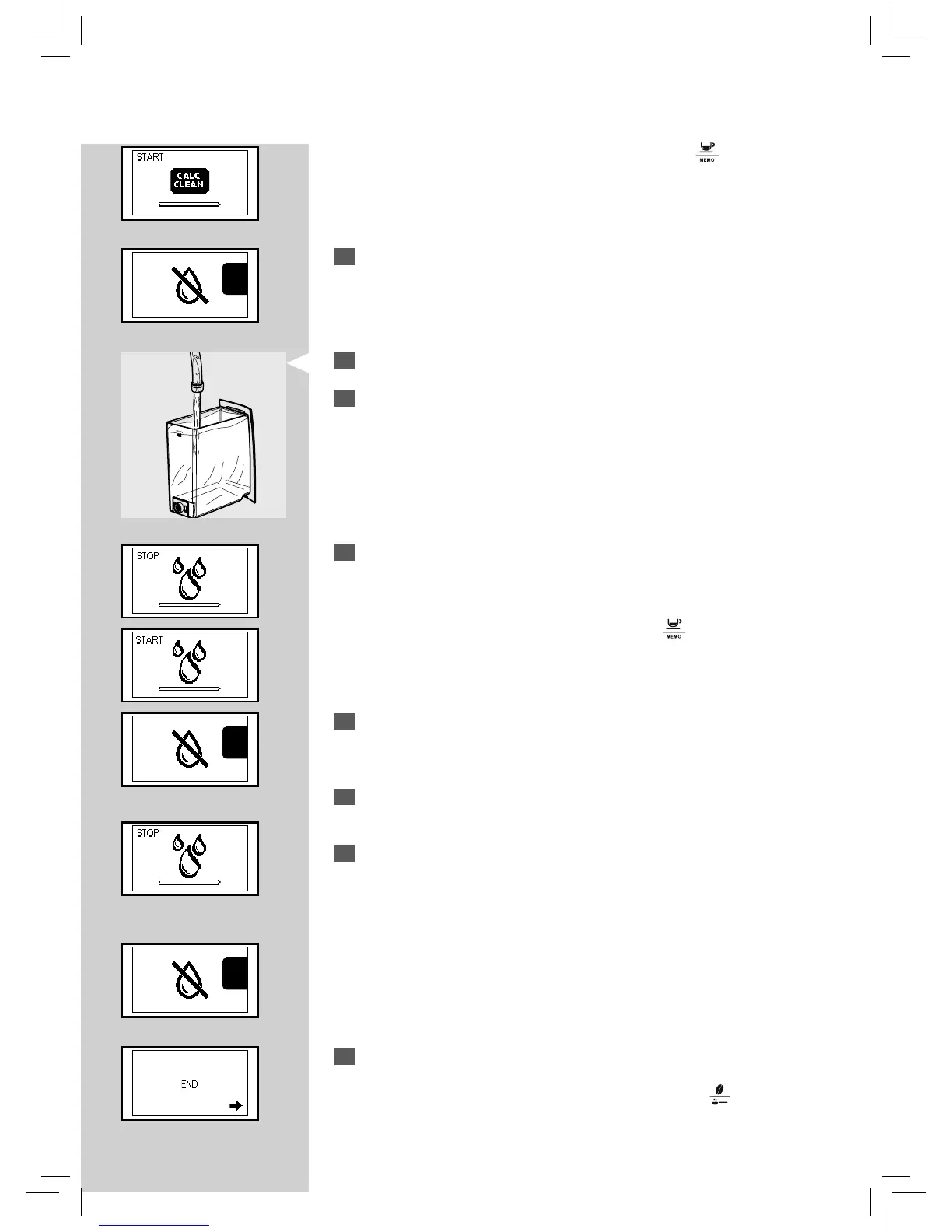
Note: The descaling cycle may be paused by pressing the " " button. To re-
sume the cycle, press the button again. This allows you to empty the container
or to go away for a short period of time.
9
When the solution in the tank is nished, the icon on the side is dis-
played. The icon indicates that the tank must be rinsed and lled.
10
Rinse the water tank thoroughly and re ll it with fresh drinking water.
11
Empty the container used to collect the liquid dispensed by the ma-
chine and place it back under the steam wand.
12
When inserting in the machine the tank lled with water, the icon on
the side is displayed. The rinse cycle of the machine starts.
Note: The rinse cycle may be paused by pressing the "
" button. To resume the
cycle, press the button again. This allows you to empty the container or to go
away for a short period of time.
13
When the water in the tank is nished, the icon on the side is displayed
to indicate that the tank must be rinsed and lled with fresh drinking
water to nish the cycle.
14
Empty the container used to collect the liquid dispensed by the ma-
chine and place it under the dispensing spout.
15
When inserting in the machine the tank lled with water, the icon on
the side is displayed. The rinse cycle continues.
The machine performs the rinse cycle with a pre-set amount of water. The
machine may require to re ll the tank many times if the necessary amount of
water has not been reached. The following icon indicates that the tank needs
to be re lled.
16
When the amount of water needed for the rinse cycle has been
completely dispensed or the water tank has been inserted again in the
machine, the icon on the side is displayed. Press the "
" button to
quit the descaling cycle.







 To Next Page