5Important
ENGLISH
1.1 Safety information
YourHDrecorderispoweredusinga12Vpowersupplyunit.YourHDrecorderhasbeen
manufacturedtomeettheappropriatesafetystandards,butyoumustfollowthebelowinstructions
tooperateitsafely.Keeptheseinstructionsforfuturereference.
Danger
• YourHDrecorderdoesnotcontainanyuser-serviceableparts.Donotattempttoopenit.All
maintenanceworkmustbecarriedoutbyqualiedservicecentres.
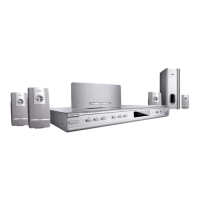
• Thesuppliedmainsplugisanon-rewireabletype.Ifyouneedtoreplacethefuse,youmustusean
ASTA-orBSI-approvedBS1362fuse,ratedat3Aandmarkedasshownbelow.
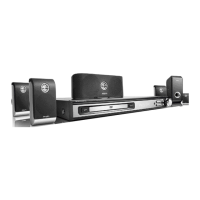
Theplughasitsfusebeneathafusecoveronitsface.Useascrewdrivertoleveroffthefuse
cover,replacethefusewithanewoneandretitscover.Never use a plug if its fuse cover is
missing.
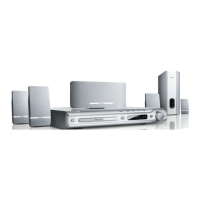
Thefuseisinsidetherewireableplug.Useascrewdrivertoremovetheplug’sbackcover.Never
put the plug into the mains socket when its cover is removed. Leveroutthefuseandreplaceitwitha
newone.Replacetheplug’sbackcover.
If the supplied mains plug is not suitable for your mains socket-outlet, DO NOT plug
it in. Remove its fuse and then cut the plug off the lead. Destroy the severed plug
immediately to avoid the shock hazard which would exist if this were to be plugged
into a mains socket. Fit an appropriate mains plug on the lead. If this plug contains
a fuse, it should be as described above. If you are using a non-fused plug, an external
fuse must not exceed 5 A.
or
AM
3 AMP
L
N
E
FUSE of correct value





 To Next Page