EasyManua.ls Logo

Philips MCW770 - Page 18

Philips MCW770
64 pages
Print Icon
To Next Page IconTo Next Page

To Previous Page IconTo Previous Page
Loading...
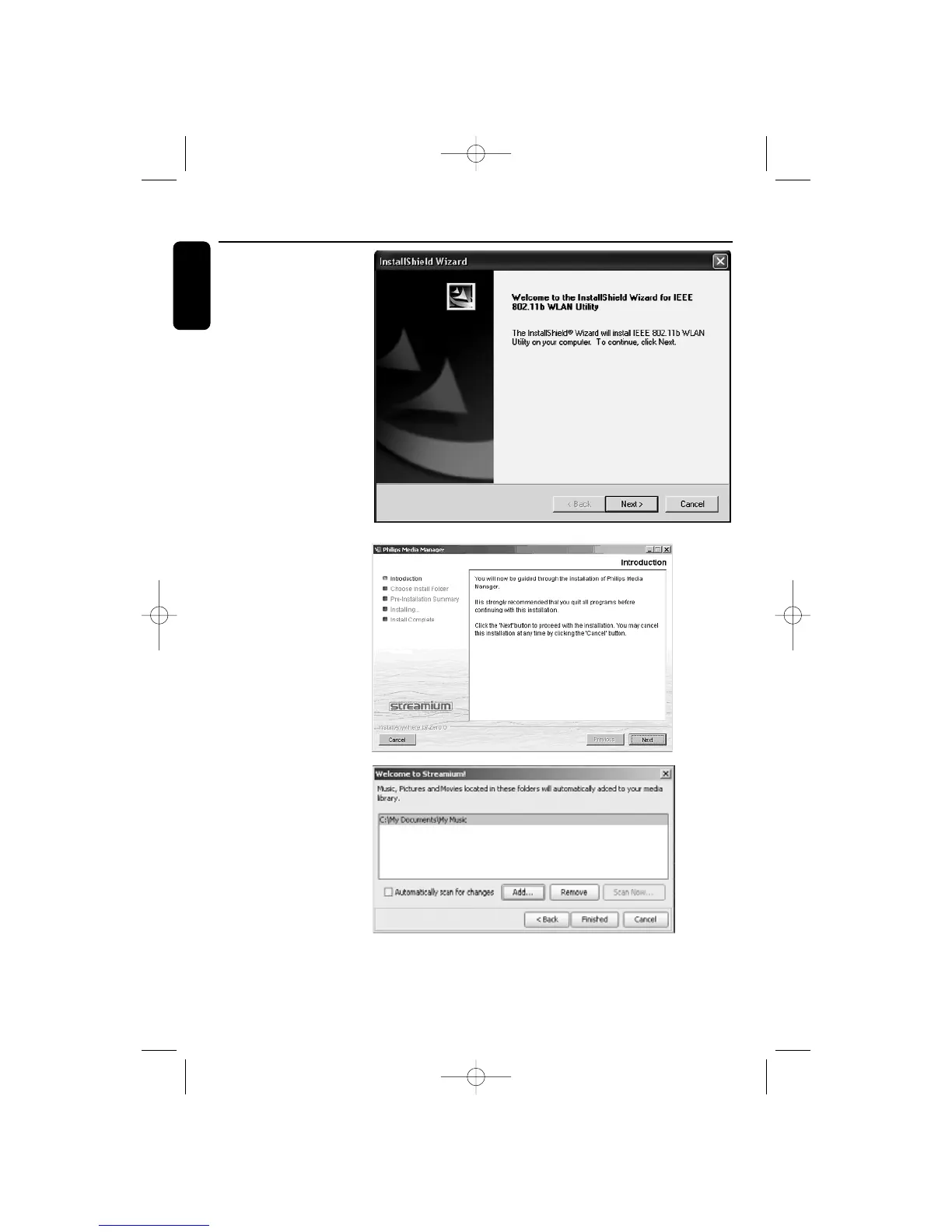
6 The following window
appears:
The driver and utility
software of the wireless
USB adapter will be
installed first. Click on
Next to start the
installation and follow
the installation steps.
Windows may display a
warning that the driver
is not approved by
Microsoft (message
differs with Windows
version). Ignore the
message and continue
with the installation.
7 The Philips Media
Manager software will
be installed next. Click
on Next and follow the
installation steps.
After installation the
Philips Media Manager
will automatically start
up.When opening the
Philips Media Manager
for the first time, you
will be asked if you
want to add a folder
and scan for media
(music) files. Open a
drive or a folder with
music in it.This folder is
now added to the
Philips Media Manager
and you can have access
to the music files in it
from the MC W770.You
can always add more
files and folders at a later time (refer to the chapter ‘Preparation for wireless PC link playback
function’)
Wireless PC link Quick Installation
18
English
MC W770/22.1 eng 7/23/04 16:07 Page 18

Table of Contents

Other manuals for Philips MCW770

Related product manuals