EasyManua.ls Logo

Philips MCW770 - Page 19

Philips MCW770
64 pages
Print Icon
To Next Page IconTo Next Page

To Previous Page IconTo Previous Page
Loading...
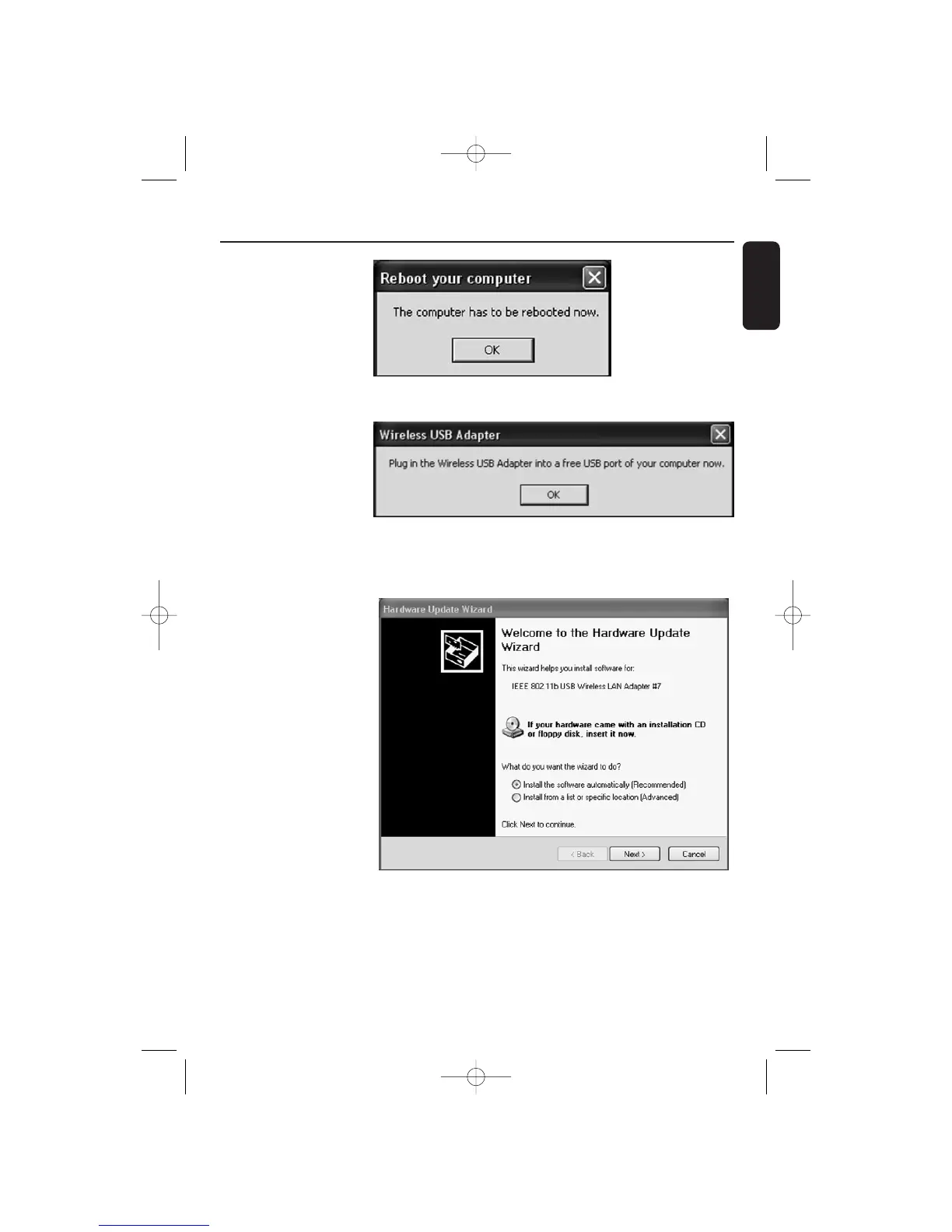
8
When the message asking
for rebooting appears, click
on OK to confirm. (Keep
the installation disc
inserted.)
9 The necessary software
components are
installed.The PC is ready
for setup. Plug the
wireless USB adapter
into a free USB port of
your computer. Click on
OK.
10Windows will find the
wireless USB adapter
and the Windows New
Hardware wizard pops
up:
Select the
recommended option.
Windows will find the
correct driver which
was just installed before.
Click on Next to
continue and start the
driver
installation.Windows
may display a warning
that the driver is not
approved by Microsoft
(message differs with Windows version). Ignore the message and continue with the installation.
Quick Installation Wireless PC link
19
English
MC W770/22.1 eng 7/23/04 16:07 Page 19

Table of Contents

Other manuals for Philips MCW770

Related product manuals