MICRO SDAV HDMI 1 HDMI 2 USB DC
MICRO SDAV HDMI 1 HDMI 2 USB DC
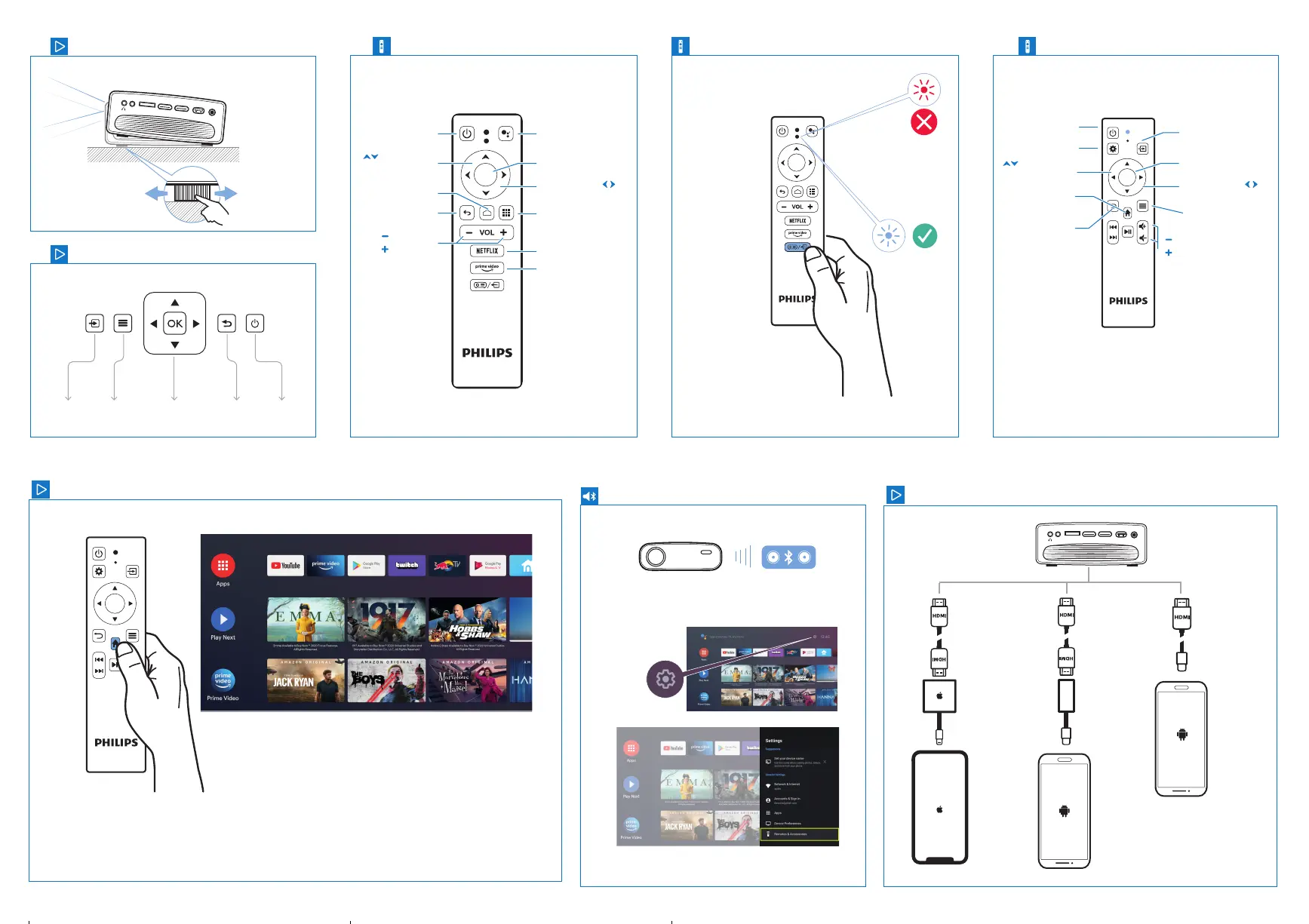
PowerSource NavigatorMenu Return
OK
Bluetooth speaker
Adjustment knob
Keys
7
8
Android TV Dongle remote control
9
OK
Android TV Navigation
Standby
On/O
Google
Assistant
Enter/
Conrm
Left /Right
direction key
Apps
Open Netix
Open
Prime Video
Up/down
direction key
Home page
Back/Exit
Volume
Volume
Projector remote control
10
Standby
On/O
Settings
Enter/
Conrm
Select
Input source
Left /Right
direction key
Options
Up/down
direction key
Android
Home Menu
Back/Exit
Volume
Volume
OK
Connecting phones/tablets to HDMI
Access to Android TV
MICRO SDAV HDMI 1 HDMI 2 USB DC
1
Google, Google Play, YouTube, Android TV and other marks are trademarks of
Google LLC. Google Assistant is not available in certain languages and countries.
> Add Accessory
2. USB-C to HDMI adapter +
HDMI cable
1. Apple Lightning to Digital
AV Adapter
©
+ HDMI
3. USB-C to HDMI cable
2 3
OK


 To Previous Page