22 EN
• Check messages by account;
• Check starred messages;
• Check unread messages.
To check one combined mailbox,
1 On the screen of mail list, tap the account
name.
» A drop-down list of account names is
displayed.
• If necessary, tap repeatedly to
return to the screen of mail list.
2 Tap Combined view.
» Different colors are used to mark the
messages from different accounts.
To check messages from a single account,
1 Repeat Step 1 in "To check one combined
mailbox".
2 Tap the selected account.
» Messages from the account are
displayed.
To check starred messages,
• Tap the star next to the message.
» The message is added to the Starred
folder.
To check unread messages,
• On the screen of mail list, the unread
messages are in white.
Compose email messages
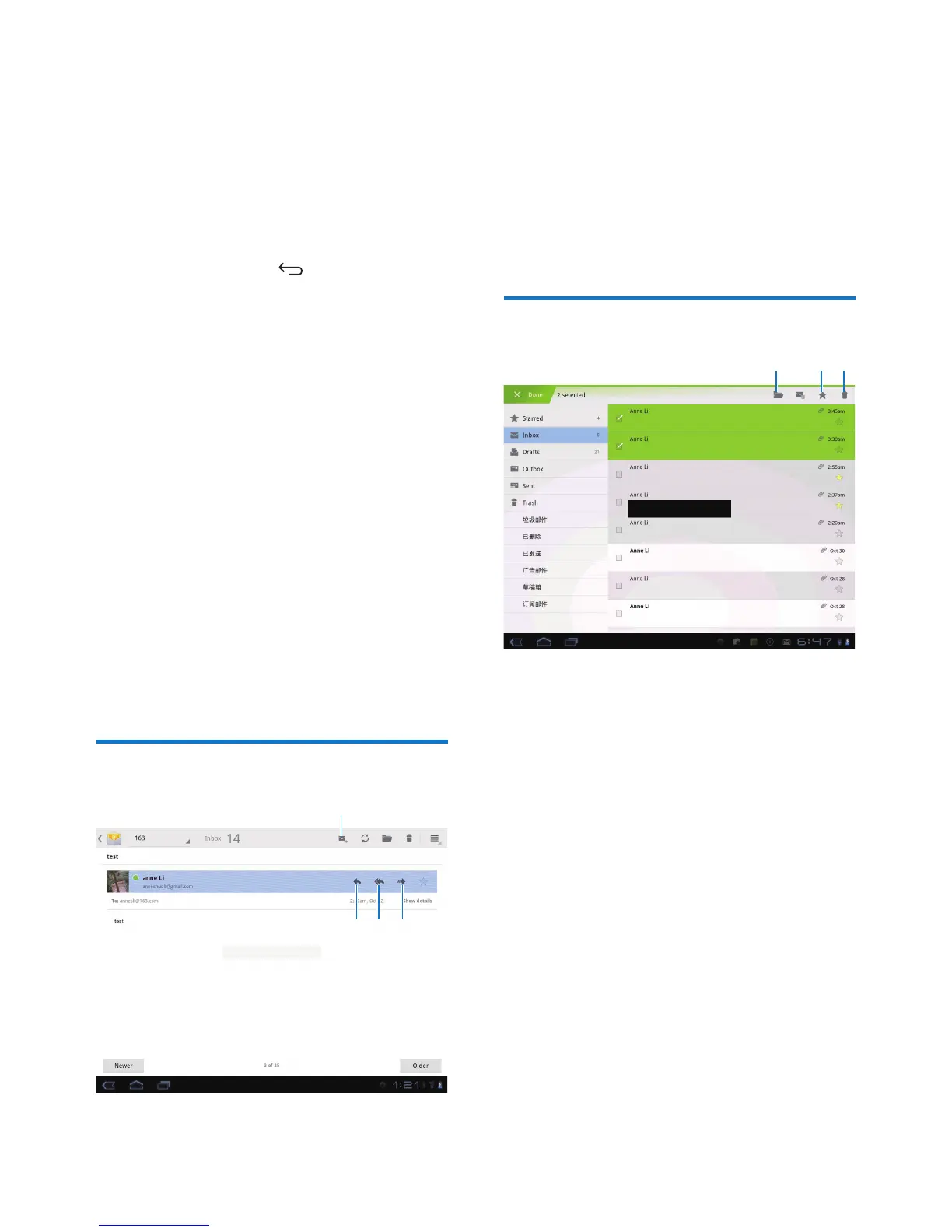
a
b c d
When you read a message, tap the icons to do
the following:
a Compose a new message
b Reply
c Reply all
d Forward
Organize email messages
1 On the screen of mail list, select messages
you want to manage:
• Tap the check boxes next to the
messages.
» Selected messages are highlighted.
2 Tap the icons to do the following:
a Move the messages to the selected
folder.
b Add the messages to the Starred
folder.
c Delete the messages.
a
b
c



 To Next Page