6 EN
2 Your new tablet
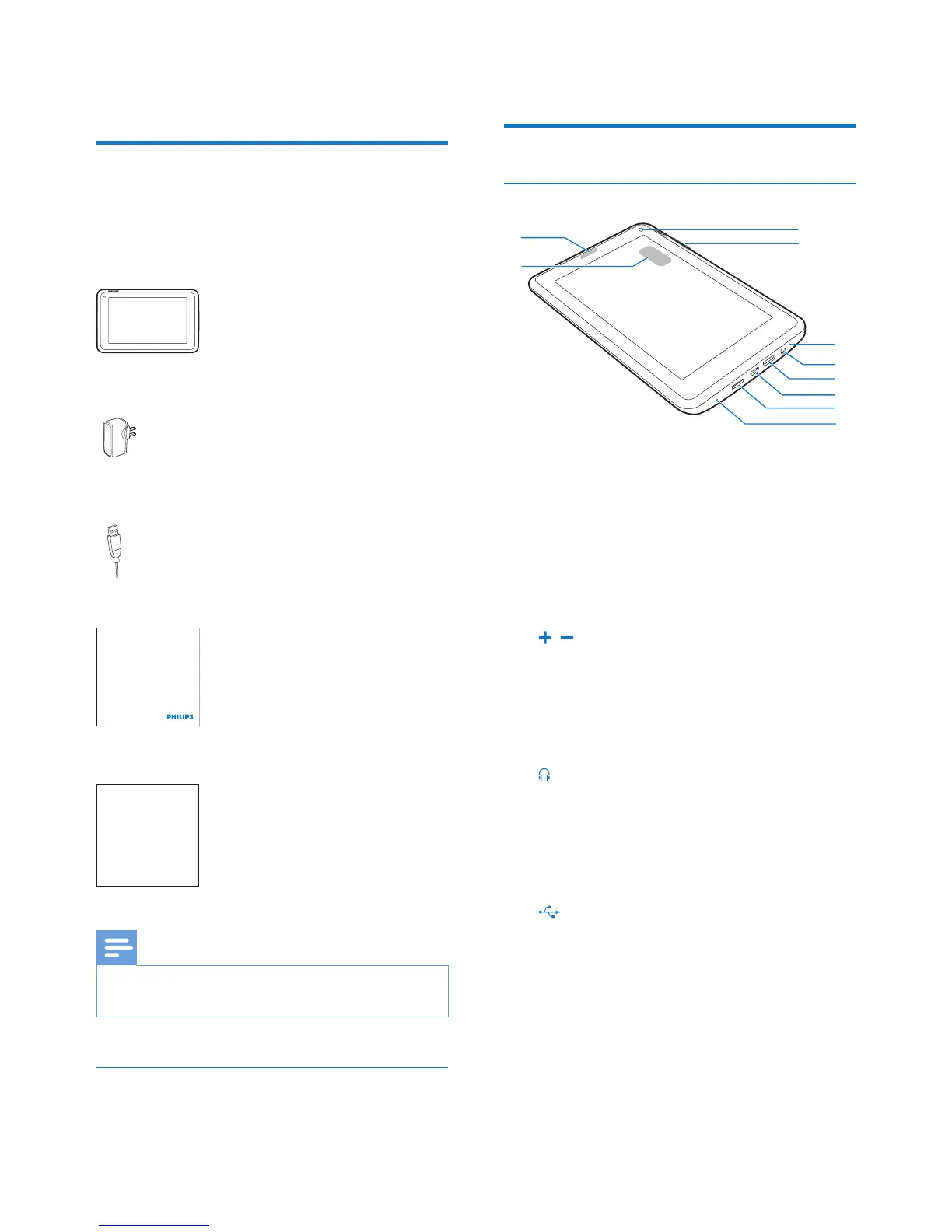
What's in the box
Make sure that you have received the following
items:
Pi3100
USB power adapter
USB cable
Quick start guide
Safety and Warranty sheet
Note
• The images serve as reference only. Philips reserves the
right to change color/design without notice.
Files loaded on the device
The following les are loaded on Pi3100:
Philips GoGear audio player
Quick start guide
Safety and Warranty
Before using your set:
Check out details inside this booklet
• User manual
Overview
Controls
a Power/ lock button
• Press and hold: switch on or off the
device.
• Press: lock/unlock the screen; To unlock
the screen, drag the lock to an icon.
b Front camera lens
c ,
• Press: increase/decrease the volume.
• Press and hold: increase/decrease fast.
d MIC
• Microphone
e
• 3.5-mm headphone connector
f MINI HDMI
• connector for the audio/ video output
to a high-denition TV (HDTV)
g
• USB connector for data transfer and
power charging
h MICRO SD
• Slot for Micro SD card
i RESET
• Press the hole by using the tip of a
ball pen when the screen does not
respond to the pressing of keys.
d
e
j
i
g
f
a
c
b
h



 To Next Page