EasyManua.ls Logo

Philips PM 6303 - 3.4.1. Controls and Sockets (Fig. 31)

Philips PM 6303
20 pages
Print Icon
To Next Page IconTo Next Page
To Previous Page IconTo Previous Page
Loading...
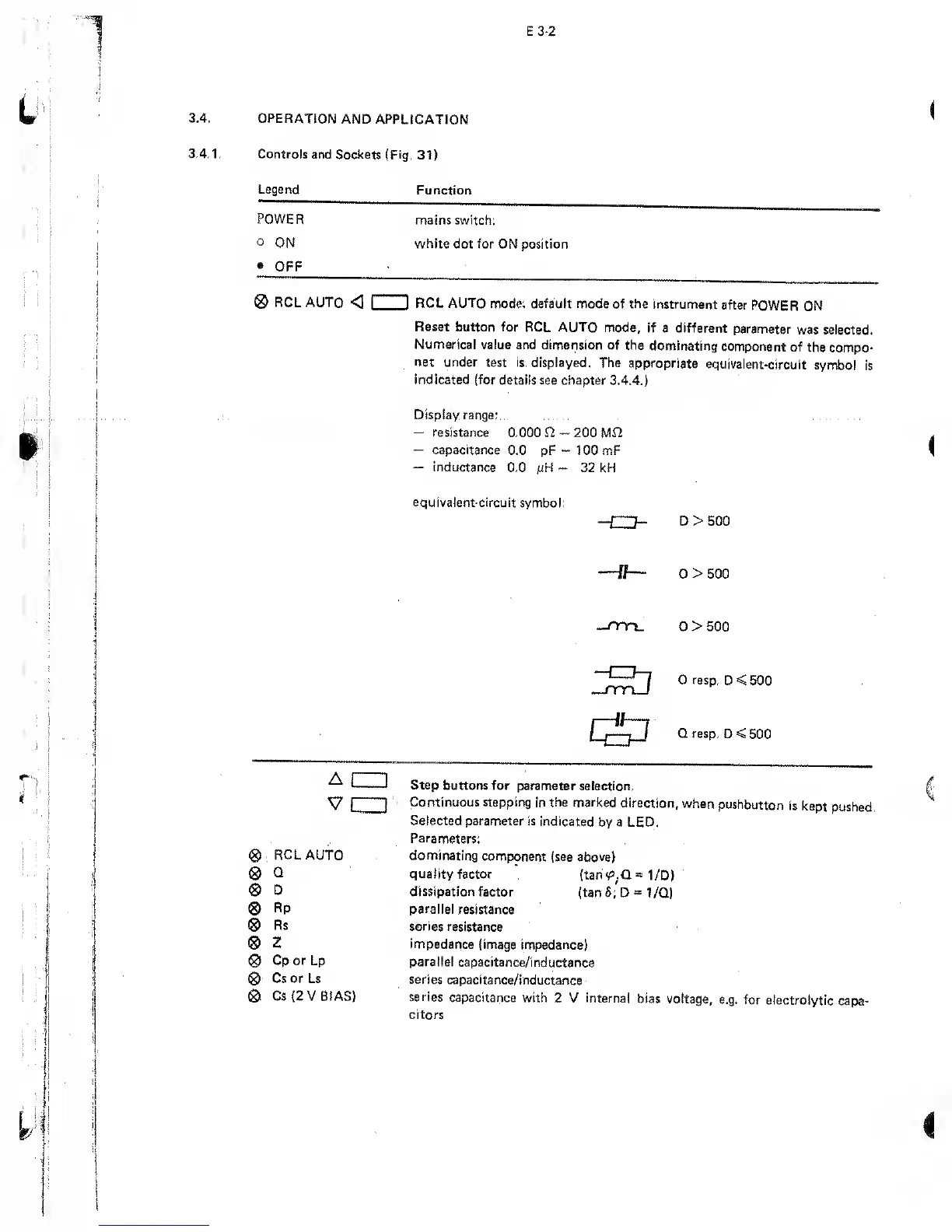
OPERATION
AND APPLICATION
Controls
and Sockets (Fig.
31)
Legend
Function
POWER
mains switch:
o
ON white
dot for
ON position
OFF
0
RCL AUTO
<
ID
RCL AUTO
mode:
default
mode of the
instrument
after
POWER
ON
Reset button for
RCL AUTO mode,
if a different
parameter
was selected.
Numerical
value and dimension
of the
dominating
component
of
the compo-
net
under
test
is
displayed. The
appropriate
equivalent-circuit
symbol
is
indicated (for
details see chapter
3.4.4.)
Display range:
resistance
0.000 H
capacitance
0.0
pF
inductance
0.0
juH
200 Mfl
100 mF
32
kH
equivalent-circuit
symbol:
—i "T-
D> 500
,1
1
«Wh|
'Jj
Q > 500
__rm_
Q
>
500
Lj-j
rmJ
Q
resp.
D < 500
&
Q resp.
D < 500
a
czd
v
cm
0
RCLAUTO
0
Q
0
D
0
Rp
0
Rs
0
2
0
Cp or Lp
0
Cs or Ls
0
Cs
(2
V BIAS)
Step
buttons for
parameter selection.
Continuous
stepping
in the marked
direction,
when
pushbutton
is
kept
pushed.
Selected
parameter
is indicated
by a LED.
Parameters:
dominating
component
(see above)
quality
factor
(tan
<p.CL
~
1/D)
dissipation factor
(tan
5;
D
*
1/Q)
parallel
resistance
series resistance
impedance
(image
impedance)
parallel
capacitance/inductance
series
capacitance/inductance
series
capacitance with
2 V internal
bias voltage,
e.g. for
electrolytic
capa-
citors

Other manuals for Philips PM 6303

Related product manuals