13
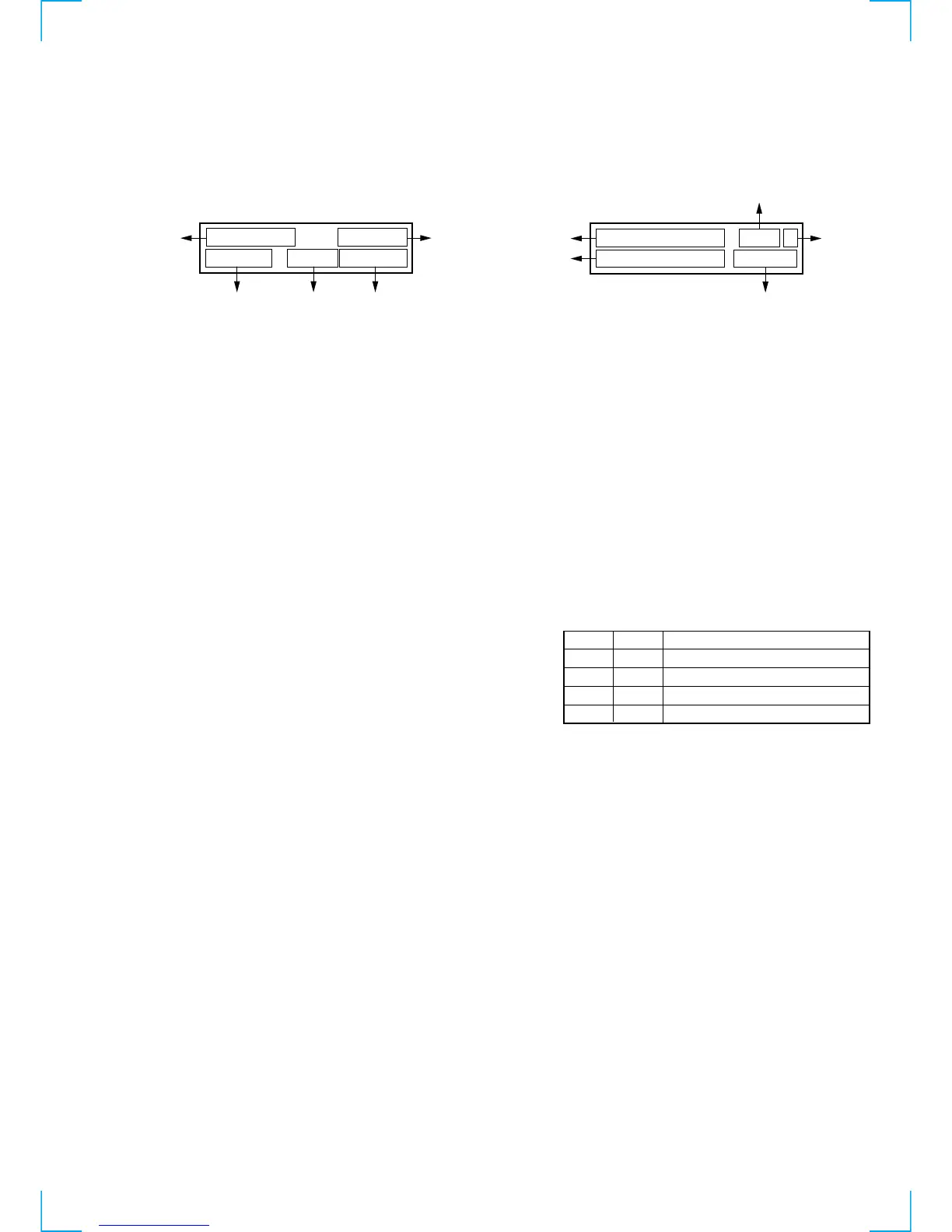
• DAB error rate display
Press [DAB] and [CHARACTER] at the same time under the DAB
tuned condition. (When the software version is 1.04, press [DAB]
ten times while [CHARACTER] is kept pressed.)
The bit error rate is displayed.
1: PIC error rate
2: MSC error rate
3: Bit rate
4: In case of audio service
F : 48 kHz sampling
H : 24 kHz sampling
In case of data service
S : stream data
F : FIDC
P : pocket data
5: DAB decoder status information
Check the contents in binary notation.
Bit 7 : not used
Bit 6 : 1 when AFC is converged.
Bits 5 to 3 : The number of CRC errors during MPEG
decode
Bit 2 : 1 when initial pulling-in is complete.
Bits 1, 0 : Contents of DAB frame length judgment
• Audio information display (DAB only)
Press [DISPLAY] and [ENTER] at the same time under the DAB tuned
condition.
Audio information for service that is selected at present is displayed.
1: Bit rate
2: Audio contents
stereo = stereo broadcast
joint = joint stereo broadcast
dual = dual channel broadcast
single = single channel broadcast
stream = stream data broadcast
FIDC = FIDC data broadcast
Packet = packet data broadcast
3: Sampling frequency
4: Protection level
5: Transmission mode
2 5 6 k b p s
4 8 k H z
s t e r e o
P L v 2 m o d e 1
1
34
5
2
F : 0 . 0 0 E + 0 0
M : 0 . 0 0 E + 0 0
2 5 6 F
S T : C 5
1
5
4
2
3
Bit 1
0
0
1
1
Frame length
96 ms
48 ms
24 ms
Judgment impossible
Bit 0
1
0
0
1



 To Next Page