24 Software update
In the VES1.1E LA there is only one software package. From following steps software update
procedure can be seen:
1. MB62_en.bin, mboot.bin and usb_auto_update_T4.txt documents should copy
directly i
nside of a
flash memory(not in a
folder).
2. Put flash memory to the tv when tv is powered
off.
3. Power on the and wait when the tv is
opened.
4. If first time installation screen is displayed, it means the software update procedure
is successful.
25 Troubleshooting
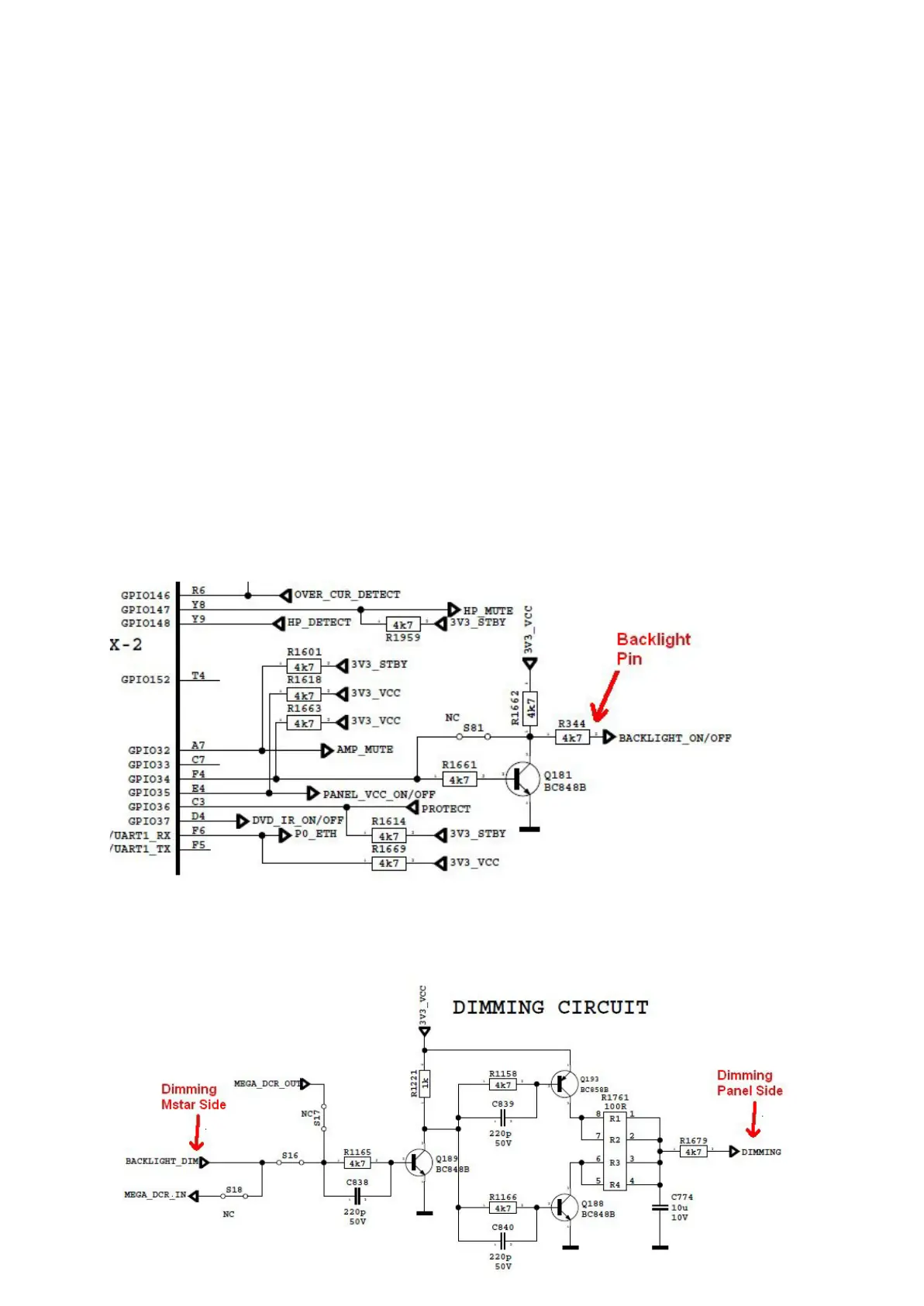
25.1 No backlight problem
Problem: If TV is working, led is normal and there is no picture and backlight on the panel.
Possible couses: Backlight pin, dimming pin, backlight supply, stby on/off pin
Backlight pin should be high in open position. If it is low, please check Q181 and panel
cables.
Dimming pin should be high or square wave in open position. If it is low, please check
S16 for Mstar side and panel or power cables, connectors.



 To Next Page