32 33
14. Flight mode
Your CROS system operates in the 2.4 GHz - 2.48 GHz
frequency range. When ying some operators require all
devices to be switched into ight mode. Entering ight
mode will not disable normal hearing aid functionality,
and will only disable the Bluetooth connectivity functions,
including the wireless transmission of sound from the
CROS device to the hearing aid on the other ear.
14.1 Enter ight mode
To disable the wireless function and enter ight mode in
CROS device:
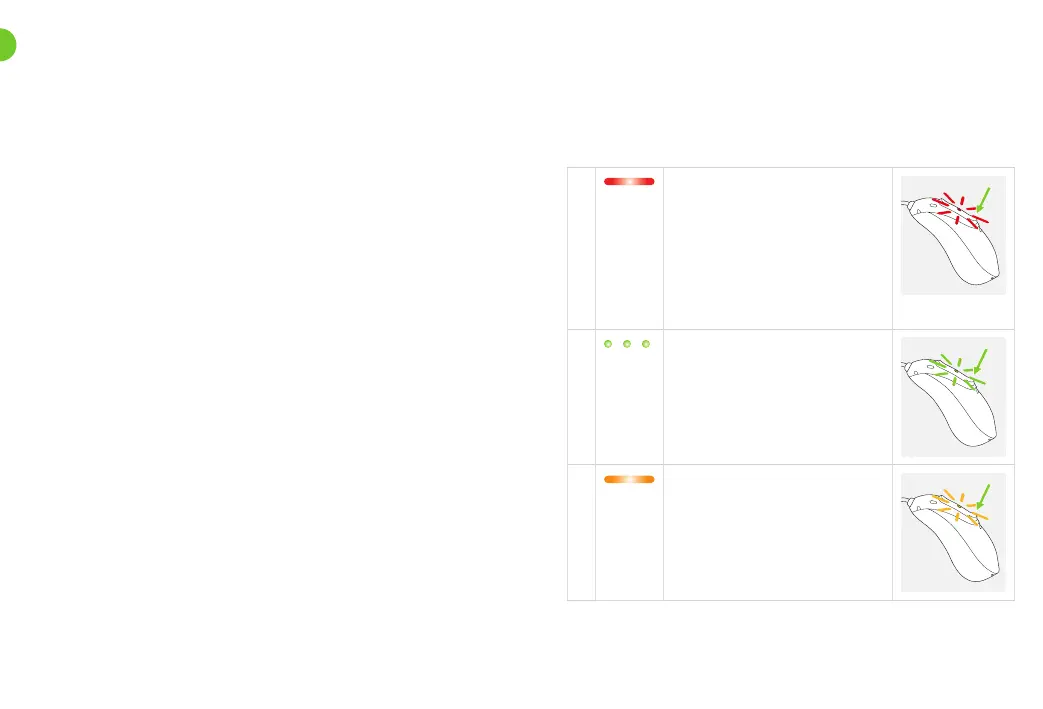
1. If the CROS device is turned o,
proceed to step 2.
If the CROS device is on, turn it o
by pressing and holding the lower
part of the button for 3 seconds,
until the indicator light turns solid
red for 3 seconds, signifying that
the CROS device is switching o.
2. Press and hold the lower part of
the button. The green indicator
light blinks when the CROS device
starts up.
3.
Keep pressing the button for
7 seconds, until the indicator light
is solid orange, then release the
button.
The solid orange light indicates the
CROS device is in ight mode.
In ight mode, your CROS system cannot connect directly
to your phone.



 To Next Page