16 17
2.
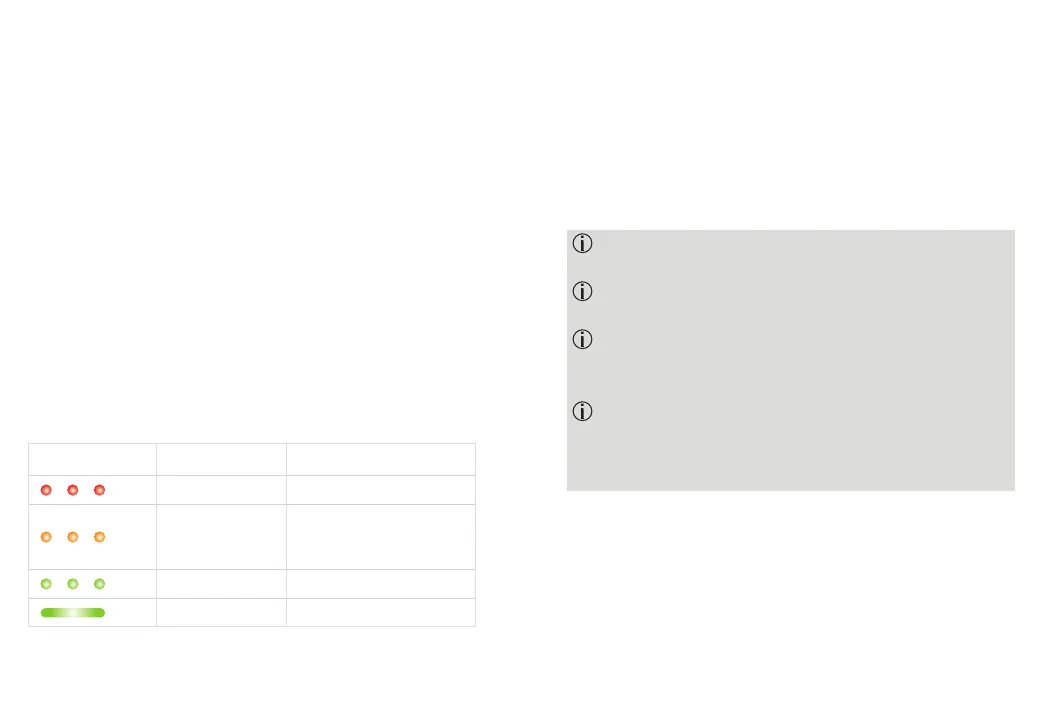
The indicator light on the CROS device will show the
charging state of the battery until it is fully charged.
When fully charged the indicator light will remain on, i.e.
solid green light.
The charging process will automatically stop when the
battery is fully charged, so the CROS device can be safely
left in the charger. It can take up to 3 hours to charge the
CROS device. The charger case lid can be closed while
charging.
Charging times
Indicator light Charging state Approx. charging times
0 – 10%
11 – 80%
30 min (30%)
60 min (50%)
90 min (80%)
81 – 99%
100% 3 h
Do not hold the tube to remove the CROS device from
the charger as this can damage the tube.
To prevent discharge, turn o your CROS device
before storing it in the disconnected charger.
To prevent discharge, turn o your CROS device after
unplugging the charger with the CROS device
charging inside.
Always close the lid when charging your CROS device
in a humid environment.
3.
Remove the CROS device from the charging slot by
simply lifting it out of the charger.
The CROS device can be set to switch on automatically
when removed from the charger. In this case the indicator
light starts blinking. The solid green light indicates the
CROS device is ready for use.



 To Next Page