24 25
11. Connectivity overview
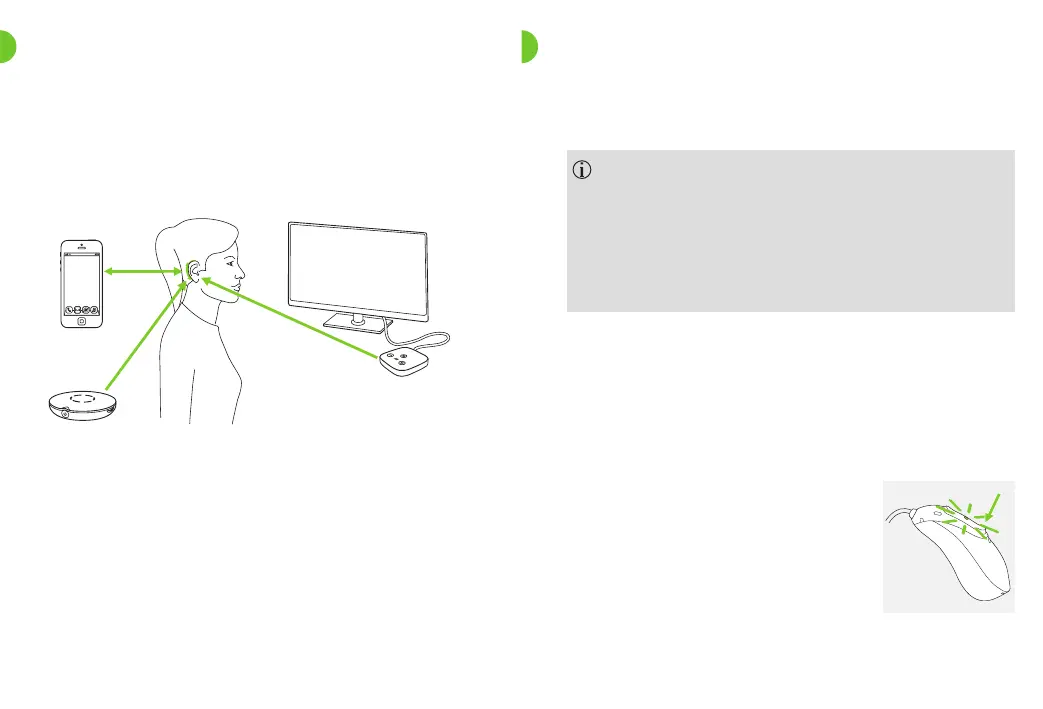
The illustration below shows the connectivity options
available for your CROS system.
* The TV Connector can be connected to any audio source such as a TV, PC or hi- system.
** Roger wireless microphones can be connected to your CROS system as well.
Bluetooth enabled
device, e.g. cell
phone
TV Connector connected to TV*
Roger**
Please note that in a CROS system the connectivity to
external devices is routed through the hearing aid only.
12.1 Initial pairing to a Bluetooth® enabled device
It is only necessary to perform the pairing procedure
once with each device featuring Bluetooth wireless
technology. After the initial pairing, your CROS system
will connect automatically to the device. The initial
pairing process can take up to 2 minutes.
1.
On your device (e.g. a phone), ensure that Bluetooth
wireless technology is enabled and search for Bluetooth
enabled devices in the connectivity setting menu.
12. Initial pairing
2.
Switch on both hearing aid
and CROSdevice.
You now have 3 minutes
to pair your CROS system
with your device.



 To Next Page