12 13
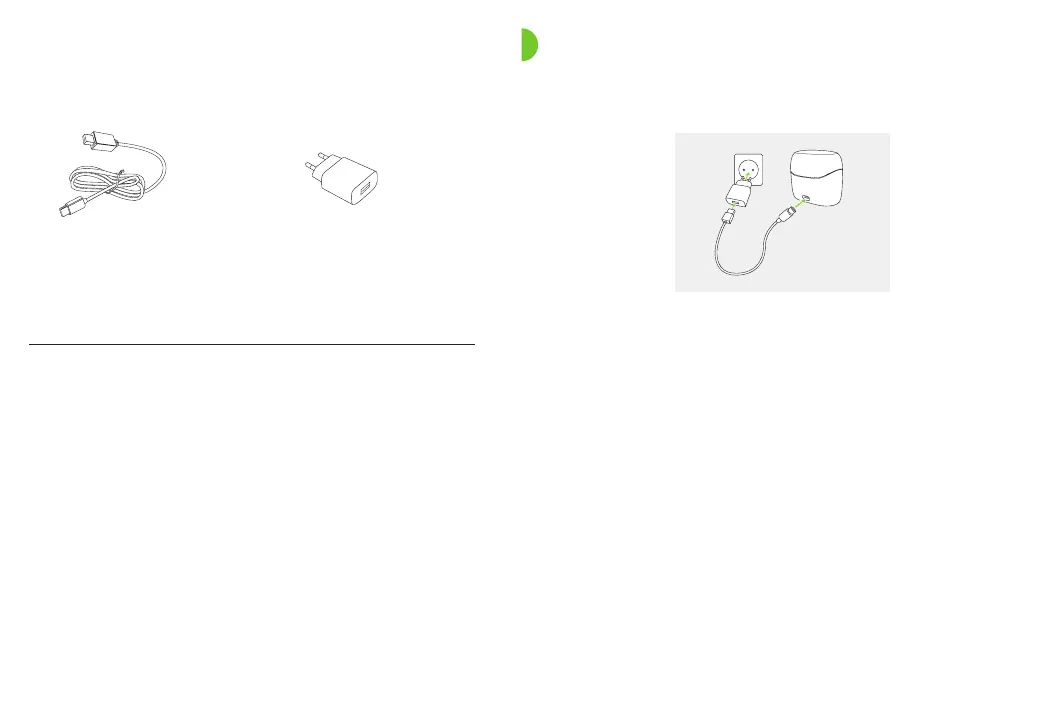
Power adapter*
External power supply
USB cable (< 3 m)
* The power adapter is not provided with this product.
3. Preparing the charger
a) Plug the larger end of the USB cable into the
poweradapter.
b) Plug the smaller end into the USB port on the charger.
c) Insert the power adapter into a power outlet.
d) The indicator light around the USB port will light up
green when the charger is connected to the power
outlet.
Connecting to the power supply
a
b
d
c
Power adapter and Charger Ease specications
Power adapter input voltage 100-240 VAC, 50/60 Hz,
current 0.25 A
Power adapter output voltage 5 VDC +/-5%, current 1 A
Charger input voltage 5 VDC +/-5%, current 250 mA
USB cable specications 5 V min. 1 A, USB-A to USB-C,
maximum length 3 m



 To Next Page