33
Solid green Battery fully charged
Green blinking
Battery charging
Red blinking
Battery <20% charging required
No light
Batteries depleted, charging required
Blue blinking
Manual pairing in progress
Orange blinking
Firmware update in progress
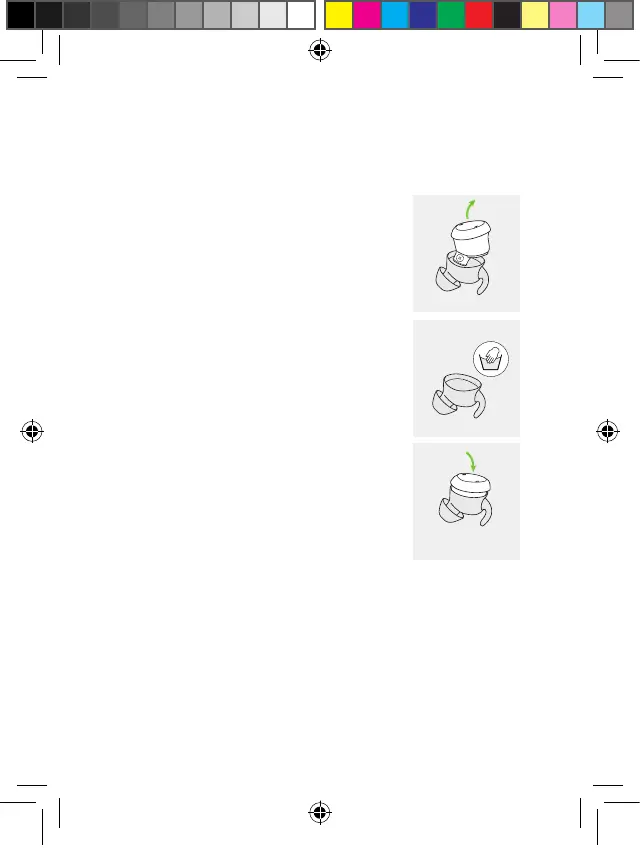
4.9 Cleaning the sleeves
Over time, earwax can accumulate in
the earbud sleeve. Follow these steps
to clean:
1. Gently remove earbud from sleeve.
2. Hand wash the sleeve in warm water
with a little soap. Never put water on
the earbud itself!
3. Make sure sleeve is completely dry!
Then gently insert earbud again.
PH_User_Guide_Earbuds_TWE21_92x125_GB_V1.00_029-3338-02.indd 33PH_User_Guide_Earbuds_TWE21_92x125_GB_V1.00_029-3338-02.indd 33 2021-05-11 8:49:16 AM2021-05-11 8:49:16 AM



 To Next Page