21SUMMIT
3.3 Main Tab
3.3.1 Main Fader
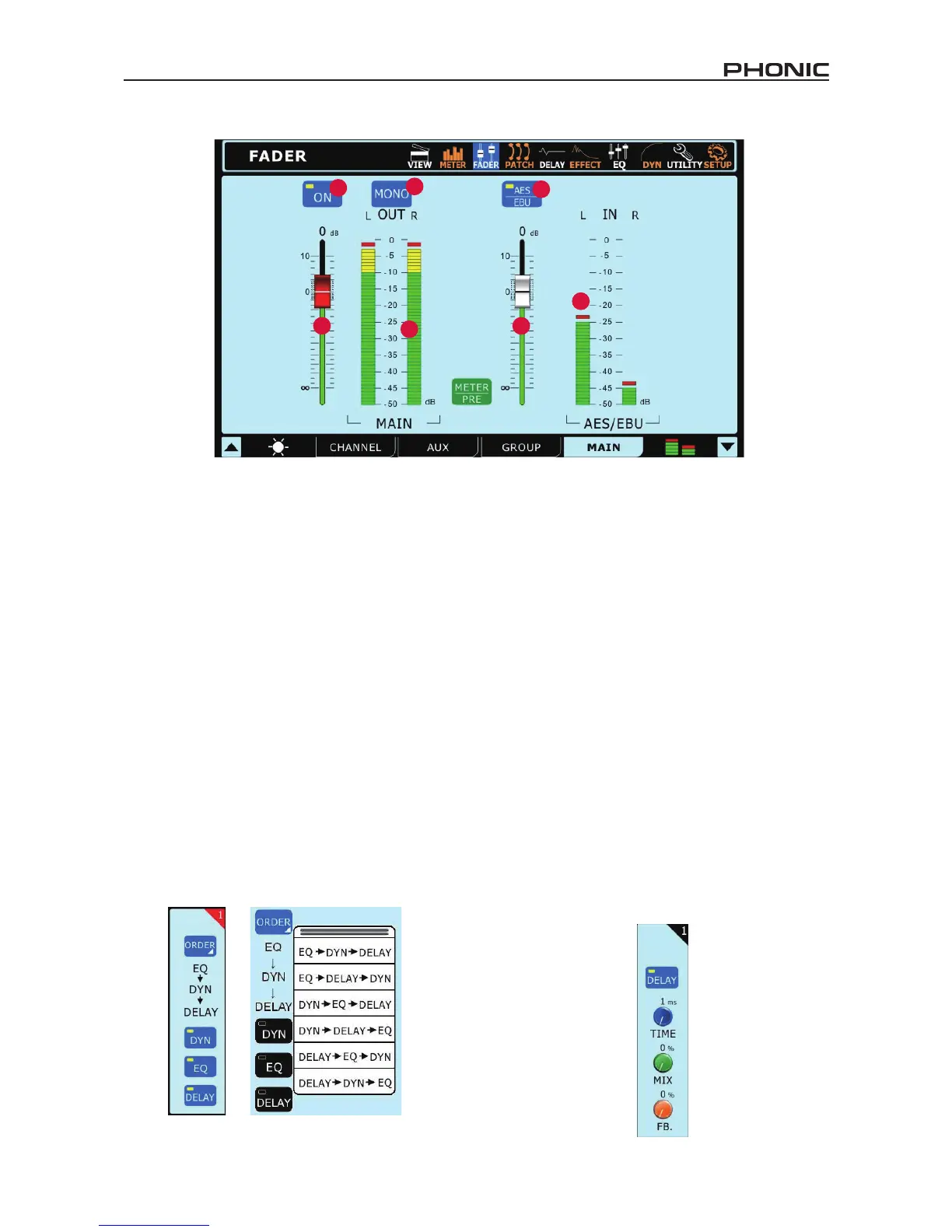
This fader will adjust the nal output level of the Main mix and input trim level of the AES/EBU In.
3.3.2 Level Meter
This stereo level meter shows the nal output level of the Main mix and the input level of the AES/EBU In.
3.3.3 On/Off Button
This button will activate and deactivate the Main mix.
3.3.4 Stereo / Mono Button
Pushing this button will adjust the main output signal between a stereo signal and a mono signal. This effectively bypasses the pan controls
on all channels and combines stereo signals.
3.3.5 AES/EBU Level Fader
This fader will adjust the incoming signal level from any external AES/EBU-enabled device currently connected to the appropriate XLR
AES/EBU inputs on the rear of the SUMMIT.
3.3.6 AES/EBU Meter
The incoming signal levels from the AES/EBU input can be viewed through this meter.
3.3.7 AES/EBU In Button
When the Main mix is selected, the AES/EBU button will allow the Digital input signal (received through the AES/EBU input) to be sent to
the main mix. The Digital output signal, taken from the main stereo mix, will always be activated.
4. Patch
Each of tabs in the Patch function provides the same options,
allowing for users to set the processing order of the equalizer,
dynamic processor and delay functions for each individual signal.
Users can also activate and deactivate any of these individual
processes using the accompanying buttons. The tabs allow users
to view channels 1 through 8, 9 through 16, all multi outputs, or
the main output.
5. Delay
In the Delay function, users can adjust the delay time, mix
(saturation) and feedback gain of the delay that is applied to the
individual input channels. A delay can be applied to any of the 16
input signals. Use the tab buttons on the bottom of the screen to
select which signals you'd like to view/adjust the delay properties
of. The maximum delay time that can be applied is 1 second. The
mix can be adjusted between 0% (no effect) to 100% (completely
saturated). Feedback gain can be adjusted between 0 and 99%.
Multi and Main outputs can only have their delay time adjusted.


 To Next Page