4 XP 600/1000/2000/2100/3000/3100/5000/5100
English
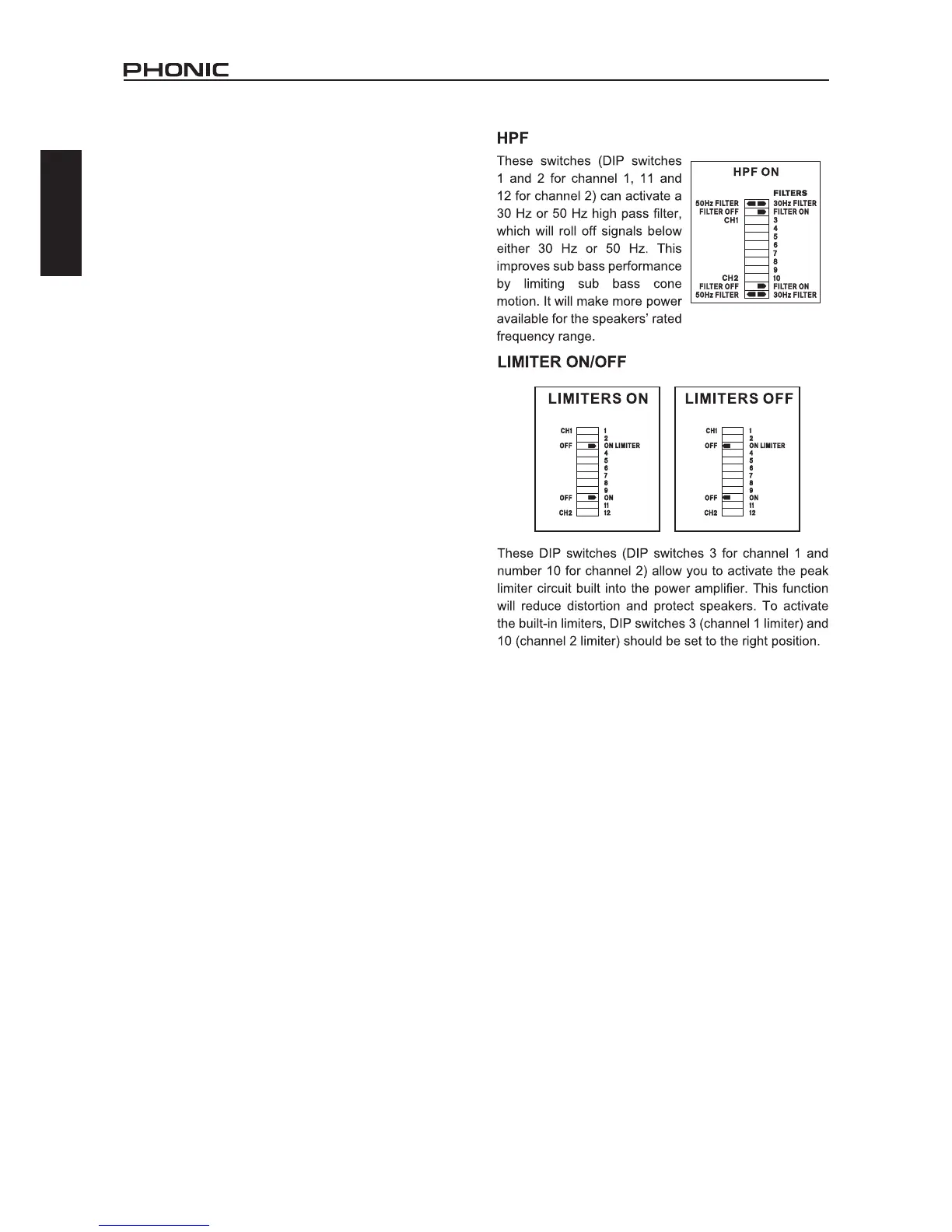
15. LIMITER ON/OFF
This switch allows you to route the peak limiter circuit to the input
signal. This function will reduce distortion and protect speakers.
This switch is not included on the XP5000 or XP5100.
16. HPF
This switch can activate a 30Hz or 50Hz high pass lter, which
will roll off signals below either 30 Hz or 50 Hz. This improves sub
bass performance by limiting sub bass cone motion. It will make
more power available for the speakers’ rated frequency range. This
switch is not included on the XP5000 or XP5100.
17. PARALLEL / STEREO / BRIDGE MONO SWITCH
Turn off the power before changing the operation mode. In ste-
reo operation, each channel of the amplier runs independently
with its own signal and speakers. When the switch is set to the
parallel mode, the input of CH2 is paralleled with that of CH1.
Then, CH1 and CH2 can drive their own speakers independently,
but they will have the same source, that of CH1. In bridge mono
operation, both channels can be congured to drive a single
load with a single signal at twice the power. Use the following
procedure to ensure the systems safety when switching from
one mode to another:
1.Turn off the power of the amplier
2.Put one speaker, of not less than 4 ohms impedance, across
the red (+) output terminals of the amplier.
3.Ensure that there is only one input signal connected to CH1.
4.Switch the amplier to bridge mono.
5.Turn the gain controls of CH1 and CH2 to the extreme left and
then turn on the amplier.
6.Verify operation at low gain, and then turn up the CH1 gain to
increase power to a desired level.
This switch is not included on the XP5000 or XP5100.
18. MODE SWITCHES (XP50 0 0 / XP510 0 only)



 To Next Page