5
Controls, connectors and display
Main controls
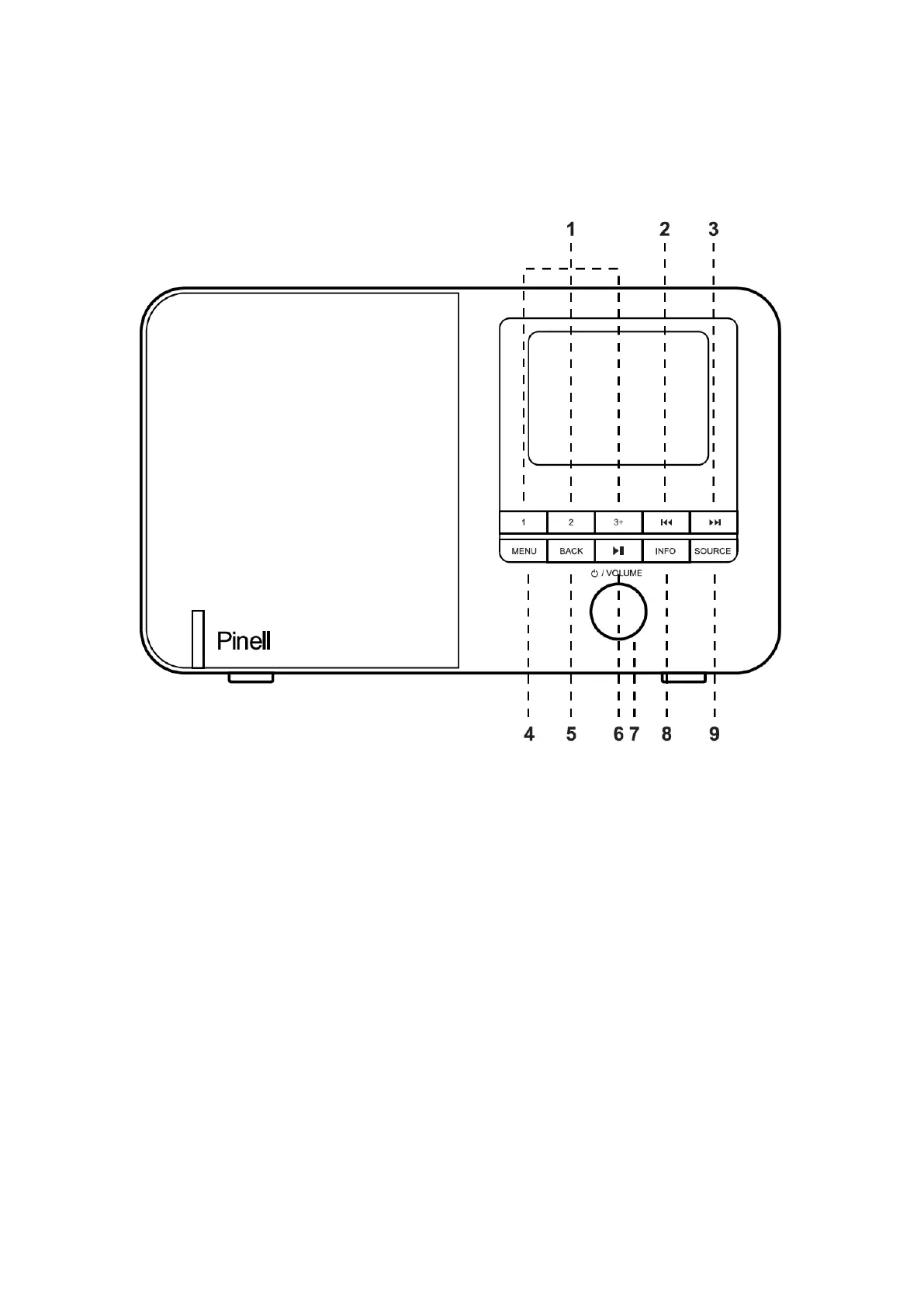
1 PRESET - Long press button 1, 2, 3+ to preset and save your favorite
stations. You can save up to 20 stations by long press 3+ and rotate
SELECT to choose the position. The short press to store.
Short press 1, 2, 3+ to select the favorite station to play or Preset recall.
2
9
- Previous: Press to select the previous track in Bluetooth and Internet
radio mode.
3
:
- Next: Press to select the next track in Bluetooth and internet radio mode.
4 MENU: press MENU to show the menu for the current mode. Press again to
show now playing screen.
5 BACK - Press to return to the previous screen.
6 u;- Press to select Play/Pause under BT mode.
7 SELECT/ SNOOZE/POWER/VOLUME:
a. Power - Turn on or back to standby mode (showing clock and date),
cancel sleep, or cancel alarm function.
b. VOLUME - Rotate to adjust the volume up or down during playback.
c. MUTE - Press to mute the music when playing.



 To Next Page