EasyManua.ls Logo

Pioneer XR-P310 - AUTOMATIC EDITING SYSTEMS; A.S.E.S. for CD to Tape Recording; A.S.E.S. Link Mode Operation

Pioneer XR-P310
36 pages
Print Icon
To Next Page IconTo Next Page
To Previous Page IconTo Previous Page
Loading...
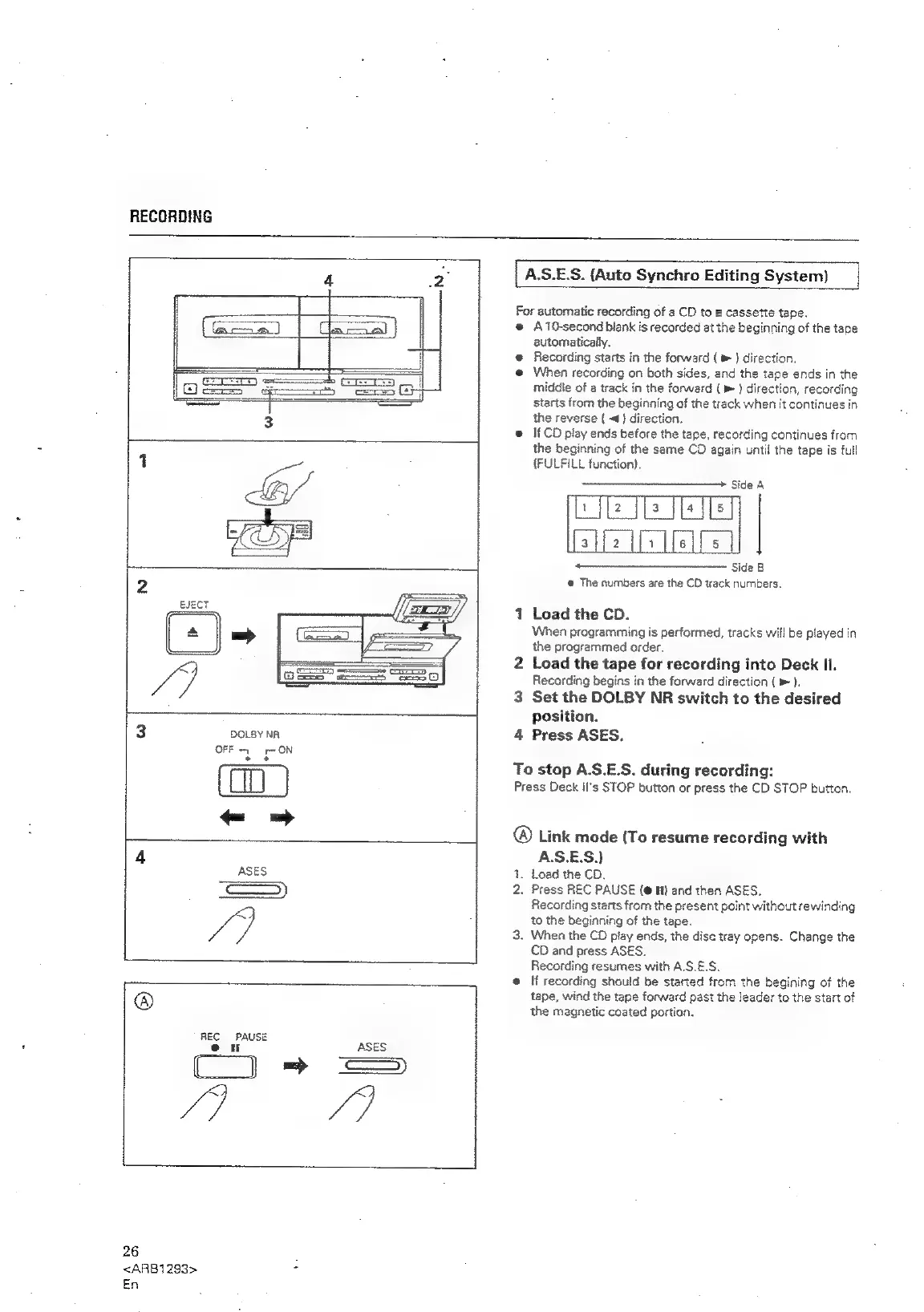
RECORDING
3
DOLBY
NR
OFF
ON
Ban!
REC
PAUSE
26
<ARB1293>
is
En
A.S.E.S.
(Auto
Synchro
Editing
System)
For
automatic
recording
of
a
CD
to
a
cassette
tape.
@
A10-second
blank
is
recorded
at
the
beginning
of
the
tape
automatically.
@
Recording
starts
in
the
forward
{
)
direction.
e@
When
recording
on
both
sides,
and
the
tape
ends
in
the
middie
of
a
track
in
the
forward
(
»
}
direction,
recording
starts
from
the
beginning
of
the
track
when
it
continues
in
the
reverse
{
<4)
direction.
@
If
CO
play
ends
before
the
tape,
recording
continues
from
the
beginning
of
the
seme
CD
again
until
the
tape
is
full
(FULFILL
function).
—————
nh
Side
A
ls
[2
a
{fa
l[s
[slf2
[y
Hell's
UJ
®
The
numbers
are
the
CD
wack
numbers.
1
Load
the
CD.
When
programming
is
performed,
tracks
will
be
played
in
the
programmed
order.
2
Load
the
tape
for
recording
into
Deck
II.
Recording
begins
in
the
forward
direction
{
>
).
3
Set the
DOLBY
NR
switch
to
the
desired
position.
4
Press
ASES.
To
stop
A.S.E.S.
during
recording:
Press
Deck
II's
STOP
button
or
press
the
CD
STOP
button.
Link
mode
(To
resume
recording
with
A.S.E.S.}
.
Load
the
CD.
2.
Press
REC
PAUSE
(@
i}
and
then
ASES.
Recording
starts
from
the
present
point
without
rewinding
to
the
beginning
of
the
tape.
3.
When
the
CD
play
ends,
the
dise
tray
opens.
Change
the
CD
and
press
ASES,
Recording
resumes
with
A.S.E.S.
@
If
recording
should
be
started
from
the
begining
of
the
tape,
wind
the
tape
forward
past
the
leader
to
the
start
of
the
magnetic
coated
portion.

Related product manuals