EasyManua.ls Logo

Pioneer XR-P310 - MICROPHONE MIXING; Monitoring Microphone Input; Recording Microphone Mix

Pioneer XR-P310
36 pages
Print Icon
To Next Page IconTo Next Page
To Previous Page IconTo Previous Page
Loading...
mm}
f
the
tape
ds
in
the
recording
itinues
in
wes
from
ipe
is
full
played
in
ok
ON.
sired
buttan,
ith
swinding
ange
the
g
of
the
2
start
of
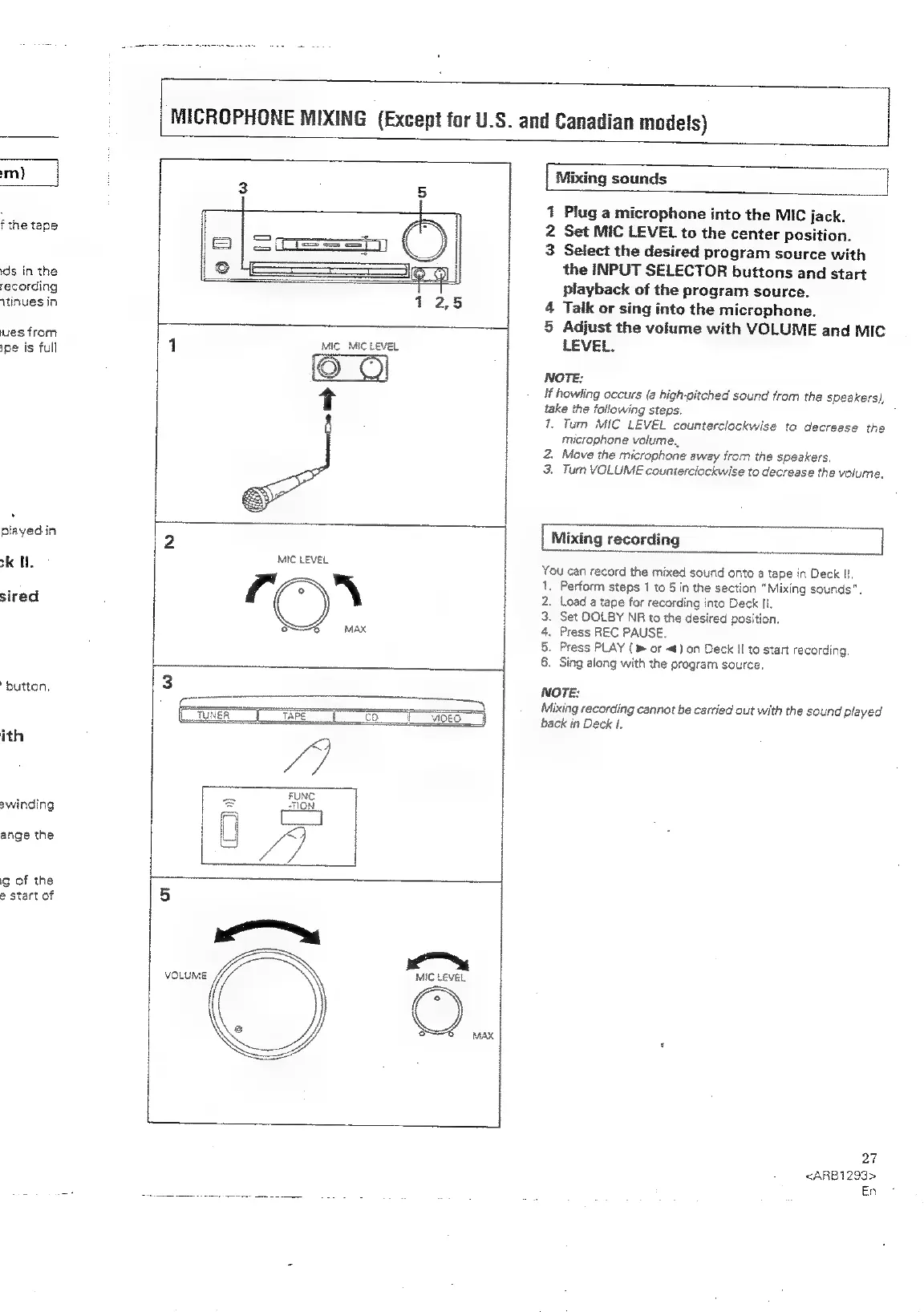
MICROPHONE
MIXING
(Except
for
U.S.
and
Canadian
models)
|
Mixing
sounds
1
Plug
a
microphone
into
the
MIC
jack.
2
Set
MIC
LEVEL
to
the
center
position.
3
Select
the
desired
program
source
with
the
INPUT
SELECTOR
buttons
and
start
playback
of
the
program
source.
4
Talk
or
sing
into
the
microphone.
5
Adjust
the
volume
with
VOLUME
and
MIC
LEVEL.
NOTE:
If
howling
occurs
(a
high-pitched
sound
from
the
speakers),
take
the
following
steps.
7
1.
Turn
MIC
LEVEL
counterclockwise
to
decrease
the
microphone
volume.
2.
Move
the
microphone
away
from
the
speakers.
3.
Turn
VOLUME
counterclockwise
to
decrease
the
volume.
MIC
LEVEL
3
VOLUME
<=
MIC
LEVEL
|
Mixing
recording
You
can
record
the
mixed
sound
onto
a
tape
in
Deck
fl.
.
Perform
steps
1
to
5
in
the
section
“Mixing
sounds”.
.
Load
a
tape
for
recording
into
Deck
Il.
.
Set
DOLBY
NR
to
the
desired
position.
.
Press
REC
PAUSE.
.
Press
PLAY
or
«)
on
Deck
!I
to
start
recording.
Sing
aiong
with
the
program
source,
Oabhwnr
NOTE:
Mixing
recording
cannot
be
carried
out
with
the
sound
played
back
in
Deck
1.
27
<ARB1293>
En

Related product manuals