EasyManua.ls Logo

Pioneer XR-P310 - SOUND ADJUSTMENT; Preset Sound Field Settings; Manual Sound Adjustment; Resetting Sound Settings

Pioneer XR-P310
36 pages
Print Icon
To Next Page IconTo Next Page
To Previous Page IconTo Previous Page
Loading...
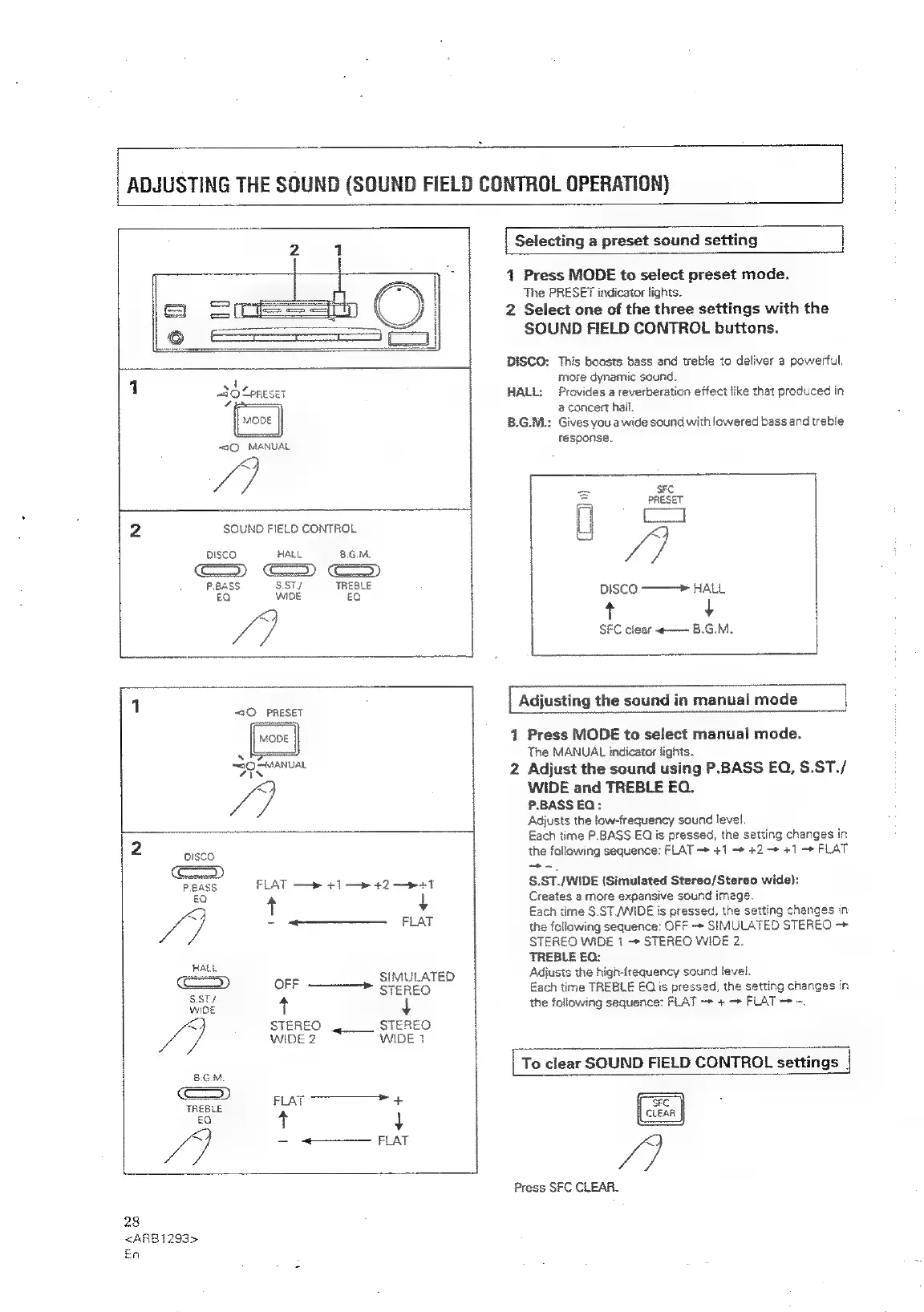
ADJUSTING
THE
SOUND
(SOUND
FIELD
CONTROL
OPERATION)
a A
1
|
Selecting
a
preset
sound
setting
|
1
Press
MODE
to
select
preset
mode.
The
PRESET
indicator
lights.
2
Select
one
of
the
three
settings
with
the
SOUND
FIELD
CONTROL
buttons.
DISCO:
This
boosts
bass
and
treble
to
deliver
a
powerful,
1
more
dynamic
sound.
HALL:
Provides
a
reverberation
effect
like
that
produced
in
a
concert
hail.
B.G.M.:
Gives
you
a
wide
sound
with
lowered
bass
and
treble
~<1Q
MANUAL
fesponse:
7]
Ne
enESET
aaa
AR
i
2
SOUND
FIELD
CONTROL
U
x
oIsco
HALL
8.6.M.
7
Ga)
pease
see
PREBLE
DISCO
——>
iw
go
SFC
clear
«—
B.G.M.
f
oy
:
.
1
[Adjusting
the
sound
in
manual
mode
|
“sO
PRESET
=
1
Press
MODE
to
select
manual
mode.
s
The
MANUAL
indicator
lights.
sas
7 7
BPs
caine
2
Adjust
the
sound
using
P.BASS
EQ,
S.ST./
q
WIDE
and
TREBLE
EQ.
P.BASS
EQ;
Adjusts
the
low-frequency
sound
level.
Each
time
P.BASS
EQ
is
pressed,
the
setting
changes
in
2
pisco
the
following
sequence:
FLAT
~*
+1
—»
+2
-*
+1
—»
FLAT
P.BASS
FLAT
—»
41
—»
42
—»+1
S.ST./WIDE
{Simulated
Stereo/Stereo
wide):
€a
4
Creates
a
more
expansive
sound
image.
x
Each
time
S.ST/WIDE
is
pressed,
the
setting
changes
in
i
mes
aaa
Aa
the
following
sequence:
OFF
+
SIMULATED
STEREO
->
STEREO
WIDE
1
STEREO
WIDE
2.
Hate
TREBLE
£0:
SIMULATED
Adjusts
the
high-frequency
sound
level.
OFF
TEREO
Each
time
TREBLE
EQ
is
pressed,
the
setting
changes
in
rae
+
+
the
following
sequence:
FLAT
+
—»
FLAT
-
~.
<<
STEREO
STEREO
LG
WiDe2
“~~
WIDE?
To
clear
SOUND
FIELD
CONTROL
settings
|
B.G.M.
c=»)
FLAT
+
TREBLE
£0
+
+
Ce
-
+——
FLAT
S/S)
Press
SFC
CLEAR.
28
<ARB1i293>
En

Related product manuals