EasyManua.ls Logo

Pioneer XR-P310 - SMART OPERATION FEATURES; Memorizing Listening Preferences; Recalling Saved Settings; Automatic Program Source Search

Pioneer XR-P310
36 pages
Print Icon
To Next Page IconTo Next Page
To Previous Page IconTo Previous Page
Loading...
h
the
powerful,
oduced
in
andtreble
1,
S.ST./
changes
in
tt
FLAT
2)
changes
in
STEREO
=
changes
in
a,
ettings
|
SMART
OPERATION
1
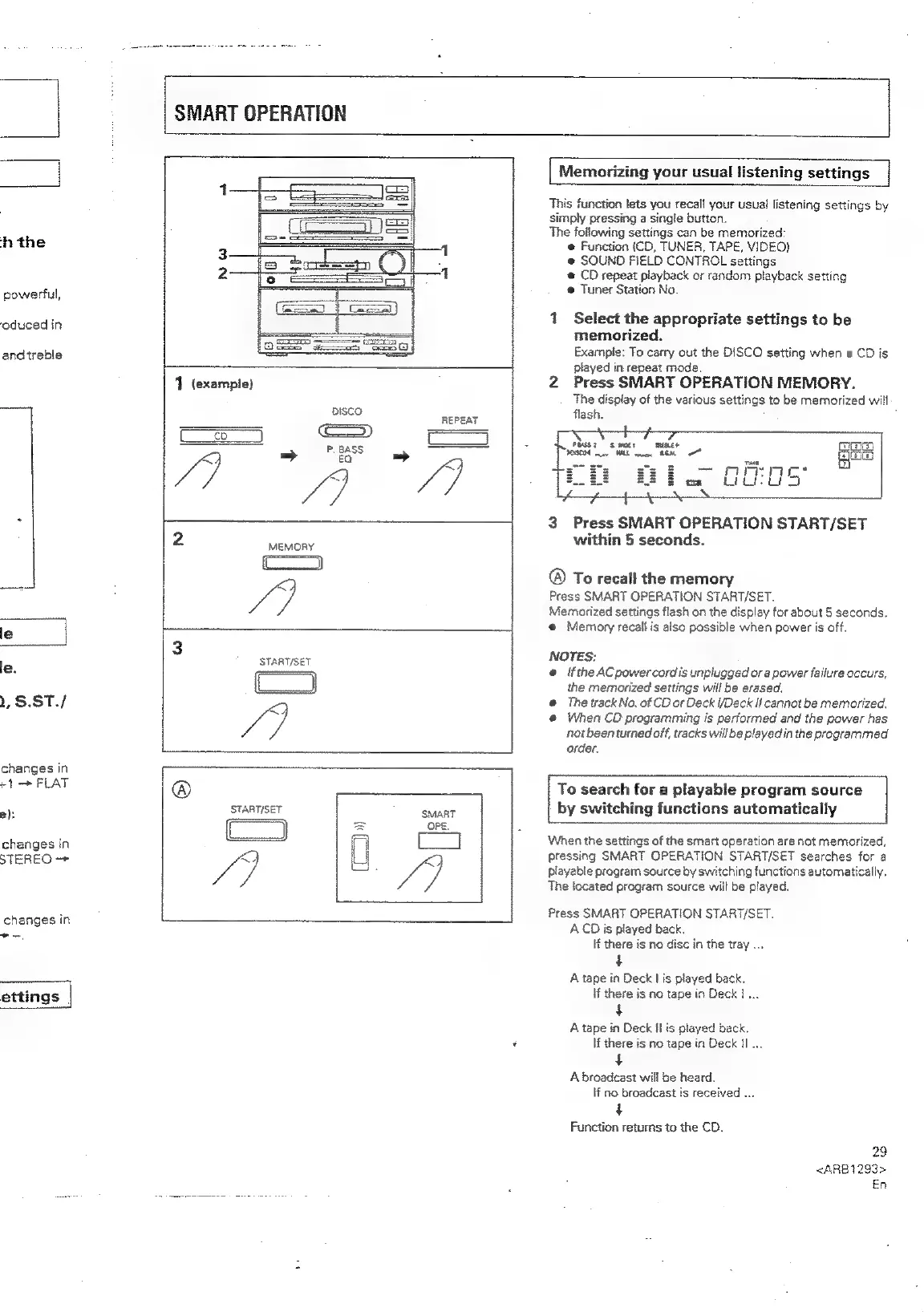
(example)
DISCO
|
oS
4
en
ne
2
MEMORY
/7
®
START/SET
Cd
A
3
START/SET
ars,
[
Memorizing
your
usual
listening
settings
This
function
lets
you
recall
your
usual
listening
settings
by
simply
pressing
a
single
button.
The
following
settings
can
be
memorized:
Function
(CD,
TUNER,
TAPE,
VIDEQ)
@
SOUND
FIELD
CONTROL
settings
@
CD
repeat
playback
or
random
playback
setting
®
Tuner
Station
No.
1
Select
the
appropriate
settings
to
be
memorized.
Exampte:
To
carry
out
the
DISCO
setting
when
a
CD
is
played
in
repeat
mode.
2
Press
SMART
OPERATION
MEMORY.
The
display
of
the
various
settings
to
be
memorized
will
flash.
ies
es}
fejeits)
3
Press
SMART
OPERATION
START/SET
within
5
seconds.
®
To
recall
the
memory
Press
SMART
OPERATION
START/SET.
Memorized
settings
flash
on
the
display
for
about
5
seconds.
@
Memory
recail
is
also
possible
when
power
is
off.
NOTES:
@
ifthe
ACpowercordis
unplugged
or
a
power
failure
occurs,
the
memorized
settings
will
be
erased.
@
The
track
No.
of
CD
or
Deck
I/Deck
Ii
cannot
be
memorized,
@
When
CD
programming
is
performed
and
the
power
has
not
been
turned
off,
tracks
will
be
played
in
the
programmed
order.
To
search
for
a
playable
program
source
by
switching
functions
automatically
When
the
settings
of
the
smart
operation
are
not
memorized,
pressing
SMART
OPERATION
START/SET
searches
for
a
playable
program
source
by
switching
functions
automatically.
The
located
program
source
will
be
played.
Press
SMART
OPERATION
START/SET.
ACD
is
played
back.
If
there
is
no
disc
in
the
tray
...
A
tape
in
Deck
|
is
played
back.
if
there
is
no
tape
in
Deck
1...
$
A
tape
in
Deck
il
is
played
back.
If
there
is
no
tape
in
Deck
Hl...
4
A
broadcast
will
be
heard.
if
no
broadcast
is
received
...
+
Function
returns
to
the
CD.
29
<ARB1293>
En

Related product manuals