EasyManua.ls Logo

Pioneer XR-P310 - MAINTENANCE; Head Section Cleaning; Head Demagnetization; External Surface Cleaning

Pioneer XR-P310
36 pages
Print Icon
To Next Page IconTo Next Page
To Previous Page IconTo Previous Page
Loading...
ts.
t
station.
memory
has
been
Re
direction
1
erasure
k
to
the
econds)
AKE-UP
AKE-UP
seconds,
ime,
(-)/REC
(-)/REC
(+)
/REC
displayed
isplay.
BY/ON.
minimum
acijust
the
ner,
timer
stting
will
TIMER
RECORDING
MAINTENANCE
To
check
timer
settings
|
|
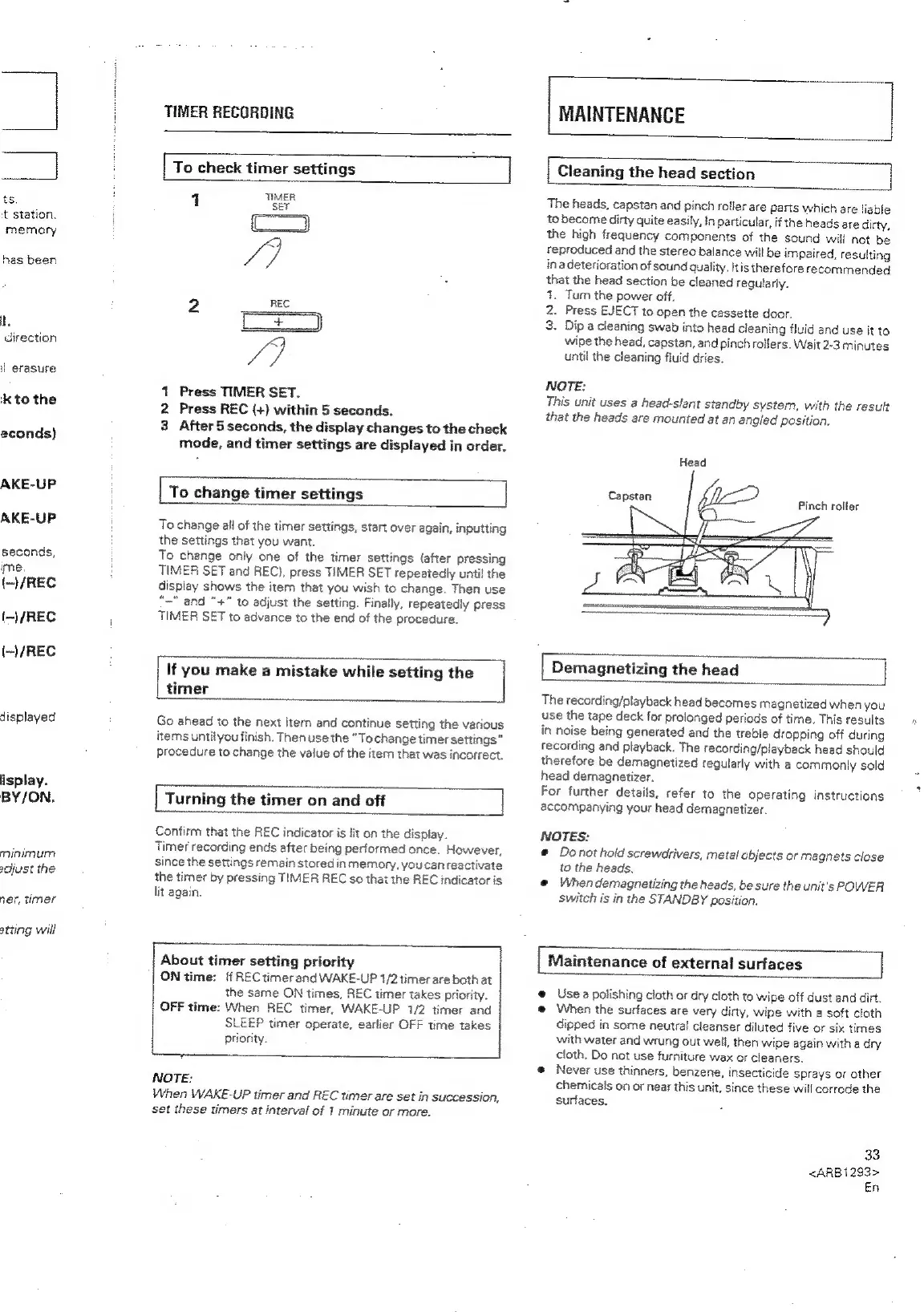
Cleaning
the
head
section
4
TIMER
The
heads,
capstan
and
pinch
roller
are
parts
which
are
liable
Cc
1
Press
TIMER
SET.
2
Press
REC
(+)
within
5
seconds,
3
After
5
seconds,
the
display
changes
to
the
check
mode,
and
timer
settings
are
displayed
in
order.
To
change
timer
settings
]
To
change
all
of
the
timer
settings,
start
over
again,
inputting
the
settings
that
you
want.
To
change
only
one
of
the
timer
settings
(after
pressing
TIMER
SET
and
REC),
press
TIMER
SET
repeatedly
until
the
display
shows
the
item
that
you
wish
to
change.
Then
use
“~"
and
"+"
to
adjust
the
setting.
Finally,
Tepeatedly
press
TIMER
SET
to
advance
to
the
end
of
the
procedure.
If
you
make
a
mistake
while
setting
the
timer
Go
ahead
to
the
next
item
and
continue
setting
the
various
items
untilyou
finish.
Then
use
the
“Tochange
timer
settings”
procedure
to
change
the
value
of
the
item
that
was
incorrect.
[
Turning
the
timer
on
and
off
Z
Confirm
that
the
REC
indicator
is
lit
on
the
display.
Timer
recording
ends
after
being
performed
once.
However,
since
the
settings
remain
stored
in
memory,
you
can
reactivate
the
timer
by
pressing
TIMER
REC
so
that
the
REC
indicator
is
lit
again.
to
become
dirty
quite
easily,
In
particular,
if
the
heads
are
dirty,
the
high
frequency
components
of
the
sound
will
not
be
reproduced
and
the
stereo
balance
will
be
impaired,
resulting
ina
deterioration
of
sound
quality,
itis
therefore
recommended
that
the
head
section
be
cleaned
regularly.
1.
Turn
the
power
off.
2.
Press
EJECT
to
open
the
cassette
door.
3.
Dip
a
cleaning
swab
into
head
cleaning
fluid
and
use
it
to
wipe
the
head,
capstan,
and
pinch
rollers.
Wait
2-3
minutes
until
the
cleaning
fluid
dries,
NOTE:
This
unit
uses
a
head-slant
standby
system,
with
the
result
that
the
heads
are
mounted
at
an
angled
position.
Head
[
Demagnetizing
the
head
|
The
recording/playback
head
becomes
magnetized
when
you
use
the
tape
deck
for
prolonged
periods
of
time.
This
results
in
noise
being
generated
and
the
treble
dropping
off
during
recording
and
playback.
The
recording/playback
head
should
therefore
be
demagnetized
regularly
with
a
commonly
sold
head
demagnetizer.
For
further
details,
refer
to
the
operating
instructions
accompanying
your
head
demagnetizer.
NOTES:
e
Denot
hold
screwdrivers,
metal
objects
or
magnets
close
to
the
heads.
@
When
demagnetizing
the
heads,
be
sure
the
unit's
POWER
Switch
is
in
the
STANDBY
position.
About
timer
setting
priority
ON
time:
ff
REC
timer
and
WAKE-UP
1/2
timer
are
both
at
the
same
ON
times,
REC
timer
takes
priority.
OFF
time:
When
REC
timer,
WAKE-UP
1/2
timer
and
SLEEP
timer
operate,
earlier
OFF
time
takes
priority.
NOTE:
When
WAKE-UP
timer
and
REC
timer
are
set
in
succession,
set
these
timers
at
interval
of
1
minute
or
more.
Maintenance
of
external
surfaces
e
Use
a
polishing
cloth
or
dry
cloth
to
wipe
off
dust
and
dirt.
@
When
the
surfaces
are
very
dirty,
wipe
with
a
soft
cloth
dipped
in
some
neutral
cleanser
diluted
five
or
six
times
with
water
and
wrung
out
well,
then
wipe
again
with
a
dry
cloth.
Do
not
use
furniture
wax
or
cleaners.
e@
Never
use
thinners,
benzene,
insecticide
sprays
or
other
chemicals
on
or
near
this
unit,
since
these
will
corrode
the
surfaces.
33
<ARB1293>
En

Related product manuals