EasyManua.ls Logo

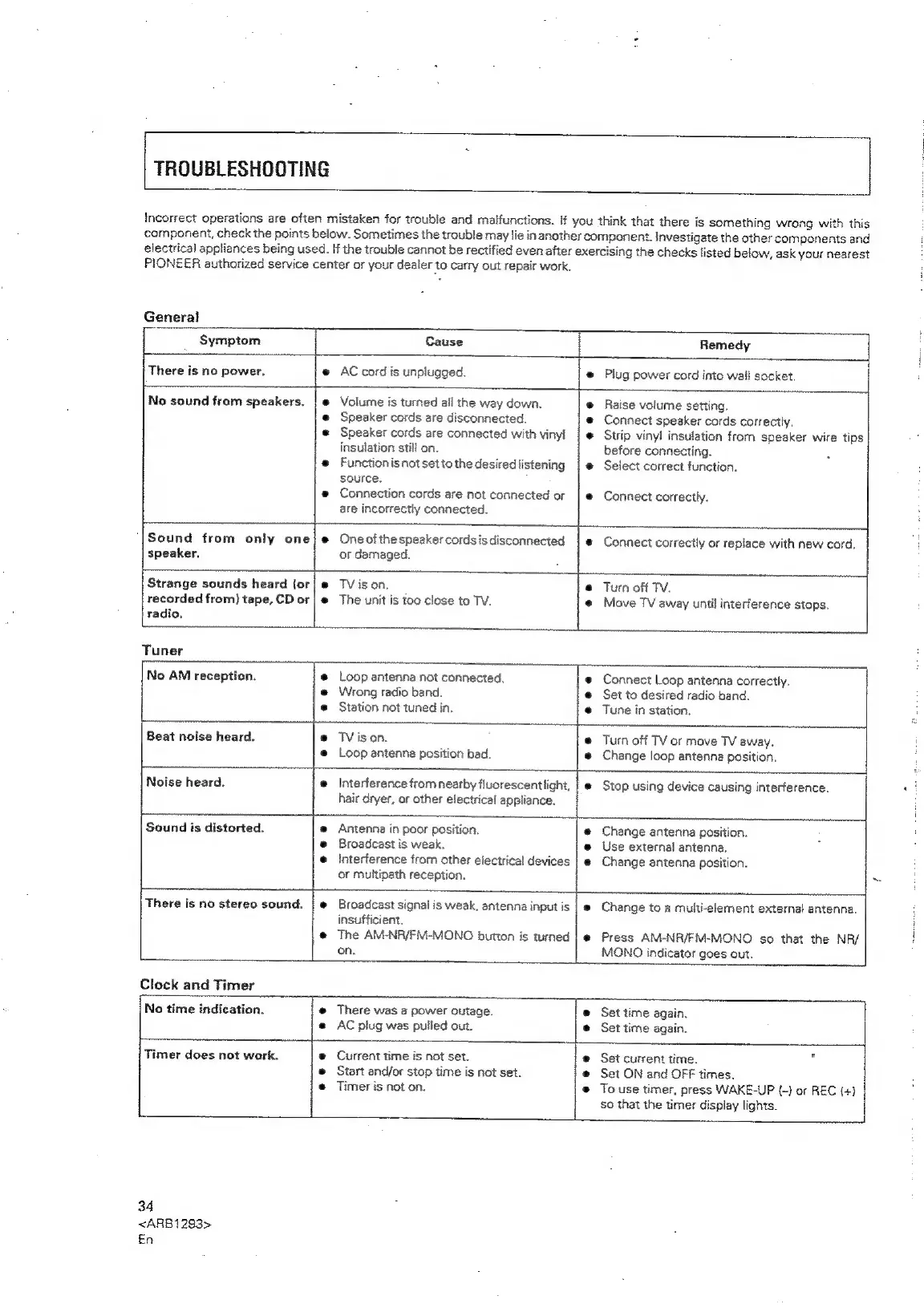
Pioneer XR-P310 - TROUBLESHOOTING GUIDE; General and Tuner Issues; Clock and Timer Issues

Pioneer XR-P310
36 pages
Print Icon
To Next Page IconTo Next Page
To Previous Page IconTo Previous Page
Loading...
TROUBLESHOOTING
Incorrect
operations
are
often
mistaken
for
trouble
and
malfunctions.
if
you
think
that
there
is
something
wrong
with
this
component,
check
the
points
below.
Sometimes
the
trouble
may
lie
in
another
component.
Investigate
the
other
components
and
electrical
appliances
being
used.
If
the
trouble
cannot
be
rectified
even
after
exercising
the
checks
listed
below,
ask
your
nearest
PIONEER
authorized
service
center
or
your
dealer
to
carry
out
repair
work.
General
Symptom
Cause
Remedy
:
|
There
is
no
power.
@
AC
cord
is
unplugged.
@
Plug
power
cord
into
wail
socket.
4
No
sound
from
speakers.
|
@
Volume
is
turned
all
the
way
down.
@
Raise
volume
setting,
@
Speaker
cords
are
disconnected.
©
Connect
speaker
cords
correctly.
©
Speaker
cords
are
connected
with
vinyl
|
Strip
vinyl
insulation
from
speaker
wire
tips
insulation
still
on.
before
connecting.
e
Functionisnotsettothedesirediistening
|
e
Select
correct
function.
source.
®
Connection
cords
are
not
connected
or
|e
Connect
correctly.
are
incorrectly
connected.
Sound
from
only
one}
e
Oneofthespeakercordsisdisconnected
|
e
Connect
correctly
or
replace
with
new
cord.
:
speaker.
or
damaged.
Strange
sounds
heard
(or|
#
TV
ison.
®
Turn
off
TV.
recorded
from)
tape,
CD
or|
®
The
unit
is
too
close
to
TV.
@
Move
TV
away
until
interference
stops.
radio.
1
Tuner
'
ae)
No
AM
reception.
@
Loop
antenna
not
connected,
@
Connect
Loop
antenna
correctly.
@
Wrong
radio
band.
@
Set
to
desired
radio
band.
©
Station
not
tuned
in.
@
Tune
in
station.
Ei
Beat
noise
heard.
@
TVison.
@
Turn
off
TV
or
move
TV
away.
:
@
Loop
antenna
position
bad.
®
Change
loop
antenna
position.
t
T
:
Noise
heard.
@
Interference
from
nearby
fluorescentlight,
|
e
Stop
using
device
causing
interference.
ss
hair
dryer,
or
other
electrical
appliance.
Sound
is
distorted.
@
Antenna
in
poor
position.
e@
Change
antenna
position.
@
Broadcast
is
weak.
e@
Use
external
antenna.
@
Interference
from
other
electrical
devices
|
e
Change
antenna
position.
or
multipath
reception.
~
L
There
is
no
stereo
sound.
|
e
Broadcast
signai
is
weak,
antenna
input
is
|
@
Change
to
a
multi-element
external
antenna.
insufficient.
i
@
The
AM-NR/FiV-MONO
button
is
tumed
|
e
Press
AM-NR/FM-MONO
so
that
the
NR/
i.
on.
MONO
indicator
goes
out.
Clock
and
Timer
No
time
indication.
@
There
was
a
power
outage.
©
Set
time
again.
@
AC
plug
was
pulled
out.
e@
Set
time
again.
|
Timer
does
not
wark.
@
Current
time
is
not
set.
@
Set
current
time.
2
©
Start
and/or
stop
time
is
not
set.
@
Set
ON
and
OFF
times.
e
Timer
is
not
on.
®
To
use
timer,
press
WAKE-UP
(-)
or
REC
(+)
so
that
the
timer
display
lights.
34
<ARB1293>
En